Short answer: Google decides which verification methods you’re offered (phone or text, email, live video call, video recording or postcard), and you can’t change that set. A verification video must be one continuous, unedited take of at least 30 seconds, recorded live and uploaded from a mobile device. In New York, we’d check the address and name first: virtual offices, unsigned co-working desks and keyword-padded names don’t meet Google’s rules.
Last updated September 29, 2026. Verification rules below come from Google Business Profile Help, checked that day.
Google Business Profile verification decides whether your details can appear on Maps and Search at all. So it’s worth getting right the first time. This guide covers how Google assigns the method, what the video has to show and how long Google takes. It also covers the address and name problems that trip up New York businesses.
For Google’s rules, our source is its Business Profile help pages, as we read them in September 2026. Where a line is our advice rather than Google’s wording, we say so.
What is Google Business Profile verification, and what does an unverified profile miss?
It’s Google’s check that a real business stands behind a profile before its details go public. Google says only verified businesses can show their business info on Maps and Search. Until you pass, yours doesn’t show there.
In practice, you get no listing for your own name and no spot in the map results. Your hours, photos and services all wait behind verification. So finish this step before you spend time on categories or reviews.
Before you start, check that you qualify at all. To be eligible, a business must meet customers in person during its stated hours. Online-only businesses and lead-generation companies aren’t eligible.
Still deciding whether a profile is worth the effort? Our guide on whether you need a Google Business Profile sets out what you give up without one.
Which verification method will Google give you, and can you choose it?
You can’t choose it: Google automatically decides which methods your profile is offered. The options Google lists are phone or text, email, live video call, video recording and postcard by mail. If your profile shows more than one, you can try another of the offered methods. Keep Google’s help page on verifying your business open while you work.
Be skeptical, then, of guides that promise a trick for getting a postcard instead of a video. We’d also advise against deleting and recreating a profile to fish for a different method. In our view it throws away the work you’ve done and could leave two listings for one business.
Is there another way to verify? Only the other methods your own profile shows, or an instant verification if Google grants one.
Google says it sometimes verifies a profile instantly. Its help page names two cases: verifying your business website with Google Search Console, and bulk verification. Neither is a promise. Still, if your website isn’t verified in Search Console yet, we’d do that early.
How long does Google Business Profile verification take?
Once you’ve completed the steps, Google says its review takes up to 5 business days and can occasionally run longer. Postcard codes usually arrive within 14 days.
Those are Google’s ranges, not guarantees, so plan around the longer end. A verification status that hasn’t changed after 5 business days doesn’t have to mean a rejection. Here are three habits we’d follow before and during the wait:
- Leave the core details alone. Our advice is not to change the business name, address or primary category while verification is pending. Editing them mid-review gives Google a moving target.
- Warn your building. Is a postcard among the methods your profile offers? Then check first that the suite number on the profile matches how the building sorts mail. In doorman and high-rise buildings, mail may land at a front desk or mailroom first. Tell the staff there that a postcard from Google is coming.
- Code not received? After 14 days, check whether your profile offers another method, and try that next.
Two jobs fit the wait because they don’t depend on Google’s review. First, claim your Apple Maps business listing with exactly the same name and address, so both maps show matching details. Then line up your review requests, with a plain walkthrough of leaving a Google review to share once you’re verified. When you ask, share the review link or QR code Google provides, as our guide to asking every customer for reviews explains.
What must a Google Business Profile verification video show?
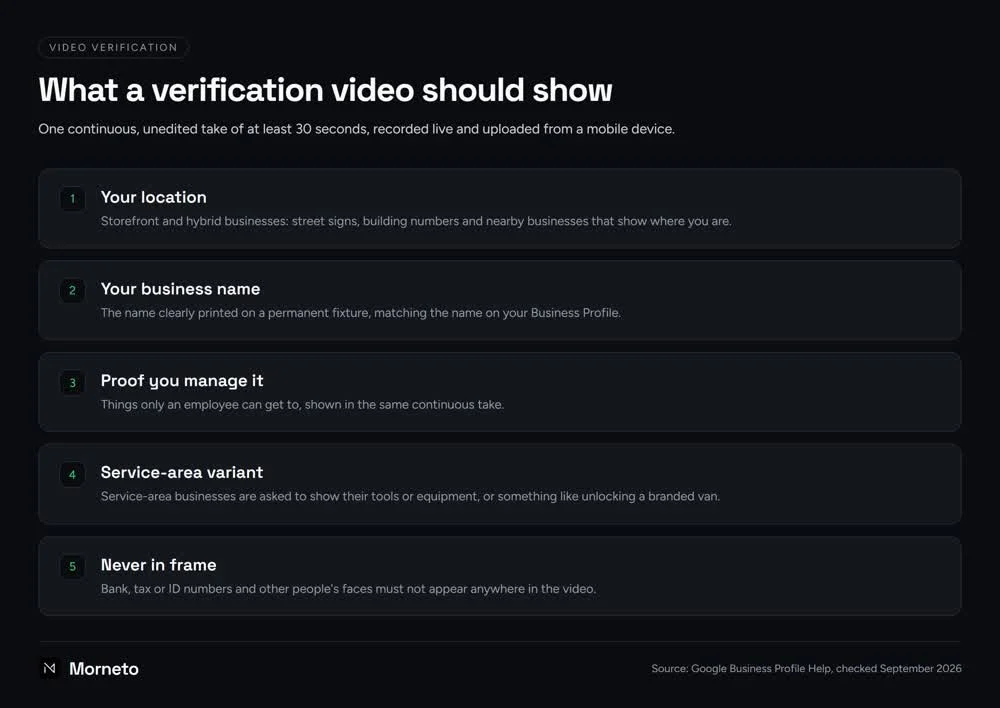
It’s your proof, in one take, that the business exists and that you manage it. Storefront and hybrid businesses also have to show where they are. Google’s rules for the recording itself are strict: one continuous, unedited video of at least 30 seconds. Pre-recorded clips aren’t allowed: you record it live and upload it from a mobile device through the Business Profile.
Google’s instructions for video recording verification set out what belongs in the frame, and we’d shoot it in this order. A storefront or hybrid business starts outside with its location: street signs, building numbers and nearby businesses. Next comes the business name, clearly printed on a permanent fixture and matching the name on your profile. Then show that you manage the place, with things only an employee can get to.
Google asks service-area businesses to show their tools or equipment in the video, or something like unlocking a branded van. For every setup, Google says bank, tax and ID numbers and other people’s faces must not appear in the video.
A common question about Google Business Profile video verification is how to bypass it. If video is the only method your profile shows, there’s no way around it. Anyone selling a workaround is selling you trouble. In our view, passing on the first try is mostly preparation:
- Walk the route once without recording. Decide where you’ll start, which sign you’ll show and which door you’ll open. Then the live take has no dead pauses.
- Aim well past 30 seconds. A take that ends right at the minimum leaves no slack if you rush one part.
- Choose proof only staff can reach. Opening the front door with your key, then the register or the back office, shows access a customer wouldn’t have.
- Clear the scene first. Put away invoices, bank statements and anything with a tax or ID number. Ask staff and customers to step out of frame.
- Check the sign reads on camera. Small lettering on a glass door may blur on a phone screen. Get close enough that the name is easy to read.
Why do New York businesses fail verification?
In our view, the address and the name deserve more attention than the camera work. Google’s rules are strict about both, and New York buildings can make them harder to prove on video. These are the verification failure reasons we’d check first:
- Virtual offices and mail-drop suites. Google says a virtual office, meaning a rented mailing address you don’t operate from, isn’t eligible for a Business Profile. That includes any Manhattan mailbox or suite you rent for mail but don’t actually work from. No video fixes it, because the problem is the address, not the recording. Profiles with address problems like this are the ones our Manhattan SEO work most often finds filtered out of the map or suspended outright.
- Co-working without signage. Google lets you list a co-working office only if it has clear signage and receives customers during business hours. Your own people also have to staff it during those hours. A desk you drop into a few days a week, with no sign on the door, doesn’t meet that test.
- High-rise and doorman buildings. Because the recording can’t have cuts, plan one route from the street to your door. Start with the street sign and building number outside. Then walk through the lobby and elevator to the suite door, with your name on a permanent sign. Ask the building manager before you film. Wait for a quiet lobby, because other people’s faces, the doorman’s included, must stay out of frame. In Midtown Manhattan office towers, also put the suite number, the right entrance and lobby hours on the profile.
- Names that don’t match the sign. Your profile name must be the real-world name on your storefront, website and stationery. Google says adding keywords isn’t allowed and can lead to suspension. It also puts the video check at risk. Say your awning shows just your bakery’s name, but the profile adds Best Cupcakes Astoria: the names no longer match.
- Home-based service businesses. A plumber or house cleaner working from a Queens apartment shouldn’t present it as a storefront. Google says service-area businesses should hide their address from customers. For the video, use the service-area version described above. Getting the service area right is part of our multilingual local search work in Queens, along with the languages field on the profile.
If that last model fits you, the glossary in our knowledge base explains what counts as a service-area business. Choosing the right type before you record can save you a failed attempt.
One more New York snag is an address that changes shape from listing to listing. Think Suite 5B on the profile, #5B in your website footer and 5th Floor on a directory. Pick one format for floor and suite, then use it on the profile, your website and every directory. We think consistency matters for map results too, as our guide to winning the map pack in New York argues.
What should you do if verification fails or Google asks you to verify again?
Fix the cause first, then try again with whichever method your profile offers. A suspended profile is a different case, covered below: Google handles it through an appeal.
Re-recording the same video with the same problem is likely to fail the same way. Work through the causes in this order instead:
- First, the name. Strip anything that isn’t on your sign, website and stationery.
- Then, the address type. Do you work at customers’ homes or job sites? If so, set the profile up as a service-area business with the address hidden, as Google asks. No setting fixes a virtual office.
- Then, the signage. The name belongs on a permanent fixture, not a paper sign taped up for the video.
- Then, consistency. Compare your website footer, contact page, Yelp and Apple Maps listings with the profile. Fix any name or suite format that doesn’t match.
- Finally, the recording. Only now re-shoot, or switch to another method if your profile offers one.
If Google asks you to verify a profile that was already verified, we won’t guess at its reasons. Instead, check who has owner or manager access to the profile. Ask each person whether they recently changed the name, address or category.
If someone did, make sure your sign and website match the new details before you record. Then work through the fix order above as if it were a first verification.
If the profile is suspended
Google says a profile that violates its guidelines becomes disabled or suspended. It then won’t show to other users on Google until the issue is resolved. If Google removes a profile, the public can’t go to it, and the owner and managers can’t act on it. You may see soft and hard suspensions mentioned online; those are industry labels, not Google categories.
Google’s route for this is its appeals tool, where you can add optional evidence through a linked form. That evidence has to match the profile’s name and address, which is where the consistency work above pays off. Google’s appeals page is inconsistent about when the 60-minute evidence window starts, so have your documents ready before you appeal.
Google says appeal reviews and decisions can take up to 5 business days. It asks owners not to file several appeals for the same issue before a decision arrives. It also asks them not to create a new profile for the same business while an appeal is under review.
Should you verify the profile yourself or let your agency do it?
Our answer: own the profile and take part in the verification process yourself, with your agency preparing you. Google lets agencies and other third parties claim and manage a profile only with the owner’s express consent. The owner must always keep ownership or co-ownership.
Google also says an agency must give back exclusive control within 7 business days of being asked. Our local SEO service page for New York businesses suggests asking any agency, us included, whose name the profile is in. So create or claim the profile under your own Google account, then add your agency as a manager.
Video verification makes the point for you anyway. The recording must be made live, and Google says it should include things only an employee can get to. In practice, we’d expect someone from your business to hold the phone, even when the agency plans the shot list.
A related warning: treat unexpected calls about Google Business Profile verification with suspicion. Google assigns the method itself, so no caller can change which one you get.
Our rule: if you didn’t start a verification step yourself, don’t give a caller payment details, logins or profile ownership. Hang up, then sign in to your profile directly to check whether Google needs anything from you.
Once Google Business Profile verification is done, the profile is only the starting line. Categories, services and photos come next, and our Google Business Profile optimization guide for New York businesses covers each one. After that, a weekly post about a service or finished project can turn profile views into website visits.
If you’d rather hand the ongoing work over, our SEO and marketing plan includes profile setup and management. It costs from $799 per month, month to month with 30 days notice. Under Google’s rules, you keep ownership or co-ownership of the profile either way.
Common questions about Google Business Profile verification
Can I verify my business on Google without a video?
Yes, if Google offers you another method or verifies the profile instantly. Google decides which methods a profile is offered, and you can’t change that set. If several options appear, you can try a different one. One instant case Google names is a business website verified with Google Search Console.
How long does Google Business Profile verification usually take?
Google says its review takes up to 5 business days once you’ve completed the steps, and it can occasionally run longer. Postcard codes usually arrive within 14 days. If a code hasn’t come after that, check whether your profile offers another method.
Can I hide my home address on Google?
Yes, if you travel to your customers and don’t serve them at your own address. Google says service-area businesses should hide their address from customers. In the verification video, Google asks service-area businesses to show their tools or equipment, or something like unlocking a branded van.
Can I use a co-working space or virtual office address?
A co-working space qualifies only with clear signage, customers during business hours and your own staff there at those times. A virtual office, meaning a mailing address you rent but don’t work from, isn’t eligible, and no verification method changes that.
What happens if my Google Business Profile is suspended?
It won’t show to other users until the issue is resolved. Appeal through Google’s appeals tool, with evidence ready that matches your profile’s name and address. Google says reviews and decisions can take up to 5 business days. It asks owners not to create a new profile for the same business while an appeal is under review.