
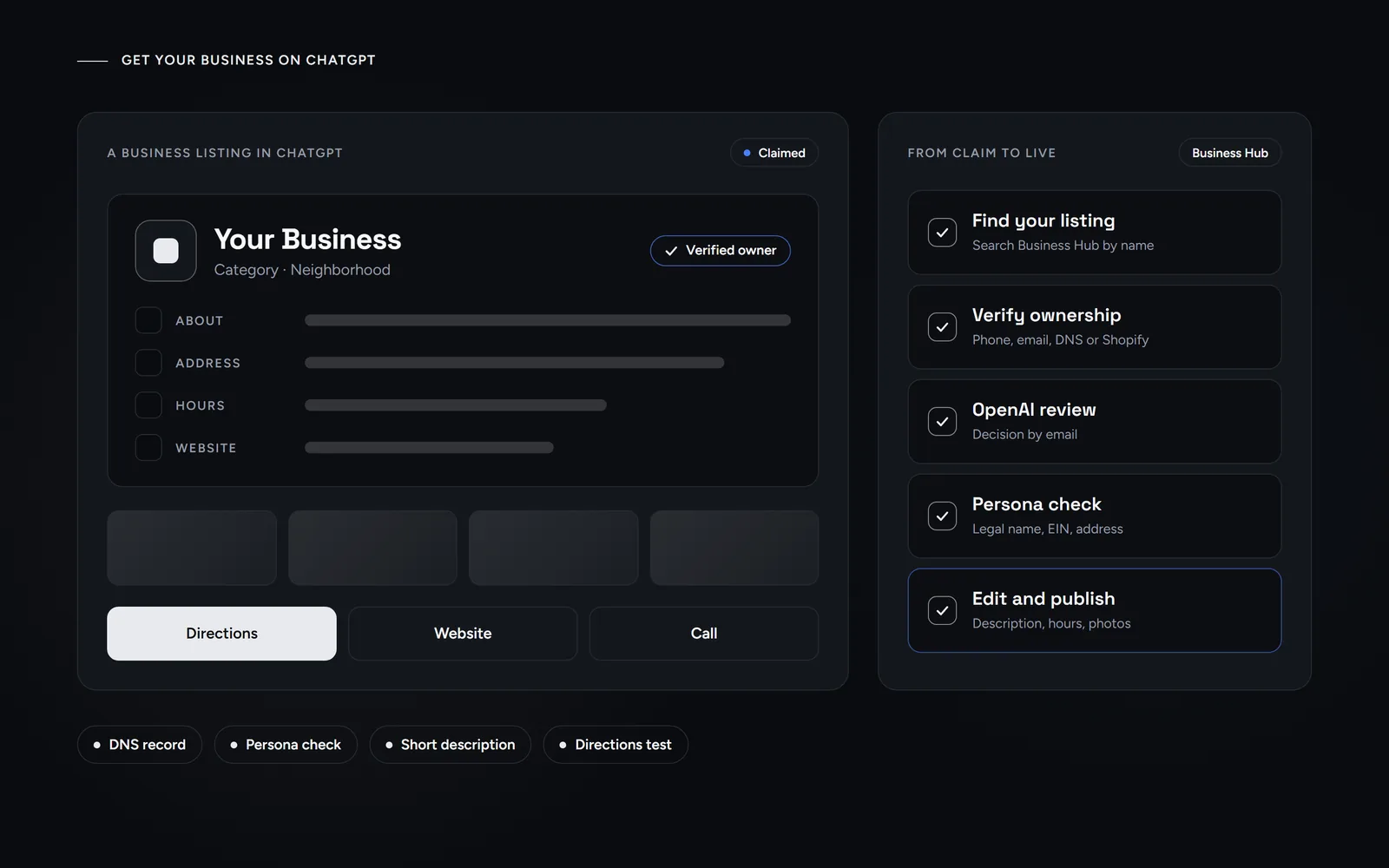
Short answer: To get your business on ChatGPT, open Business Hub, find your listing and verify it by phone, email, a DNS record or Shopify. After OpenAI approves the claim, pass the Persona business check, then edit the profile. We did all of it for our own studio on Nov 13, 2026. Claiming controls what the listing says, not how often it appears.
Last updated Nov 13, 2026. OpenAI launched Businesses in ChatGPT in beta on Nov 10, 2026. Three days later, we claimed our own listing. Morneto is a web design, SEO and Google Ads studio in New York, so we wanted to see the process before our clients asked about it. This guide shows how to get your business on ChatGPT the way we did it: the claim, the DNS check, the Persona review and the profile edits. We also list the limits we hit, because the help articles we read mention almost none of them. For how AI answers choose their sources in the first place, see what we saw when our pages got cited in ChatGPT.
What does it mean to get your business on ChatGPT?
ChatGPT already shows business listings when people ask for local help, and many of those listings exist before anyone claims them. Ours did. When we searched Business Hub, a listing for Morneto was already there, with our Broadway address, our phone number and a web design category. So claiming doesn’t create a new presence. Instead, it gives you control over what the existing listing says.
Business Hub is where you do that. You open it from the ChatGPT sidebar, search for your business by name and prove you’re allowed to manage it. After approval, you can edit the profile, upload photos and connect a product feed. Some businesses can also build an AI agent that answers customer questions.
One naming trap is worth knowing. ChatGPT Business is also the name of OpenAI’s paid plan for teams, and in our DataWise check on Nov 13, that phrase drew about 12,100 US searches a month. That plan has nothing to do with listings. In fact, OpenAI says you don’t need an Ads account or an Enterprise agreement to claim a business.
What do you need before you start?
Most delays to get your business on ChatGPT come from missing details, not from the tool itself. So have these ready before you open Business Hub:
- A website on your own domain. OpenAI says claiming is initially open to eligible businesses with a website. Local stores and restaurants can currently claim only an existing US listing.
- One way to verify. Business Hub offers phone, business email, website domain or Shopify, but you only see the methods it supports for your listing. We chose the domain, so we needed access to our DNS.
- Your legal details. The Persona check asks for the legal name, the entity type, the EIN and the registered address, exactly as filed with the state.
- A short description. The description field stops at 300 characters, so write it in advance.
- Photos saved as JPG. Our PNG logo failed to upload, while the same logo saved as a JPG went through.
How do you get your business on ChatGPT, step by step?
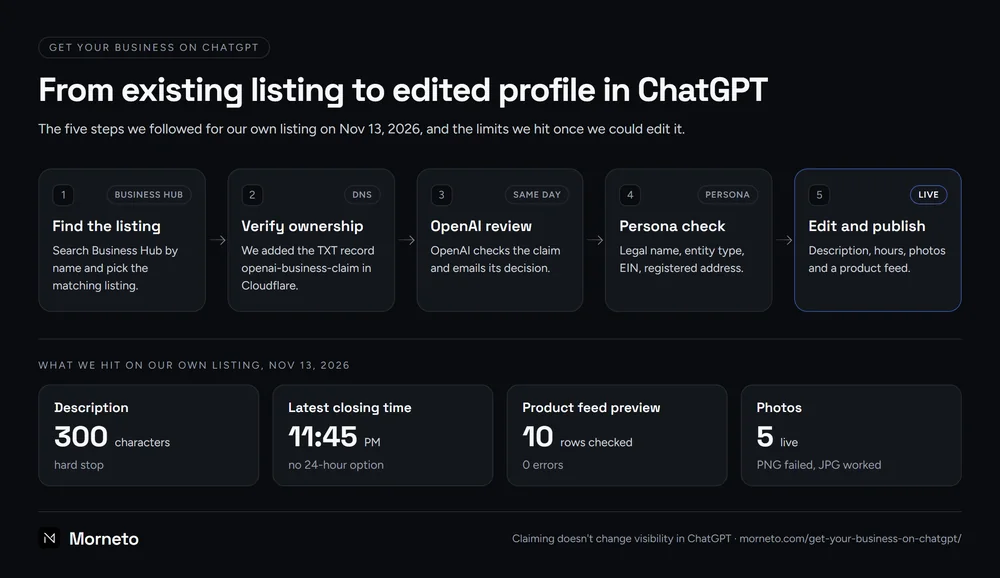
Here is the order we followed on Nov 13, 2026. All five steps finished the same day, although OpenAI says review times vary.
- Find the listing. Open Business Hub, search your business name and select the matching listing. Then confirm which ChatGPT account will manage it.
- Verify ownership. We picked the website domain. ChatGPT showed a TXT record with the host openai-business-claim and a one-time value, plus an expiry about 24 hours away. We added it in Cloudflare, and both Cloudflare’s and Google’s public DNS returned it within a minute.
- Wait for the review. After we clicked Verify domain, the claim went into review. OpenAI checks each claim and emails its decision. Ours came back approved the same day.
- Pass Persona. An approved claim still can’t publish edits. First, Persona has to verify the business itself, which we cover in the next section.
- Edit and publish. Once Persona approved us, an email confirmed that we could edit our business. Then we filled in the profile, the hours, the photos and a product feed.
If you see Contact support instead of a way to verify, the listing is locked. In that case, OpenAI support has to grant you access. The official steps are in OpenAI’s own setup guide for Business Hub, and the diagram below shows how our own run went.
What does the Persona check ask for?
Persona is the verification service OpenAI uses, and it checks your registered company, not your brand. In our case, it asked for the legal name of the LLC, the entity type, the EIN and the registered address. Part of the flow continued on a phone.
Two fields made us stop and think. The first was the DBA field. A DBA is an assumed name that you have formally filed with the state, so only fill it in if you have one on file. We left it empty, and the check passed.
The second was the address. The registered address on file with New York State isn’t always your office. Ours differs, and Persona wanted the registered one. Meanwhile, the address customers see on the listing stayed our office on Broadway. In short, copy these details from your state filing, not from your website.
Which limits did we hit when editing the profile?
The editor has tabs for the basics, contact details, location, hours and photos. Most fields work as you would expect. However, six things surprised us, and the help pages we read didn’t mention them:
- No name field. The listing kept the name Morneto. Our Google profile reads Morneto Web Design & SEO, but no tab let us change it. OpenAI’s support chat also told us the display name isn’t self-serve yet.
- A 300-character description. Our Google description runs about 730 characters, so we rewrote it to 290, with prices and service areas in it.
- No open-24-hours option. The latest closing time you can pick is 11:45 PM, with a separate time zone setting.
- Photo review and formats. Uploads go through a review before they appear. Our PNG logo failed, while a JPG of the same logo worked, and five photos are live now.
- A website field tied to verification. When we tested a different link there, ChatGPT asked us to verify that new domain too. So keep your own domain in it.
- The agent builder. For our business type, it said it isn’t available yet. OpenAI limits agents to eligible ecommerce and online service businesses in the US.
None of this blocks you from going live. Still, if you want to get your business on ChatGPT with the same facts as your Google profile, plan your description and hours around these limits first.
Why does the Directions button open the wrong place?
Of all the steps to get your business on ChatGPT, this one cost us the most time. On our listing, the Directions button opened Google Maps with a search for the street address only. For an office building, that shows a pin on the building, not your Google listing with its reviews. As a result, many businesses at a shared address will hit the same problem.
The location field only suggests street addresses, so there is no direct way to link your Google profile. What worked for us was the second address line. We put our business name in it. Because the button sends the full address text to Google Maps, the search then matched our Google listing, which opened with our reviews. The trade-off is that the name now also appears in the address line on the ChatGPT card.
Test before you change anything. First, search your exact address in Google Maps. If it already opens your listing, leave the field alone.
How does Business Hub compare with Google Business Profile?
Both profiles describe the same business, but they don’t behave the same way. This is how they compared on our own two profiles in November 2026:
| Field | Google Business Profile | ChatGPT Business Hub |
|---|---|---|
| Business name | Editable on the profile | No name field in the editor yet |
| Description | Up to 750 characters | 300 characters, hard stop |
| Hours | Includes an open-24-hours option | Latest closing time 11:45 PM |
| Verification | Google picks the method, such as a video | Phone, email, DNS record or Shopify, then Persona |
| Directions | Opens your listing in Google Maps | Searches the address text in Google Maps |
| Products and services | A products section on the profile | A CSV feed, after you accept OpenAI’s merchant feed terms |
Even after you get your business on ChatGPT, the Google profile still carries more detail, and ChatGPT’s own Directions button sends people to Google Maps anyway. If yours is thin, start there. Our guide to getting a Google Business Profile verified covers that side. After that, keep the two consistent, with the same name, address, phone and hours wherever the fields allow it.
Can a service business use the product feed?
We tried. Business Hub takes a CSV in OpenAI’s feed format, with nine required fields: item ID, title, description, URL, brand, seller name, image URL, availability and price. Prices are written as an amount plus a currency code, such as 997.00 USD. We listed our 10 services with their published starting prices and turned checkout off.
Before the upload, Business Hub asks you to accept OpenAI’s merchant feed terms. That is a legal agreement, so read it, and let the business owner accept it. After that, the preview checked 10 sample rows and found 0 errors. About an hour later, the upload history showed the feed as processed, with 10 products and no problems listed. Still, OpenAI’s own wording leans toward retailers, so we don’t know yet whether ChatGPT will show services from it. We’ll update this post when we do.
Will claiming get your business on ChatGPT more often?
Not by itself. OpenAI says plainly that claiming a profile doesn’t change its visibility in ChatGPT, and that advertising doesn’t influence its independent answers. What claiming buys you is accuracy and data. You decide what the listing says, and after Persona you get insights on mentions and website clicks over the past 28 days, once there is enough activity to report.
Being recommended is a separate job. ChatGPT draws on what it can find about you across the web, so your own pages and other sites’ mentions of you matter more than the listing. That work is AI SEO for your pages and your brand, and it rests on the same groundwork as getting found by AI in Copilot and Google’s AI features. Whether that pays off for a small business is a fair question, and our break-even math on whether SEO is worth it lets you check it yourself.
The consistency checks above are the same ones we run in Google Business Profile optimization. If you’d rather have someone else get your business on ChatGPT and keep it in step with Google, ask us for a free audit of your listings, and keep the findings either way.
Common questions about how to get your business on ChatGPT
What is a ChatGPT business profile?
It is the listing ChatGPT shows for a business, with its name, category, address, phone, hours, photos and website. Many profiles exist before anyone claims them. Claiming one in Business Hub lets the owner correct the details and add more.
Is it free to claim your business in ChatGPT?
Yes. OpenAI says you don’t need an Ads account or an Enterprise agreement to claim a business. Claiming, verifying and editing our own listing cost nothing. Sponsored business agents run through Ads Manager, which is paid advertising.
How long does ChatGPT business verification take?
OpenAI says review times vary. For us, the DNS record was visible within a minute, and both the claim and the Persona check were approved the same day. During the beta, plan for it to take longer.
Does claiming your listing help you rank in ChatGPT?
Not directly. OpenAI states that claiming a profile doesn’t change its visibility in ChatGPT. It does make the listing accurate, and it unlocks insights on mentions and website clicks over 28 days.
Can you change your business name in Business Hub?
Not in our editor in November 2026. No tab had a name field, and OpenAI’s support chat said the display name isn’t self-serve yet. You can still send the request through the Business Hub feedback form.