
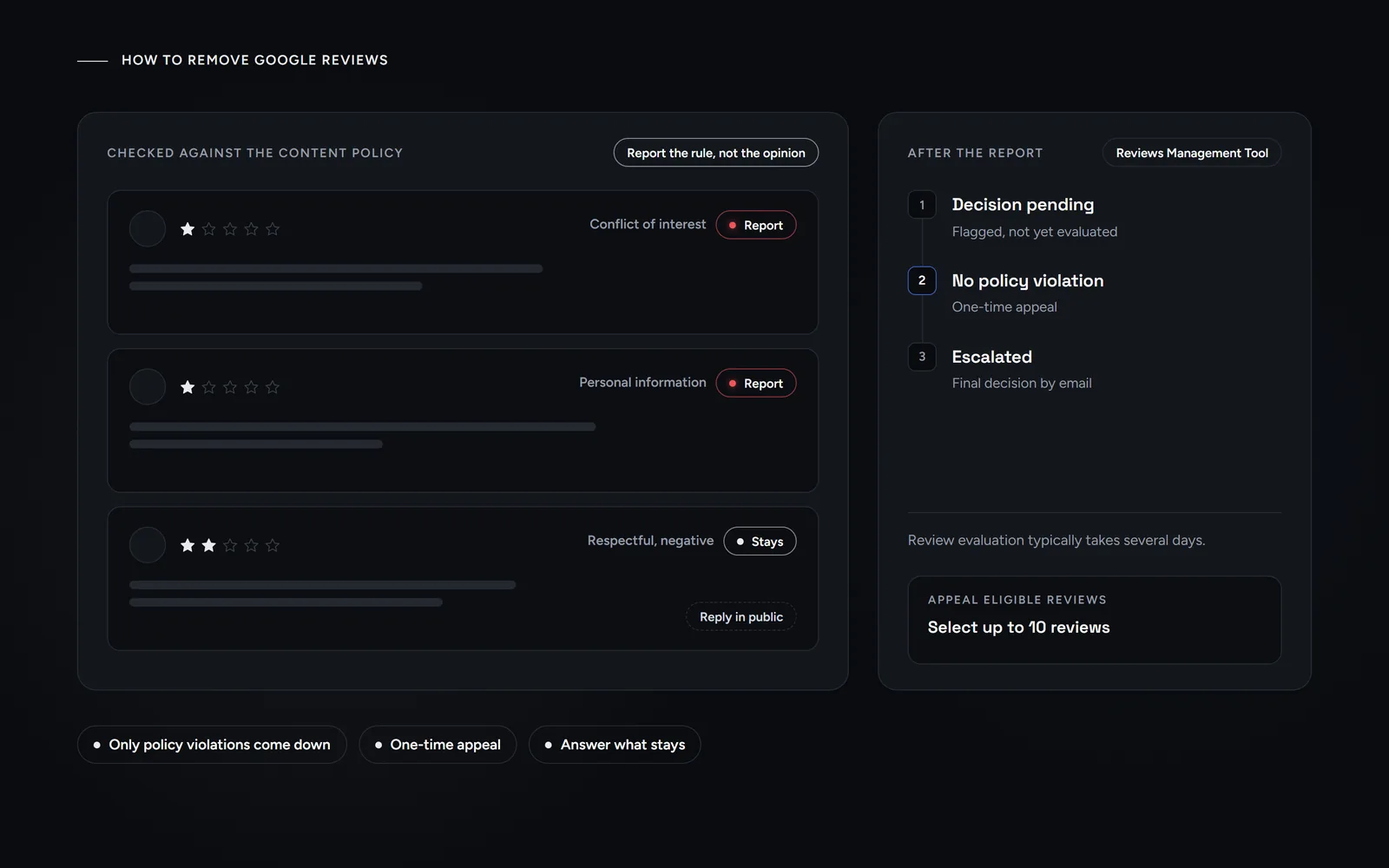
Short answer: you can’t remove Google reviews just because you dislike them. Instead, you report the ones that break Google’s content policy, such as fake reviews, conflicts of interest or harassment. Then you track each report in the Reviews Management Tool and appeal once if Google keeps the review. The rest you answer in public.
A one-star review about a visit that never happened feels personal. For a small business, a few of them can change how a profile looks overnight. This guide is for New York owners who want to remove Google reviews that break the rules, and for owners whose real reviews vanished. Last updated October 31, 2026: every step and status label below comes from Google’s own help pages, checked that day.
Can you remove Google reviews from your Business Profile?
Not directly. Google’s Maps help says you can’t directly delete someone else’s review. The person who wrote it can still edit or delete it. What you can do is report it, and then Google decides.
Google’s help is blunt about the limits. You can report any review, but only reviews that violate Google policies are eligible for removal. Google also asks owners not to report a review just because they disagree with it. In its words, it doesn’t get involved in conflicts between businesses and customers. So the useful question is not whether a review is unfair. Rather, it is whether the review breaks a specific rule.
That distinction matters for your Google Business Profile, the free listing behind your result in Maps and Search. A report that names the rule a review breaks gives Google something to check. By contrast, a report that only says the customer is wrong does not.
Which reviews does Google actually take down?
Before you try to remove Google reviews, check them against the prohibited and restricted content policy for Maps. In plain language, these are the categories to check first:
- Fake engagement. Reviews not based on a real experience, and reviews paid for directly or in kind. The same goes for content one person posts from multiple accounts, and for reviews a competitor posts to undermine you.
- Rating manipulation. Incentivized reviews, unusual volumes or patterns of reviews, and conflict-of-interest reviews. Google says a conflict may include current or former employment, a contractual relationship, industry competitors or family.
- Harassment and hate speech. Specific threats of harm, doxxing, and content that vilifies people for a protected characteristic.
- Offensive content. Attacks on individuals, deliberately provocative content, and unsubstantiated allegations of unethical behavior or criminal wrongdoing.
- Personal information. A full name, a face or medical details posted without consent. However, Google allows the name of a professional who does business under that name, such as a doctor, lawyer, realtor or contractor.
- Off-topic and advertising. Political or social commentary, personal rants, and reviews that carry links, phone numbers or email addresses.
- Obscenity and profanity. Profanity used to offend or to emphasize criticism.
Just as important is what stays. The same policy says Google allows content that describes negative experiences in a respectful manner. So a real customer who calmly calls your service slow is within the rules, even when you see it differently.
How do you report a review the right way?
There are two routes, and both end in the same evaluation. The quickest one starts on your profile:
- Open the review. Go to your Business Profile and select Read reviews.
- Flag it. Next to the review, select Report, then pick the reason, for example Spam or Profanity.
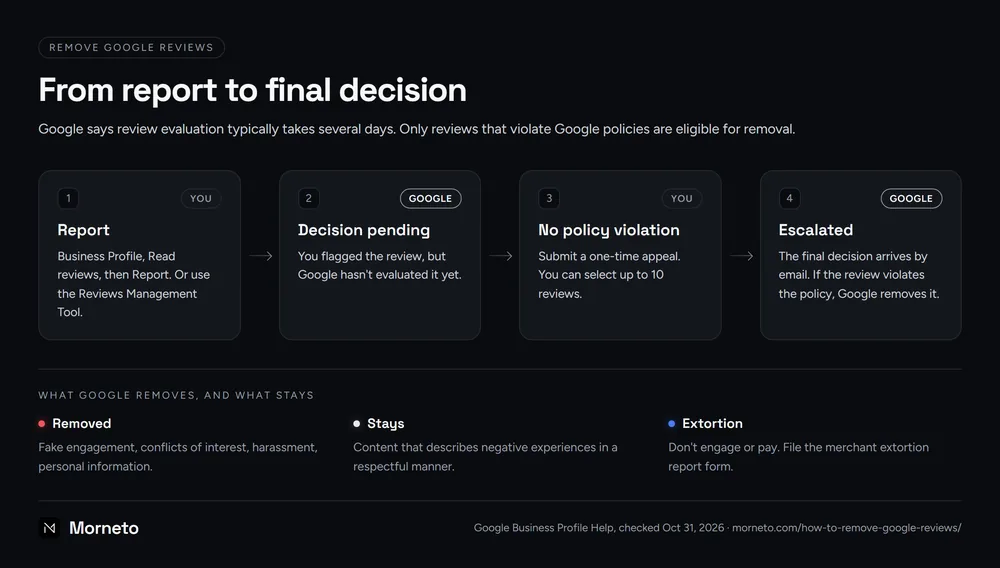
- Send it. Select Send report. After that, you can follow the report in the Reviews Management Tool.
The second route runs through that tool itself. First, confirm the email linked to your profile and select your business. Then choose Report a new review for removal, select Report next to the review, give the reason and submit. Google walks through both routes in its help page on reporting inappropriate reviews on your Business Profile.
A few habits make a report stronger. To start with, choose the reason that matches the actual rule rather than the one that sounds worst. For example, a review from a former employee can be a conflict of interest. Next, keep a simple log with the date, the review and the reason. Also, when one account posts inappropriate content, you can report the user profile itself. In the Google Maps app, tap Business, then Reviews, then the reviewer’s name, and choose More and Report.
Extortion is a separate case. Sometimes a wave of one-star and two-star reviews arrives, followed by a demand for money to remove them. Google says not to engage or pay, because paying doesn’t guarantee removal. Instead, collect screenshots that show the date, time and sender, and file the merchant extortion report form.
What happens after you report a review?
Google says review evaluation typically takes several days. Meanwhile, the Reviews Management Tool shows one of three statuses:
- Decision pending. You flagged the review, but Google hasn’t evaluated it yet.
- Report reviewed – no policy violation. Google evaluated it and found no violation. At this point you can submit a one-time appeal.
- Escalated – check your email for updates. Your appeal went to escalation, and the final decision arrives by email.
To appeal, open the tool again and choose the option to check a review you reported earlier. At the bottom, select Appeal eligible reviews. You can select up to 10 reviews, then fill in the form in the new tab. If the review violates the policy, Google removes it. Otherwise it stays live, and its status shows as Escalated.
Because the appeal is one-time, treat it as your best chance to remove Google reviews you believe break the rules. So write it as a short case: which rule the review breaks, and what proves it. For example, a reviewer who never appears in your booking records is a concrete point. So is a reviewer who works for a competitor. By contrast, a general claim that the review is fake gives Google nothing to check.
Why are real Google reviews disappearing in 2026?
Sometimes you are not trying to remove Google reviews, but to keep real ones. Google’s help page says its automated spam detection may occasionally remove legitimate reviews by mistake. In that case, it tells owners to contact support.
Reports of vanishing reviews have come in waves. On October 27, 2025, Search Engine Roundtable reported numerous complaints about vanishing reviews. Then, on February 19, 2026, it saw an uptick in complaints again. On July 3, 2026, it reported that some businesses had lost thousands of reviews. A Google spokesperson told the site that Google would restore any reviews it removed incorrectly. Later, an update to the article said Google considered it resolved.
In our view, the scale helps explain the misfires. On April 16, 2026, Google said it blocked or removed over 292 million policy-violating reviews in 2025. Over the same year, it published more than 1 billion helpful reviews. The same post covered a sudden spike in spam reviews. In that case, Google said, it would remove the fake content, pause new reviews, alert the owner and show a banner.
Google’s help page on missing reviews lists quieter causes too:
- Checks and merges. Policy checks can delay a review for a few days, and so can a recent profile merge.
- Policy removals. Google says reviews removed for policy violations won’t be restored.
- Reinstatement. Reviews can drop after a profile comes back, and Google again points owners to support. If the whole profile went down, our guide to what to do when a Google Business Profile is suspended covers the next steps.
Finally, the policy names unusual volumes or patterns of reviews as manipulation. In our view, a steady habit of asking every customer is safer than a big push in one week.
What doesn’t work when you try to remove Google reviews?
Most shortcuts fail, and several create a bigger problem than the review itself:
- Paying a removal company. Only reviews that break Google’s policy are eligible for removal, whoever reports them. So a promise of guaranteed removal is a red flag. When a pitch comes with an alarming automated report, the warning signs in our guide on how to tell a real audit from an automated one apply too.
- Bargaining with the reviewer. Google bans offering payment, discounts or free services for the removal or revision of a negative review. Fixing the problem is fine. However, a refund that depends on deleting the review is not.
- Pressure or threats. The FTC rule on consumer reviews bans unfounded legal threats and intimidation used to get a review removed. It also bans knowingly false public accusations for that purpose.
- Burying it with gated or fake reviews. Asking only happy customers breaks the same policy, and so do fake reviews. For fake engagement, Google can block new reviews for a set period or unpublish existing ones. It can also show a warning that fake reviews were removed. Our guide to getting more Google reviews within the rules covers how to ask instead.
- Flagging every negative review. Google asks owners not to report reviews they merely disagree with, so mass reports only add noise.
Sometimes a review states something false about you as a fact, and that can raise questions of defamation. Those questions depend on the facts and on state law, so talk to a lawyer before you act. This guide is not legal advice. Separately, the Maps report menu for user profiles includes a Legal issue reason.
How should you answer a review that stays up?
Since you can’t remove Google reviews that follow the policy, the reply becomes the part you control. Google lets only verified businesses reply. It also checks each reply first, usually within 10 minutes but sometimes up to 30 days. Afterward, the reviewer gets a notice and can still change the review.
- Keep it short. Thank them, say you are sorry to read it, and offer a direct phone number or email.
- Stay factual if it looks fake. Say calmly that you can’t find the visit in your records, and invite them to get in touch. Then report it if it breaks a rule.
- Leave out private details. Never confirm a client, a treatment or an invoice in public.
Here is our own rule, since it shapes the advice above. When a Morneto project finishes, we send clients our guide on how customers leave a Google review, with no script to copy and no incentive attached. Likewise, in our Google Business Profile management work, each review gets an answer under the client’s business name. We never reward a review, even if a client asks. That work runs inside the SEO and marketing plan, from $799 per month. Or, if you would rather have someone look at your profile first, ask for a free search visibility audit before you choose a plan.
Common questions about how to remove Google reviews
Can a business owner delete a Google review?
No. Google says owners can’t directly delete someone else’s review, though the person who wrote it can edit or delete it. Instead, an owner can report a review that breaks Google’s policy, and Google then decides whether to remove it.
How long does Google take to remove a review?
Google says review evaluation typically takes several days. If you appeal, the final decision arrives by email after the escalation, so the whole process can take longer.
Will Google tell me if a review was removed?
For reviews you report, the Reviews Management Tool shows the status, and appeal results come by email. Also, when Google pauses new reviews after a spike in spam, it says it alerts the owner.
How do I get Google reviews back?
Google says reviews removed for policy violations won’t be restored. However, if you think its spam filter removed real reviews by mistake, contact Business Profile support and describe what changed and when.
Can you legally pay a company to remove bad reviews?
That depends on what the company does, so ask a lawyer about your case. What is clear: the FTC rule bans groundless legal threats and intimidation used to get a review removed. Google, in turn, bans offering the reviewer an incentive to change or remove a negative review.