Short answer: Google Business Profile posts are short updates, offers and event notices that appear on your profile in Search and Maps. We suggest posting about once a week, whenever you have something real to point to, such as a service page, a finished project or holiday hours. Google doesn’t name posts as a ranking factor, so use them to turn profile views into website visits.
Last updated September 29, 2026. Post rules below come from Google Business Profile Help, checked that day.
We wrote this guide to Google Business Profile posts for a small business owner with one location and a verified profile. It sticks to what Google documents, says plainly where Google is silent, and adds our own posting routine.
If you just want the official instructions, Google’s help page on Business Profile posts is the place to start. No profile yet? Read what a business gives up without a Google Business Profile first, then come back.
What are Google Business Profile posts, and where do customers see them?
They are updates you publish on your own profile. Google describes them as a way to share announcements, offers, updates and event details with customers on Search and Maps.
Where they appear depends on the device. On a phone, posts show in the Updates or Overview tab of your profile, in both Search and Maps. On desktop, they sit in a section called “From the owner.”
There is also a featured post, pinned directly to the profile on mobile. However, Google currently offers it only to single-location food and drink businesses. On top of that, it’s limited to English in the US, UK, Canada, Australia and New Zealand. So most service businesses won’t see that option.
Every placement Google lists is on the profile itself. So your reader has already found you and is probably comparing you with one or two others. Write for that person. Our guide to Google Business Profile optimization for New York businesses covers the other fields, from categories to photos.
Which post type and button should a small business use?
Use an Update for nearly everything. Google’s create flow lists three types: Update, Offer and Event. Product isn’t one of them.
- Update. It can carry a description, a photo, a video and one action button with a link. Google says that button “should direct customers to a website where they can complete the action.”
- Offer. It needs a title, dates and a time. Google adds a View Offer button automatically, and you can add a coupon code, a link and terms.
- Event. Give it real start and end times. Without them, Google shows the event as lasting 24 hours on the event dates.
For the button, pick the action the page actually supports. We’ve used Learn more on every post so far, because it suits a page that explains something.
Call now is the other button worth knowing. Google suggests it instead of typing a number into the post. Skip it if your profile has no phone number yet.
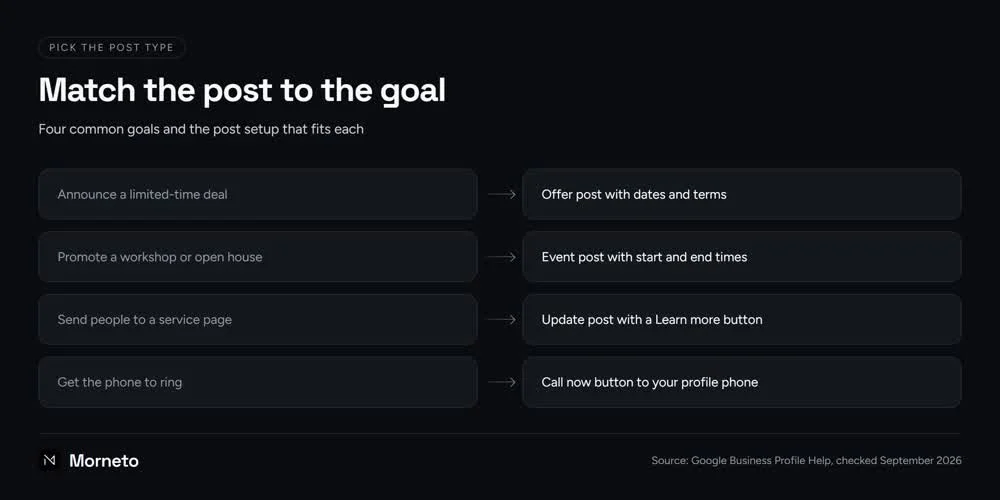
In practice, announce a limited-time deal with an Offer post that has dates and terms. Promote a workshop or open house with an Event post that has start and end times. Send people to a service page with an Update post and a Learn more button. And to get the phone to ring, add a Call now button, which dials your verified profile phone number.
What should you post if you don’t run sales or events?
Post about pages you already have. A service business may never run a sale, yet it still has plenty to say. Think of the work itself, the questions customers ask and the details that change through the year. These Google Business Profile post ideas all have a page behind them:
- A service explainer. One service, what it includes and who it suits, with the button going to that service’s page.
- A finished project. Two sentences and a real photo of the job, such as a bathroom retiled in Bay Ridge. Link it to your project page.
- A question customers keep asking. Answer it in two lines, then link to the page or guide that answers it in full.
- Holiday or special hours. Change the hours on the profile first. Then post a reminder that links to your contact page before a holiday closure.
- A new guide. When you publish something useful on your site, a post points profile visitors to it.
- Your prices. If you publish them, a post linking to your pricing page answers a common question before anyone calls.
Here’s a made-up example of a finished-project Update. The text might read: “We finished a bathroom retile this week, with a new floor and new shower walls. The page below explains what the job involves.” The button would be Learn more, linked to your bathroom renovation page.
For Update posts that point to your site, our house rule is one post, one existing page, one Learn more button. It builds on Google’s line about the button leading to a website, but the rule itself is ours. It also settles what to write: if there’s no page worth opening, there’s no post yet.
We skip a few things on purpose. We don’t stuff keywords into the text, force a neighborhood name into every line, or publish filler to look active. A post is only as useful as the page it opens. So check the page first, because small business web design that turns visits into inquiries matters more than any post’s wording.
Do Google Business Profile posts help SEO or map pack rankings?
Not in any way Google has stated. Google doesn’t present posts as a ranking factor. Its own description is about sharing news with customers, not about ranking higher.
None of this proves posts can never affect ranking. But it does mean you shouldn’t publish them to climb. Be wary of anyone who sells posting as a ranking service. We don’t sell it that way.
The value sits at the moment of choice, when someone compares two contractors on a phone. One profile has a recent post about the exact job they need, linked to a page that explains it. The other has nothing new. That post may not move a ranking, but it can win the click.
If what you’re after is Google Business Profile SEO in the ranking sense, spend your time elsewhere. Our breakdown of what decides the three map results in New York covers the work we’d prioritize. Showing customers how to leave a Google review is part of that work.
How often should you post, and how long do posts stay visible?
Post when you have a page worth sending people to. For a typical small business, that might mean about once a week. That’s our own answer to how often to post on Google Business Profile, not a Google rule. Separately, Google archives posts older than six months unless you set a date range.
You may still read that posts vanish after seven days. That was true once, but it changed years ago. So an evergreen post, such as a service explainer, can stay up for months. A time-bound post, such as an offer or an event, should carry a date range that matches the news.
Google’s own tool handles scheduling. You can set a post for a later date and time. You can also make it repeat weekly, monthly or on a custom schedule. The simplest habit is to write a month of posts in one sitting and schedule them a week apart.
Be careful with the Repeats option, though. Google’s Maps content policy lists posting the same content multiple times as not allowed. That policy mainly targets user contributions, and the posts tool offers repeats itself. Still, we’d write each post fresh rather than recycle the same text.
Can you post too often? We’d worry less about frequency than about running out of real pages to point to. Past that point, extra posts turn into filler, and filler helps nobody reading your profile.
If a weekly post keeps slipping down your list, hand it off. Profile work is part of our SEO and marketing plan from $799 a month, month to month.
Why do Google posts get rejected, and what should you check first?
Google’s help names a few causes: contact details that can’t be tied to the business, low-quality text and blocked links. Google reviews every post after it’s published, and the status tells you where it stands.
Two statuses matter. Pending means the post isn’t visible yet, either because it’s still uploading or processing, or because the profile isn’t verified. Not approved means it isn’t visible, and a question mark next to the status points to the policy it broke.
When a post is rejected, open the policy the question mark points to. Fix that one thing, then publish a corrected post. Better still, run this check before you publish:
- No contact details in the text. Google may remove posts with unverified contact information, including phone numbers, email addresses and social media handles. A phone number that can’t be tied to the business might get the post rejected. Use the Call now button instead, if your profile has a number.
- Clean, human writing. Google asks posters to avoid misspellings, extra characters, filler and auto-generated content. If a tool drafted the text, rewrite it in your own words and read it aloud once.
- Links to your own pages. Google blocks links to malicious or adult destinations. The safest target is a page on your own site.
- On topic and respectful. Google asks for posts that are respectful, family-friendly and complete, with relevant details. Its Maps content policy also rules out general, political or social commentary and personal rants.
- No product content in regulated fields. Businesses in regulated industries can still post, but not content about those products.
- No deals if you run a hotel. Google’s posts policy names hotels as the one business type that can’t create offer posts or mention deals and discounts. Other businesses can run offers within Google’s general post rules.
- A photo within Google’s photo guidelines. JPG or PNG, between 10 KB and 5 MB, at least 250 by 250 pixels, with 720 by 720 recommended. That spec comes from Google’s general photos page, and the posts help pages give no separate size.
One more point in Google’s posts content policy matters: the business, not Google, is responsible for making posted content legal. If you work in a regulated field, run the wording past your own counsel first.
How do you tell whether your posts are actually working?
Judge Google Business Profile posts by the visits and inquiries they send, not by how busy the profile looks. We haven’t found a per-post click metric for Update posts documented in Google’s help. So we tag every button link and read the results in GA4.
Tagging means adding UTM parameters to the button’s URL. Use utm_source, utm_medium and utm_campaign together, all in lowercase so names stay consistent. Then add utm_content to name each post. This is our own practice; we found no Business Profile help page that asks for it.
Our scheme is simple: source google, medium organic, campaign gbp_post, and a short content label per post. A button link on a holiday-hours post might end in ?utm_source=google&utm_medium=organic&utm_campaign=gbp_post&utm_content=holiday_hours.
In GA4, we look these visits up by campaign rather than by channel. We open the Traffic acquisition report, switch the table to Session campaign and find gbp_post. Then we add Landing page as a secondary dimension to see which page each post sent people to.
Before you compare anything, make sure GA4 records your contact-form submissions or booking requests. Otherwise you’ll see visits but not inquiries. Then give it a couple of months before you draw conclusions.
After that, compare which posts sent visits and which landing pages turned them into inquiries. Write more of what worked. A few visits to a page that converts beat many visits to a page nobody acts on.
What our own routine looks like
Google verified our profile on September 16, 2026. Since then we’ve published nine Update posts. Each has a Learn more button and a UTM-tagged link to one existing page. Those pages include the free audit, our pricing, the local SEO service page and blog guides.
We check each post word for word against the live page, and we approve every post before it goes out. No phone number, email or URL goes in the text. Because our profile has no phone number yet, we don’t use Call now either.
Our launch wasn’t a model to copy: the first posts went out in same-day batches. The target from here is about one a week. We have no performance numbers to share yet, so we don’t claim any.
In our local SEO service for New York businesses, publishing posts is part of the monthly work. Ask through our contact page for a free audit of your profile and the pages behind your posts.
Common questions about Google Business Profile posts
Can you schedule Google Business Profile posts in advance?
Yes. Google lets you schedule a post for a later date and time. You can also set it to repeat weekly, monthly or on a custom schedule. Rather than using repeats for the same words, we’d schedule freshly written posts a week apart.
How long does a post stay on the profile?
Google archives posts older than six months unless a date range is set. The seven-day expiry you may read about in older guides no longer applies. For news with an end date, we’d set a date range that matches it.
What image size should a post photo be?
Google’s posts help pages give no separate size. Its general photo guidelines ask for JPG or PNG between 10 KB and 5 MB. They recommend 720 by 720 pixels, with a minimum of 250 by 250. A sharp, well-lit photo of real work matters more than exact dimensions.
Is Product a Google Business Profile post type?
No. Google’s help lists three post types in the create flow: Update, Offer and Event. A guide that adds Product as a fourth type doesn’t match that list. For most service businesses, an Update with one button to a relevant page covers nearly everything.
Can you put a phone number in a post?
It’s risky. Google says a phone number that can’t be tied to the business might get the post rejected. It may also remove posts with unverified contact details. Instead, it suggests a Call now button, which dials the verified phone number on your profile.