Short answer: internal links are the links between pages on your own website. They matter for SEO because Google discovers pages by following them, reads the anchor text to understand what each page is about, and treats a page with many relevant internal links as more important. Structure them as hubs and spokes, use descriptive anchor text, and audit them every time you publish.
Last updated 18 August 2026. The numbers in this guide come from an audit of our own site (35 posts, 27 pages) run that morning; we show the before and after, including the gap we found.
Most owners think of SEO as keywords and backlinks. Internal links, or seo internal linking as the tools call it (typed every way around: internal links for SEO, SEO internal links, internal links in SEO), are the part you control completely, cost nothing, and, in our experience, are the difference between a blog that quietly supports the pages that earn money and a blog that floats on its own. This guide explains what internal links do, how Google reads them, how to structure them, and the routine that keeps them healthy as the site grows.
What are internal links and why do they matter for SEO?
An internal link is any link from one page on your domain to another page on the same domain: a menu item, a link inside a paragraph, a “related guides” line, a button. External links point to other websites; backlinks are external links pointing at you. Internal links are the only kind you can add, move or remove in five minutes without asking anyone.
They matter for three reasons that Google spells out in its own SEO Starter Guide: they help Google find your pages, they tell Google what a page is about, and they suggest which pages you consider important. In practice, they also decide what a visitor reads next. A post about website cost that links to your pricing page turns a reader into an enquiry; the same post with no link turns a reader into a bounce.
How do internal links help search engines understand your site?
Discovery: Google follows links to find pages
Google’s crawler reaches most pages by following links from pages it already knows, as its explanation of how Search works describes. A page with no internal links pointing to it, an “orphan”, can still be found through a sitemap, but it is crawled less often and ranks worse. Google’s own guidance is blunt: every important page should have at least one link from another page on your site.
Context: anchor text describes the target
The clickable words carry meaning. Google’s link best practices say anchor text tells people and Google something about the page you link to. “Web design cost in New York” tells Google the destination is about price; “click here” tells it nothing. Internal links are the one place where you write your own anchor text, so every one is a small, free description of the page it points to.
Importance: link counts are a vote you cast yourself
If twenty of your posts link to your services page and two link to your privacy policy, you have told Google which one matters. That is exactly what you want. Consequently, the pattern of internal links across a site is a map of priorities, and it should match your business.
How do internal links pass authority, and where should it go?
Every page that earns links, from other sites or from your own, has some authority to pass on. Internal links move that authority around the site. Because most backlinks land on the homepage and a few strong articles, internal links are how that value reaches the pages that never earn a backlink on their own: service pages, pricing, location pages. Therefore the rule is simple. Point authority at the pages that make money, using the blog as the delivery system. A redesign tests this rule hardest: every internal link should point straight at the new URL rather than lean on a redirect, as how to protect Google traffic during a site redesign explains.
Our own numbers show it working. Across our 35 posts, the web development agency in New York page receives 20 internal links from the blog, pricing 16, Google Ads 14 and SEO 13. Those pages have to rank for commercial phrases, so that is where the blog sends its weight. Meanwhile, the privacy page receives none, and that is also correct. If your own site’s linking pattern needs a check, start with the crawl and index basics in our technical SEO checklist.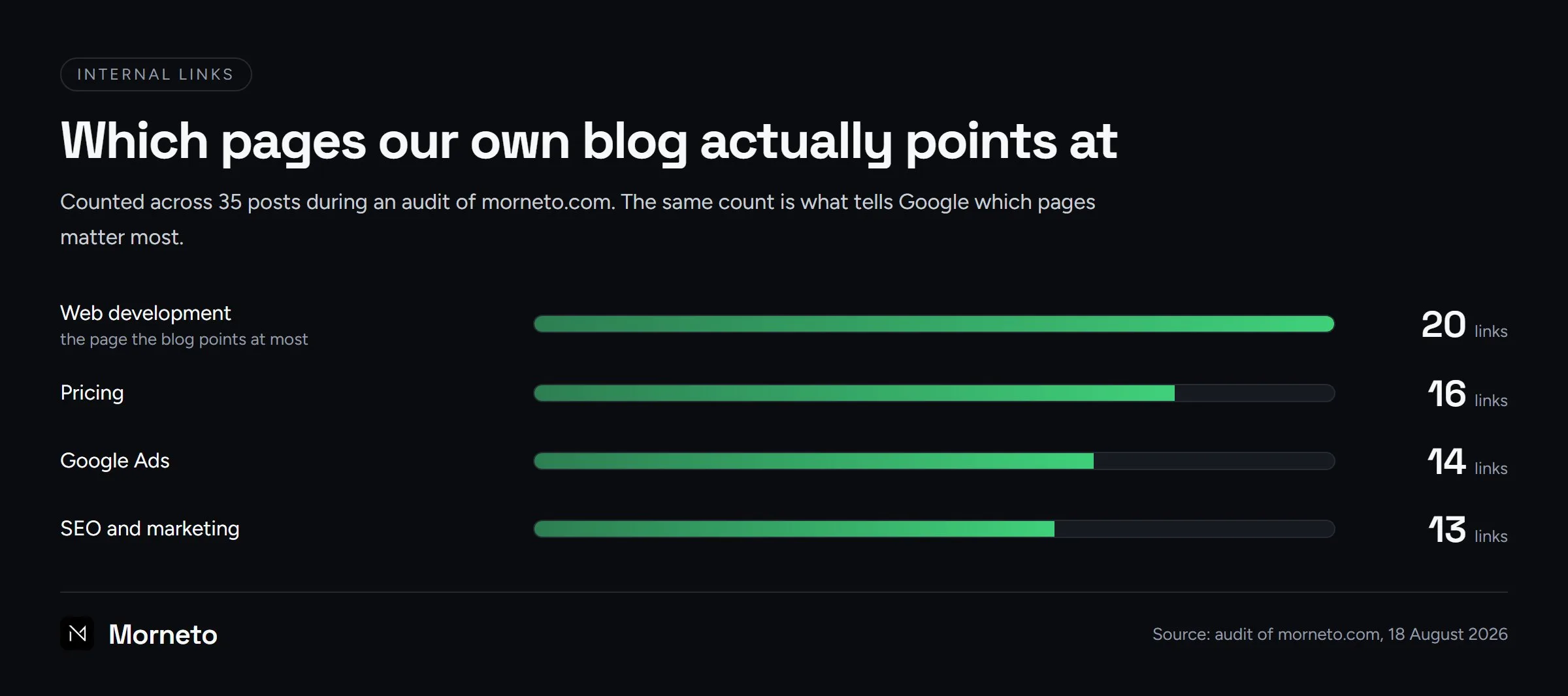
How do internal links improve the user experience?
A good internal link answers the question the reader has next. Someone reading about why their site is slow wants to know how to fix it; someone comparing agencies wants to know what one costs. Each link that answers the next question keeps the visitor on the site, and each visitor who stays is one more chance to become an enquiry. That is why how to choose a web design agency links to pricing, and why why small businesses stay invisible online links to the free audit. In short, the link is the path from reading to acting.
Does internal linking help SEO on its own?
It helps, but it multiplies what is already there instead of creating it. As the sections above show, internal linking gets a page crawled, describes it and passes it authority. However, three things are beyond its reach:
- Making a thin page worth indexing. A link brings Google to the page; the content then decides whether Google keeps it. In other words, crawled is not the same as indexed.
- Creating authority from nothing. Internal links move the value a site has earned from other sites. They decide where it goes, but not how much of it there is.
- Fixing the wrong page type. If searchers want a price list and your page is an essay, more links will not change what Google shows.
So treat internal links as the multiplier on good pages, not a substitute for them.
What is the hub-and-spoke model?
Pillar pages
A pillar page covers a broad topic and is usually the page you want to rank for the commercial phrase: your SEO service page, your Google Ads page, your pricing page. It is the hub. Location pages follow the same pattern: our New York page covering all five boroughs is the hub above each borough and neighborhood page.
Cluster content
Cluster content is the set of specific posts around that topic: the budget question, the “clicks but no calls” question, the Microsoft-versus-Google question. Each spoke links up to the hub with a descriptive anchor, and, this is the part most sites miss, the hub links back down to the spokes. Google’s guidance to cross-reference your own content meaningfully is exactly this. Both directions matter: the spokes lift the hub, and the hub tells Google the spokes belong to a topic it already trusts.
Our own example, including the gap
Our Google Ads service page is a hub with five spokes: Ads management in NYC, the small-business budget guide, clicks-but-no-calls, the AdWords guide and the Microsoft Advertising comparison. Every spoke linked up. However, when we audited the site this morning, only 3 of our 27 pages linked down to any post at all. The blog was supporting the money pages, but the money pages were doing nothing for the blog. We fixed it the same day: 21 pages now carry a short “Related guides” line with three to four descriptive links, which took the count from 3 to 22 pages and added 80 hub-to-spoke links. Nothing on those pages changed visually. That is the kind of gap you only find by measuring, which is why the audit belongs in the routine below.
Which internal links belong in an internal linking strategy?
Hub and spoke organizes links by topic. A strategy also organizes them by where the reader stands in the buying decision, because a guide, a comparison and a service page need different links. This is the rule we apply on this site:
- Informational guides. Each one links to at least one comparison guide and at least one money page, so authority that arrives on a knowledge post never stops there.
- Comparison guides. Each one links to at least two money pages, because their readers are closest to choosing.
- Money pages. In turn, pricing, contact and service pages link back down to the guides that answer their visitors’ objections.
- Placement. Finally, every link inside a guide sits mid-sentence, at the point where the reader already has the question the target page answers.
Once the rule is written down, the routine below becomes a checklist instead of a judgment call.
Which internal linking rules actually work?
- Write descriptive anchor text. Use the words a searcher would use for the destination: “our Google Ads pricing”, “SEO agency in New York”, “how to make your website faster”. Never “click here”, “read more” or “this article”. Google says it, and it also reads better.
- Put internal links in the running text. A link inside a relevant sentence is worth more than the same link in a sidebar or footer, because the surrounding words give it context. Menus and footers are for navigation; the body is where the SEO value sits.
- Add a “related guides” line, not a widget. One sentence at the end of the body with three or four links to the most relevant posts does the job on every page. Automated “you may also like” widgets tend to link to whatever is newest, not what is relevant.
- Link services from FAQ answers when it is natural. A question like “how much does this cost?” is the perfect place for a link to the pricing page.
- Keep the count sensible. There is no magic number, and Google gives none. Our working rule is up to about eight internal links per thousand words in a post; more than that reads like a directory. Fewer than three usually means the post is not doing its job for the money pages.
- Use real HTML links. Google reads standard anchor tags with a proper address; buttons driven only by JavaScript may not be followed. Most builders do this correctly, but check the buttons a developer hand-coded.
| Link type | Where it lives | SEO value | Rule |
|---|---|---|---|
| Contextual link in a paragraph | Body of a post or page | Highest | Descriptive anchor, relevant target |
| Related guides line | End of the body | High | Three to four links, hand-picked |
| FAQ answer link | Inside an answer | Medium to high | Only where the answer really needs it |
| Menu and footer | Every page | Low per link | Navigation, not strategy |
What mistakes break internal linking best practices?
Best practices tend to break by accident rather than by choice, often during a redesign or a cleanup. Four mistakes are worth checking for:
- One anchor, two destinations. When the same phrase links to two different pages, you tell Google that two pages answer one question. Instead, give each phrase one target.
- Links to pages that no longer exist. Deleting a page leaves every link to it ending on a 404, so update those links in the same session.
- Nofollow on your own links. It asks Google to give those links no weight, which is the opposite of what you want between your own pages.
- Links to pages set to noindex. They still spend link value on a page that is not allowed to rank.
Therefore, run a site crawl after every redesign: it surfaces all four, and fixing them costs nothing but time.
How do you maintain internal links when you publish new content?
New content is where structures rot. A post goes live, nothing links to it, and six months later it is an orphan nobody visits. Our routine for every new post takes about fifteen minutes and looks like this.
- Link out first. The new post links to the money page it supports with a keyword anchor, plus three to five related posts.
- Then link in. Add at least three links to the new post from existing posts, each in a sentence that makes sense on its own page.
- Add it to the hub. If the post belongs to a service topic, add it to that page’s related guides line.
- Re-audit quarterly. Count incoming links per post and per page. Google’s Links report in Search Console shows internal link counts by page for free; a simple crawl or a script does it in more detail. Look for orphans, for money pages that fall behind, and for anchor text that has drifted into “here”.
- Refresh, do not just add. When you update an old post, trim its density and repoint links to newer, better pages. This is also where what a good SEO audit tells you comes in: internal links are one of the first things a real audit measures.
None of this needs a tool you have to pay for. It needs a habit. If you would rather have it done, it is part of what our SEO agency in New York does in the first month on any site, and the free SEO audit we offer starts with exactly this measurement. Internal links also feed the newer channels: the answer-first structure that helps you get found by AI search depends on the same clear links between a question page and the page that answers it, and a fast site makes every one of those hops cheaper, which is why how to make your website faster sits next to this guide in our own routine.
Internal links are one of the five things we check when traffic falls; the full diagnosis is in why your website traffic is dropping.
Common questions
What is internal linking in SEO?
Internal linking is the practice of connecting your own pages on purpose. You decide which page links where, and with what anchor text, so readers and Google reach the pages that matter.
How many internal links should a page have?
Enough to answer the reader’s next questions and point at the pages that matter, and no more. Our working rule is up to about eight per thousand words in a post, at least three incoming links per post, and a related guides line on every service page.
Do internal links help a new website rank?
Yes, and they are the fastest lever a new site has. They get pages crawled sooner, describe them through anchor text and send whatever authority the site earns to the pages that need it. They do not replace backlinks, but they decide how much value each backlink is worth.
Should the anchor text be my keyword?
Use natural, descriptive phrases that include the target page’s topic, such as “web design cost in New York”. Vary them a little, keep them concise, and avoid stuffing the same exact phrase into every link. Google asks for descriptive, not identical.
What is an orphan page and how do I find one?
An orphan is a page with no internal links pointing to it. Find them with the Links report in Search Console, a site crawler, or a simple script that lists incoming links per page. Fix each one with two or three contextual links from related pages, or remove the page if nothing should link to it.