Short answer: how to make your website faster comes down to three jobs done in the right order: shrink and lazy-load images and video, put a cached copy of every page on a fast server behind a CDN, and stop scripts from blocking the first paint. Measure with Google PageSpeed Insights before and after. On our own site that routine produces a 99–100 performance score on mobile and desktop.
Last updated 18 August 2026. The screenshots and numbers in this guide are from PageSpeed Insights runs on morneto.com on that date; scores move by a point between runs, so we show the run, not a rounded number.
Most guides on how to make your website faster hand you a list of forty tips and no order. In practice, three groups of fixes decide almost the whole result, and one of them (the server) is usually done for you the moment you choose the right hosting. This guide keeps the three groups, explains why each one earns money and not only points, and shows what the same routine measures on our own site. If you first want to see what slowness costs, why website speed is costing you customers covers the damage; this post is the repair.
Why does a faster website earn more money and rank higher?
Because two different systems reward it. First, Google’s ranking systems look at page experience. Google’s own page-experience documentation says they reward pages that provide a good one, measured partly through Core Web Vitals. However, Google also says it will still show the most relevant page even when its experience is poor. So speed is not a shortcut past good content. Instead, it is the tie-breaker between two good pages, and it is a direct lever on the second system: your visitors.
The visitor side is where the money is. In the Milliseconds Make Millions study, published by Google with Deloitte across 37 brand sites and 30 million sessions, a 0.1 second improvement in mobile speed lifted retail conversions by 8.4 percent and average order value by 9.2 percent; travel conversions rose 10.1 percent. A tenth of a second. For a New York service business the mechanism is the same. The enquiry form that appears in one second gets filled in; the one that appears in five gets abandoned on the train. If you run Google Ads in New York, speed also feeds the landing page experience part of your Quality Score, which Google Ads Help confirms affects both your cost per click and your ad position.
Moreover, the targets are public. Google’s Core Web Vitals call a page good when the largest content paints within 2.5 seconds, interaction to next paint stays under 200 milliseconds and cumulative layout shift stays under 0.1, measured at the 75th percentile of real visits. Our glossary explains Core Web Vitals in plain words if the names are new.
How do you measure website speed before you change anything?
Before you learn how to make your website faster, find out how slow it is. Use Google PageSpeed Insights, because it is free, it is Google’s own tool and it shows two things at once: a lab test on an emulated phone (the score) and, once your site has enough traffic, field data from real Chrome users. A new or small site shows “No data” for the field part. That is normal, and it is exactly what our own report shows below. Run mobile first, because Google indexes the mobile version. Then note four numbers before you touch anything.
| Metric | Good | What usually breaks it | Which step fixes it |
|---|---|---|---|
| Largest Contentful Paint (LCP) | ≤ 2.5 s | A huge hero image or video, slow server, render-blocking CSS | Steps 1 and 2 |
| Interaction to Next Paint (INP) | ≤ 200 ms | Heavy JavaScript, too many plugins, chat widgets | Step 3 |
| Cumulative Layout Shift (CLS) | ≤ 0.1 | Images without width and height, late-loading fonts and banners | Steps 1 and 3 |
| Time to First Byte (TTFB) | ≤ 0.8 s | Cheap shared hosting, no page cache, no CDN | Step 2 |
Once the site earns real traffic, the Core Web Vitals report in Search Console (explained by Google here) shows the same metrics from real visitors, page by page. That report, not the lab score, is what Google’s ranking systems actually use.
How to make your website faster, step 1: images and media
Images are almost always the heaviest thing on the page. Therefore this is where the biggest win sits, and it needs no developer.
- Use modern formats. Convert PNG and JPEG to WebP or AVIF; the same photo is typically 25 to 50 percent smaller at the same visible quality. Google’s guide to choosing the right image format covers when each one wins. Most hosts and caching plugins can convert automatically on upload.
- Size images to how they are shown. A 4,000-pixel photo displayed at 800 pixels wide sends five times the data for no visible gain. Resize before upload, and let WordPress serve its smaller versions on phones.
- Lazy-load everything below the fold. Modern browsers do this natively with a single attribute, as Google explains here. The one exception matters: never lazy-load the first big image or the hero, because that is your LCP element and delaying it costs you the score.
- Give every image width and height. That single habit removes most layout shift, because the browser reserves the space before the file arrives. We found a 0.12 CLS on our own pricing page in August that came from one hero image without dimensions; adding two attributes fixed it.
- Treat video as the exception it is. A background video is the most expensive thing you can put above the fold. If you keep one, strip the audio track, compress it hard, and give it a poster image. We tested our homepage hero at 720p and at 1080p with the audio removed; the score was the same, so we kept the sharper file, at 2.8 MB, and accepted that it costs about two points on mobile. That is a deliberate trade, and knowing the number is the point.
How to make your website faster, step 2: server, caching and a CDN
The server decides how quickly the first byte leaves, and nothing you do to images can rescue a slow one. In practice, three things do most of the work.
- Choose hosting with a modern stack. LiteSpeed or NGINX with server-level caching beats bare Apache on the same shared hardware at the same price. Our web hosting comparison for 2026 lists which hosts have it, and the best hosting platform for a website narrows it to three.
- Turn on page caching. With caching, the server does not rebuild the page for every visitor; it hands over a stored copy in a few milliseconds. On WordPress this is a plugin setting (LiteSpeed Cache, WP Rocket, or the host’s own), and it is the single biggest server-side gain.
- Put a CDN in front. A content delivery network such as Cloudflare stores copies of your pages and files on servers around the world, so a visitor in Queens is served from New York and a visitor in London from London; Cloudflare’s explanation of a CDN is a good primer. The free tier is enough for most small businesses.
- Compress text. Brotli or gzip compression shrinks HTML, CSS and JavaScript by 70 to 90 percent in transit; Google’s note on text compression shows how to check it. Most modern hosts and every CDN switch it on by default; check yours does.
Our own setup is exactly this: LiteSpeed page cache on Hostinger, Cloudflare in front caching full pages, Brotli on, and every purge followed by re-warming the cache so real visitors never hit a cold page. It is not exotic; it is just done.
How to make your website faster, step 3: clean up code and scripts
This is the step that decides interactivity. It is also where sites that “did everything” still fail, usually because of things added later.
- Minify CSS and JavaScript. Removing spaces, line breaks and comments is free weight loss; caching plugins do it in one switch.
- Defer what is not needed to draw the page. Give non-essential scripts the
deferorasyncattribute so they stop blocking text and images. Google’s guide to loading third-party JavaScript efficiently shows the pattern; chat widgets, heat maps and tag managers are the usual offenders. - Remove what you do not use. Every plugin, app or theme feature loads code on every page whether it is used or not. Ten unused plugins is a common finding on the audits we do, and deleting them is often worth more than any single optimization.
- Self-host and preload your fonts. Fonts pulled from a third party add a connection and a swap; hosting the two files you actually use and preloading them removed our last flicker and took our layout shift to zero.
- Do not let optimization break the site. Here is our honest lesson from this month. A cache purge deleted the minified script files while an old copy of the page still pointed at them; as a result, the CDN cached the “not found” answer and our contact form silently stopped working for a few hours. It is fixed, and the rule we now follow is simple: after every purge, check the pages a customer actually uses. Speed work without a check afterwards is how fast sites lose enquiries.
What does this look like on our own site?
Rather than describe a run, we would rather show one. Both screenshots are Google PageSpeed Insights reports for the homepage of morneto.com, captured on 18 August 2026 at 06:27, on Google’s emulated Moto G Power with Lighthouse 13.4.1 for mobile and the standard desktop profile.
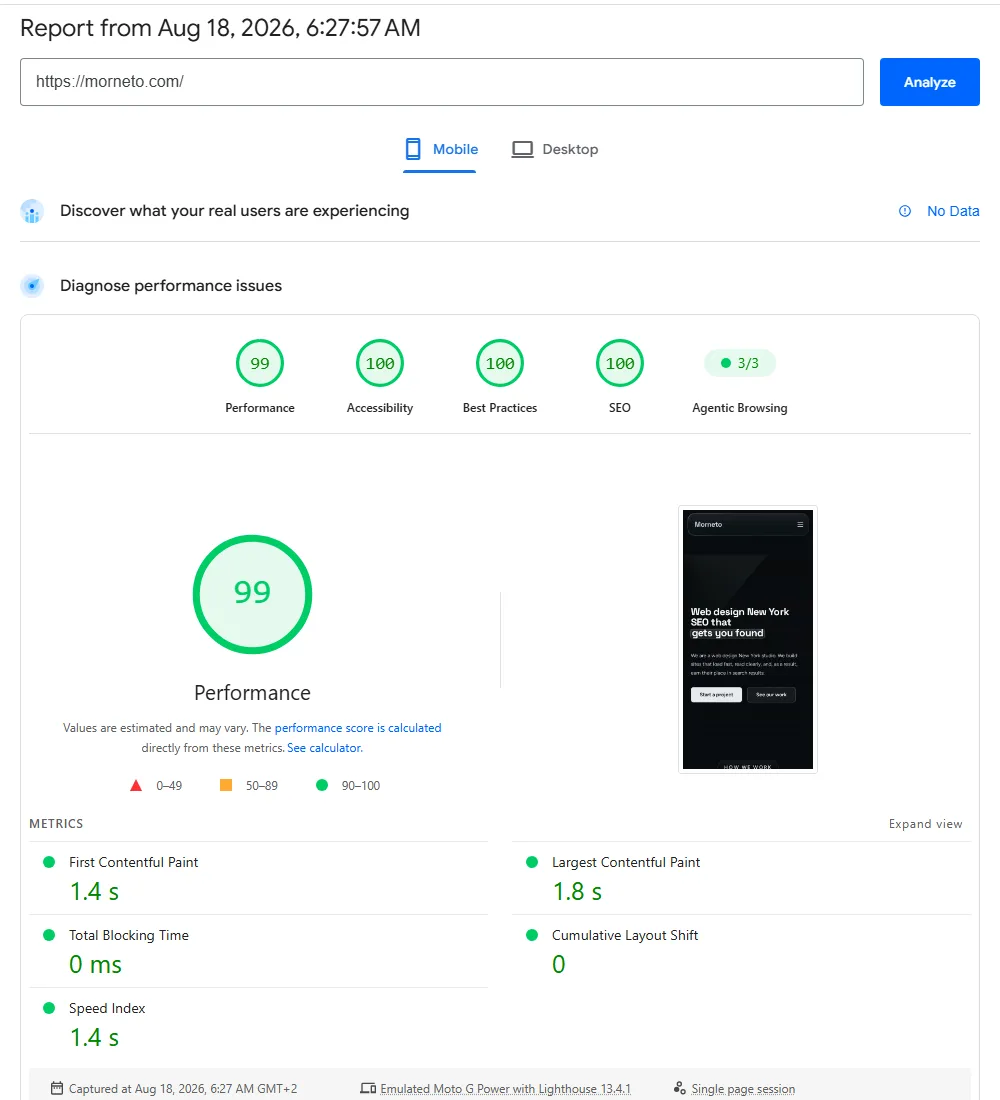
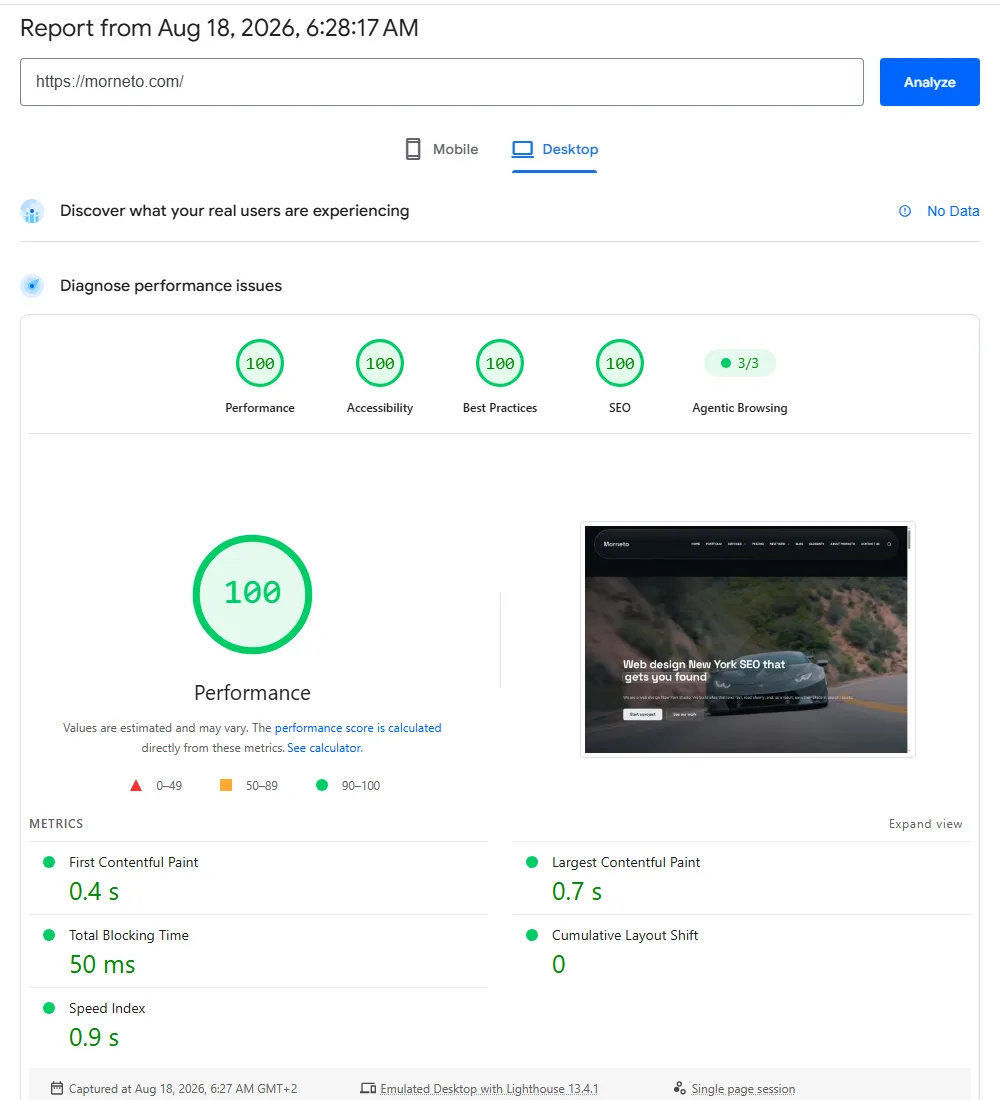
Three honest notes belong next to those numbers. First, the score varies: we see 99 on one mobile run and 100 on the next, because a lab test on a throttled connection is an estimate. Second, the “No data” line means our site does not yet have enough Chrome visitors for Google’s field data; the lab score is a promise about what visitors will get, and the field data is the proof, which comes with traffic. Third, a 99 does not rank a page on its own; Google says so itself. What it does is remove speed as a reason to lose, on Google, on Bing and in front of the person holding the phone.
That is how to make your website faster in practice. It is the routine above, applied to a real WordPress site built with Elementor: WebP images sized to their slots, lazy loading everywhere except the hero, width and height on every image, self-hosted and preloaded fonts, LiteSpeed page cache plus Cloudflare, minified and deferred scripts, and one 2.8 MB muted hero video we chose to keep. Every site our web development agency in New York builds ships to this standard, and the web design cost in New York we publish includes it, because a slow site is not a finished site.
In what order should a small business fix a slow website?
- Measure the homepage and your two most visited pages in PageSpeed Insights, mobile first, and write the four numbers down.
- Fix the server first: modern hosting, page cache on, CDN in front. If your host cannot do this, moving is cheaper than optimizing around it.
- Fix images: convert, resize, lazy-load, add dimensions, tame the video.
- Cut scripts and plugins, then minify and defer what remains.
- Re-measure, and check the forms and buttons still work.
Steps 1, 3 and most of 4 are within reach of any owner with an afternoon. Step 2 depends on your host, and the last part of step 4 usually needs a developer. If the theme itself is the problem, a rebuild is often faster than a rescue; how to build a website in New York puts speed in its place among the other steps, and the best website builders for entrepreneurs says which platforms stay fast without a fight. Not sure where your site stands? Our free SEO audit for New York businesses includes exactly this measurement, with the numbers explained. For the crawl, index and structure fixes that speed work alone won’t cover, our technical SEO checklist walks through the rest in dependency order.
Speed work sometimes turns into a rescue: a plugin update takes the site down, or a cache purge breaks the checkout. If that is where you are right now, emergency website support explains what to do in the first ten minutes and who to call.
Speed is one cause of a decline, but not the most common one in 2026. Why your website traffic is dropping ranks the five real causes in the order we find them.
Speed is a build decision before it is a fix. Performance web design covers how a site is put together so it stays fast after launch. Keeping it fast is then part of routine upkeep, and what website maintenance involves month to month sets out the updates, backups and checks.
Common questions
What is a good PageSpeed Insights score?
Green starts at 90, and anything from 90 to 100 is good in Google’s own scale. Chase the Core Web Vitals underneath the score rather than the last two points; a 92 with all three vitals green beats a 99 that only holds on a lab test.
How fast should a website load in 2026?
Show the largest content within 2.5 seconds on a mobile connection, respond to taps within 200 milliseconds and keep layout shift under 0.1. Those are Google’s published Core Web Vitals thresholds, measured at the 75th percentile of real visits.
Does a faster website rank higher on Google?
Speed is part of Google’s page-experience signals, so between two equally relevant pages the faster one has the edge. It will not outrank better content, but it does lift conversions and lowers Google Ads costs, which is where most of the money is.
How much does it cost to make a website faster?
Images, caching and plugin clean-up cost time rather than money. Better hosting is typically $5 to $30 a month more. A one-off speed fix by a developer usually lands between a few hundred and $1,500 depending on the mess; if the theme is the problem, a rebuild is often the cheaper route.
Can a WordPress site with Elementor be fast?
Yes. Our own site is WordPress with Elementor and scores 99 to 100 on mobile. The builder is not the problem; unused plugins, oversized images, cheap hosting and no caching are.
Can I make my website faster without a developer?
Mostly. Much of how to make your website faster is owner-level work: converting and resizing images, enabling caching, adding a free CDN and removing unused plugins. Server changes, script deferral and layout-shift fixes in the theme are where a developer earns the fee.