
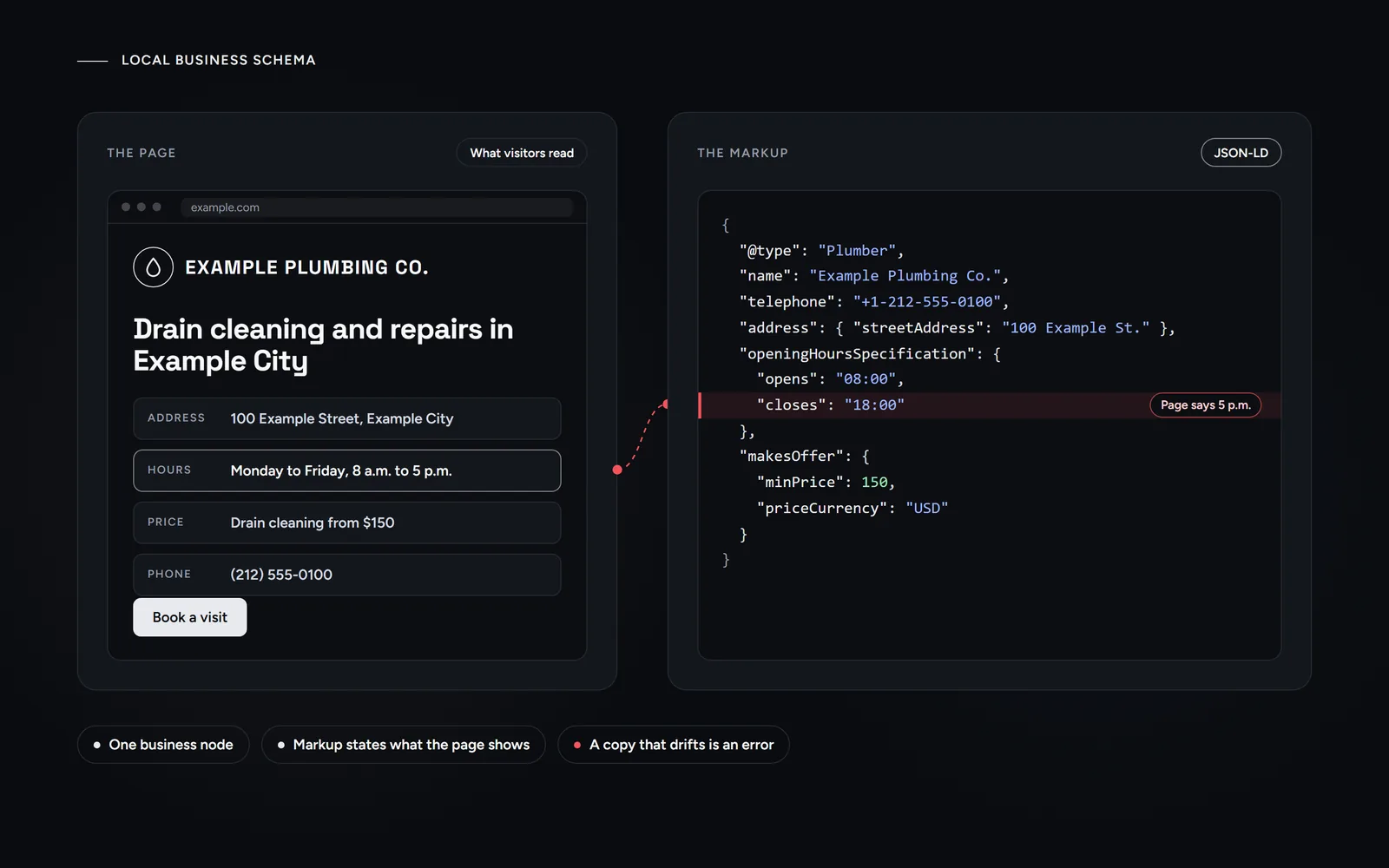
Short answer: local business schema is JSON-LD code that lists facts such as your name, address, hours and prices. It only helps when it matches the page. On our own site, however, most problems came from upkeep, not from missing markup. So most of our fixes removed or corrected markup, and we never mark up review stars about ourselves.
Most guides to local business schema hand you a template and then stop. This one starts with our own site instead. We are a New York studio that builds websites and does local SEO, so our markup should be clean. Still, our audits found real errors, and fixing them took several rounds between August 24 and October 11, 2026.
What is local business schema, and what does it do in 2026?
Local business schema is structured data about a business that serves customers in a place. Generally, it uses the schema.org vocabulary in a small JSON-LD script inside the page’s code. Our glossary gives a plain-English definition of schema markup in general.
According to Google’s documentation on LocalBusiness structured data, only two properties are required: name and address. Google also asks you to use the most specific subtype possible, such as Plumber or Dentist.
However, what the markup does not do matters just as much:
- It is not a listed ranking factor. Google’s local ranking help names relevance, distance and prominence as the main factors, but it never mentions structured data.
- It guarantees nothing. Google states that it does not guarantee your markup will show up in results.
Instead, Google’s own tips for local ranking focus on the Business Profile. That is why our local SEO work for New York businesses starts there. So the honest job of local business schema is accuracy: it restates facts your page already shows. The same goes for the profiles you list in sameAs, which is why our guide to setting up a LinkedIn company page that matches your website lists a profile only once it is live.
What did audits find in our own structured data?
It started with a site audit crawl on August 24, 2026, which flagged 124 schema validation errors. The main cause was one property, audience, because schema.org does not define it for the plain local business type we used. We had also used serviceArea, an older property that schema.org replaced with areaServed. When we removed both, the next crawl showed 6 errors, all from our own blog listing markup. Then we fixed that markup, and the final crawl that day showed 0.
Later, a deeper audit on September 15 covered 133 pages. It found no broken JSON, but it found problems a validator would never flag:
- The brand as a person. On 73 posts, the author was a Person named after the company. However, Google’s article guidance says: don’t use the wrong type.
- Two logos. The business node used a blog card as its logo, not the real one.
- An extra entity. Our theme also printed its own microdata Organization on all 133 pages.
- A hidden FAQ. Our About page carried four questions and answers that existed only in the markup.
- A broken price. On two posts, the markup said “Our fixed price is 7,” while the page said $997.
- Stale copies. Eight archive pages still served an old cached copy of the business markup.
- FAQ drift. 47 of 479 FAQ answers in the markup no longer matched the page.
That is why an audit has to compare the markup with the page itself. If you plan to hire one, our guide to what a useful audit should flag also shows the signs of a fake one.
Why did we remove markup instead of adding more?
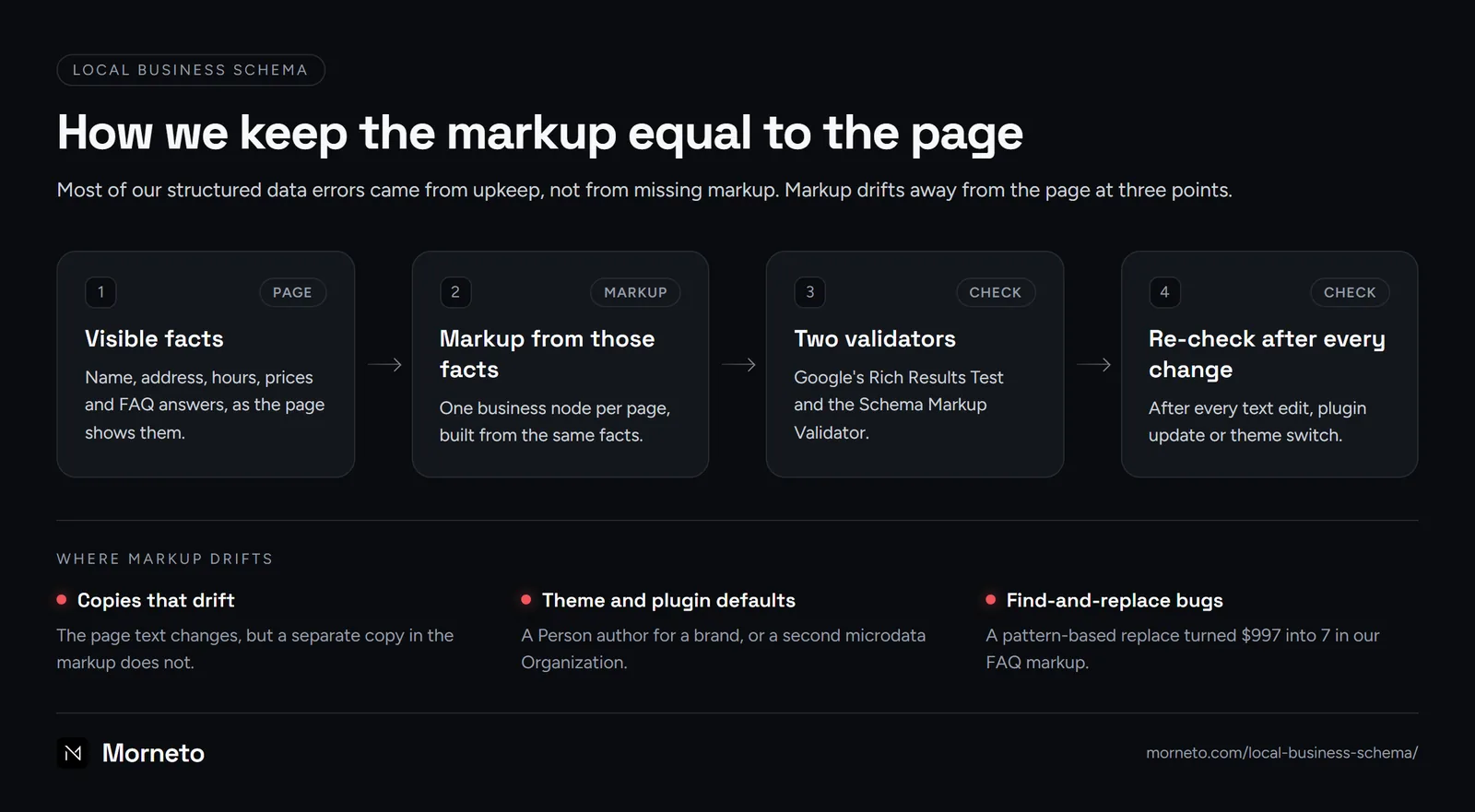
The audit’s most useful finding was its diagnosis: no pattern of manipulation. Instead, the problems came from upkeep. Some were copies that did not move with the page: the FAQ copy, the cache and prices kept in several places. Others were theme and plugin defaults, such as the author type and the microdata. In short, each copy of a fact is one more place where it can go wrong.
So on September 15, our fixes were mostly removals. To begin with, the hidden FAQ markup left the About page, and we switched off the theme microdata. Then the blog card left the business node, which now uses the brand logo. Articles also stopped listing the brand as a Person author and now point to the organization. Finally, every marked-up FAQ answer went back in sync with the visible text. As a result, all 149 URLs we checked that day showed 0 JSON-LD errors and exactly one business node each.
Equally important, we added no new markup that day: no ratings, reviews, HowTo, Product, Event or video markup. The next day, we also removed a slogan that appeared nowhere on the site.
How do you put prices in local business schema without contradicting the page?
Our site shows starting prices: websites from $997, and SEO from $799 per month. Until September 16, though, our catalog markup stated each amount as a flat price, which the page never says. Since then, our markup uses two schema.org types, and so can yours:
- A one-time starting price. Use a
PriceSpecificationwithminPrice, so the amount reads as a floor. - A monthly starting price. Use a
UnitPriceSpecificationwithminPriceandunitTextset toMONTH.
Two days later, another audit found the same prices twice on our neighborhood pages. They were flat in the service markup, but “from” and “per month” in the business node. Moreover, several of those pages did not even show the prices. So we added a plain price sentence and moved every offer to one format. By October 11, the last service offers used minPrice too, and a check found no flat price left in the markup.
Finally, the broken $997 needs its own warning. An earlier edit used PHP’s preg_replace, a pattern-based replace function. In its replacement text, “$99” means “insert matched group 99”. No such group existed, so it inserted nothing and left the 7. Since then, we change dollar amounts only with plain text replacement and then compare the result with the page.
Which markup do we refuse to add, and why?
We refuse four kinds of markup, each for a reason Google states itself:
- Review stars about ourselves. Under Google’s review snippet rules, a business that controls the reviews about itself cannot get review stars on its LocalBusiness or Organization pages. Google also suggests
aggregateRatingonly for sites that collect reviews about other businesses. So our pages carry 0 rating markup. - A business node per neighborhood. We are one business, so every page carries one business node, and its
areaServedlists 16 places. Since Google wants markup to be a true representation of the page, a branch per page would fail that test. - Special AI markup. Google’s AI optimization guide, updated July 10, 2026, says generative AI search needs no special schema.org markup. So plain, accurate markup is enough.
- FAQ markup for hidden questions. Google’s rule is direct: don’t mark up content that is not visible to readers. Our old About page FAQ broke exactly that rule, until we removed it.
Breaking these rules can cost you: a manual action for structured data takes away a page’s rich result eligibility. According to Google, it does not affect how the page ranks.
Do FAQ rich results still show in Google, and why do we keep FAQPage?
No, they do not. According to Google’s changelog entry of May 8, 2026, they no longer appear in Google Search starting May 7, 2026. Then, on June 15, Google removed the documentation. Before that, since August 2023, Google had shown them only for well-known government and health websites. Our site went live in August 2026, so our FAQ markup has never produced an FAQ rich result.
Still, we keep FAQPage markup on pages with a visible FAQ, for three reasons:
- It mirrors what readers see. On October 11, all 627 marked-up questions also appeared in the visible text.
- Other systems may read it. Google’s introduction to structured data notes that properties beyond its own needs may be useful for other search engines, services, tools and platforms.
- It is cheap to keep accurate. On our posts, a build script creates it from the visible answers before publishing.
However, FAQ markup was also our most drift-prone markup. On September 15, 402 of 479 marked-up answers matched the page exactly, and 30 differed only in punctuation. Of the other 47, 38 had drifted after we rewrote the page, 5 had lost dollar amounts and 4 were missing.
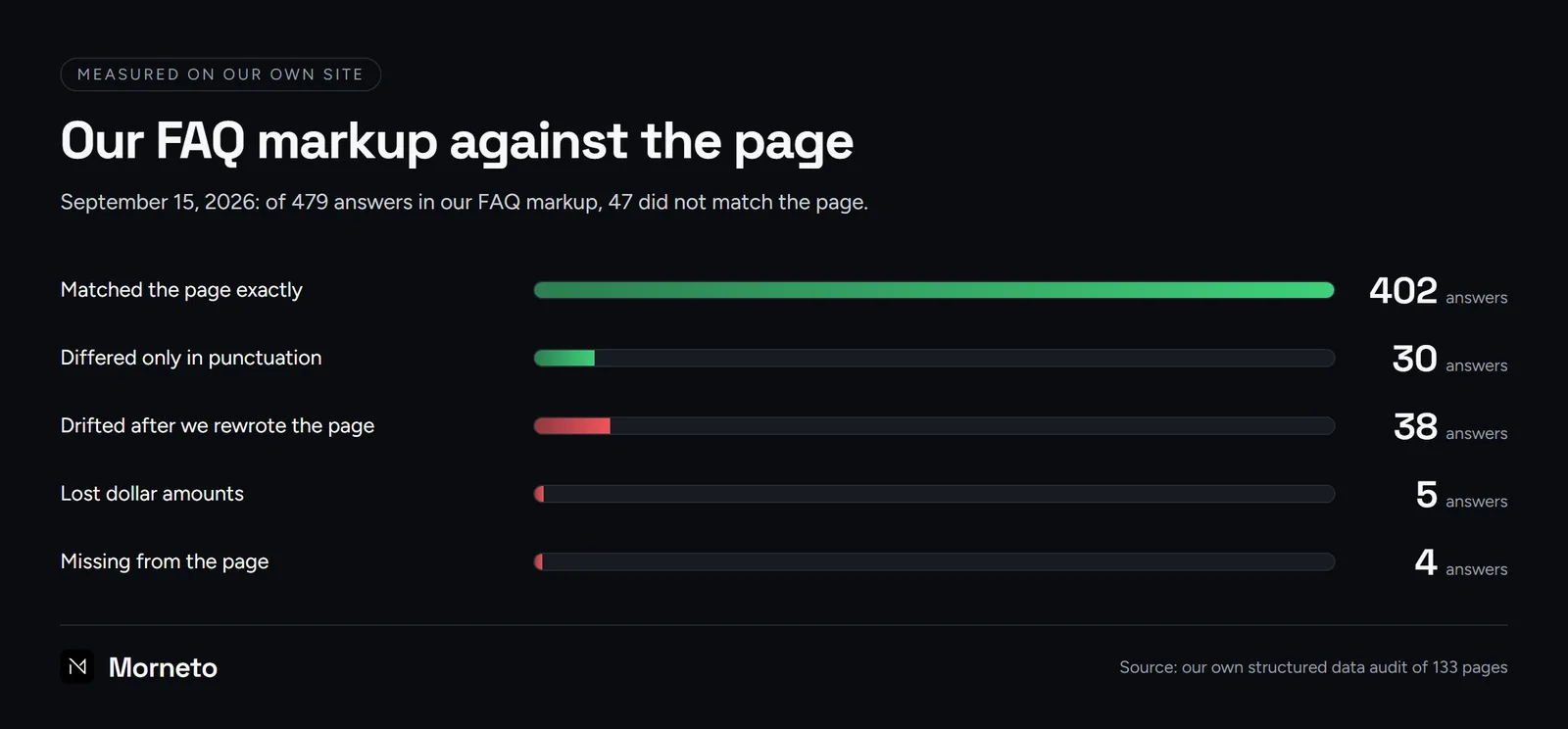
Drift hit 16 of 24 page-builder pages, where the markup lived as a separate copy, against 4 of 73 posts. If you cannot keep such a copy in sync, remove it. Either way, we promise no rich result and no AI mention from it.
What does a clean local business schema example look like?
Here is a clean local business schema example for a fictional plumber. Swap in your real details and delete what your page does not show. Then wrap it in a script tag of the type application/ld+json.
{
  "@context": "https://schema.org",
  "@type": "Plumber",
  "@id": "https://www.example.com/#business",
  "name": "Example Plumbing Co.",
  "url": "https://www.example.com/",
  "telephone": "+1-212-555-0100",
  "address": {
    "@type": "PostalAddress",
    "streetAddress": "100 Example Street",
    "addressLocality": "Example City",
    "addressRegion": "NY",
    "postalCode": "00000",
    "addressCountry": "US"
  },
  "areaServed": [
    { "@type": "Place", "name": "Example City" },
    { "@type": "Place", "name": "Example County" }
  ],
  "openingHoursSpecification": [{
    "@type": "OpeningHoursSpecification",
    "dayOfWeek": ["Monday", "Tuesday", "Wednesday", "Thursday", "Friday"],
    "opens": "08:00",
    "closes": "17:00"
  }],
  "makesOffer": [{
    "@type": "Offer",
    "itemOffered": { "@type": "Service", "name": "Drain cleaning" },
    "priceSpecification": {
      "@type": "PriceSpecification",
      "minPrice": 150,
      "priceCurrency": "USD"
    }
  }, {
    "@type": "Offer",
    "itemOffered": { "@type": "Service", "name": "Drain maintenance plan" },
    "priceSpecification": {
      "@type": "UnitPriceSpecification",
      "minPrice": 30,
      "priceCurrency": "USD",
      "unitText": "MONTH"
    }
  }]
}- @type. Plumber is a schema.org subtype of LocalBusiness, so it follows Google’s advice to pick the most specific type.
- name and address. Both are required, so match your sign and your Business Profile exactly.
- telephone. Numbers from 555-0100 to 555-0199 never reach a real line, so replace ours with the number your page shows.
- makesOffer. A starting price uses
minPrice, and a monthly one addsunitTextMONTH. Google shows no feature for it, so this is about accuracy.
Two things are missing on purpose. There is no aggregateRating, for the reasons above. There is no geo either: if you add coordinates, copy the pin from your verified Business Profile, never a city center. If you would rather not maintain this yourself, structured data is part of the sites we build.
How do you check the schema on your own business site?
A short routine catches most of what our audits found, and it works for any local business schema:
- Run Google’s Rich Results Test. It shows which Google features your markup can earn, and it flags errors.
- Run the Schema Markup Validator. It checks the markup against the schema.org vocabulary itself, not only against Google’s features.
- Count the blocks. Search the page source for
application/ld+json. Expect one business node per page and at most one FAQPage. - Compare every fact with the page. Names, prices, hours and FAQ answers should match the visible text word for word.
- Repeat after every change. Check again whenever you edit text, update a plugin or switch themes. Also clear stale cached pages one by one.
On October 11, 2026, a check of all 165 sitemap URLs found 510 JSON-LD blocks and 0 invalid ones. Then a second pass over 189 URLs found all 627 FAQ questions in the visible text. For everything beyond markup, the rest of our technical checklist runs from crawling and indexing to speed. And how we measure results on our own site covers the numbers that show whether any of it pays off.
Common questions about local business schema
Is FAQ schema deprecated?
The FAQ rich result is: Google stopped showing it on May 7, 2026. However, the FAQPage type still exists on schema.org, so markup that matches a visible FAQ remains valid.
Does local business schema help rankings?
Google does not list it as a ranking factor. Instead, its local ranking help names relevance, distance and prominence, and never mentions structured data. Still, accurate markup helps Google understand the page, which is a different job.
Where do you add schema code on a website?
Put the JSON-LD in the HTML of the page, inside a script tag of the type application/ld+json. In general, Google recommends JSON-LD where your setup allows it. Google lets LocalBusiness markup sit on any page, so we print one business block on every page from one template. That leaves only one copy to update.
Should I use LocalBusiness or Organization?
Use one node with the most specific LocalBusiness subtype for the business customers visit or hire. A separate Organization node can describe the brand, and the two can point to each other by ID.