Short answer: You can’t force a citation in AI Overviews or AI Mode. Google picks supporting links only from indexed, snippet-eligible pages on sites its Search Console AI control includes, and only when an AI answer appears. To rank in AI Overviews, make each key page answer one customer question plainly, then check Search Console’s Generative AI report, which counts impressions only.
Last updated September 29, 2026. Google's rules and Search Console features below come from Google's own documentation, checked that day. Morneto's numbers come from our own Search Console.
If you’ve read that Search Console can’t show AI Overviews data, that advice is out of date. Google rolled out its Generative AI performance report to all websites worldwide as of August 31, 2026. So learning how to rank in AI Overviews now comes with a way to check your work.
This guide stays on Google. ChatGPT, Copilot and Perplexity are separate engines, and our guide to getting found by AI across engines covers them.
How do AI Overviews and AI Mode pick the sites they cite?
Google documents who is eligible for a supporting link, and the list is short. Google says there are no extra requirements or special optimizations for either feature, and that normal SEO best practices apply.
Google’s page on AI features and your website sets the baseline. A page must be indexed and eligible to show in Search with a snippet. Google’s newer optimization guide adds that your site must be included through the Search generative AI control in Search Console. Even then, Google says indexing and serving aren’t guaranteed.
Beyond those conditions, query fan-out makes the rest hard to plan. To build one answer, AI Overviews and AI Mode may run several related searches. Google says this lets it show a wider and more varied set of supporting links than a classic results page.
That cuts both ways for a small business trying to rank in AI Overviews. Your page could earn a link through a related question you never targeted. A kitchen remodel search, for example, might branch into permit rules. However, you can’t pick those searches, so answer the obvious follow-up questions where customers would look for them.
AI Mode and AI Overviews may also use different models, so the links in each can differ. And AI Overviews appear only when Google’s systems judge them additive, so they often don’t show at all. Still, AI Mode SEO has no separate rulebook: the same eligibility conditions cover both features.
Do you have to rank on page one to show up in AI Overviews?
Google’s conditions don’t mention a ranking position, so page one isn’t a written rule. In our view, though, ranking still comes first. The basics that earn a ranking are the same ones Google points to for AI features.
In our reading, fan-out may also explain why a page can appear without a page-one ranking for the main query. It might best match one of the related searches instead. Treat that as a bonus, not a plan.
In the Performance report, an AI Overview takes up one position, and every link inside it gets that same position. So your average position for a query can reflect an AI Overview link, not only a classic result.
Our own numbers don’t settle this either way. As shown below, our homepage, About and privacy pages drew far more AI impressions than any single guide. But the report can’t show which searches were behind them.
So treat AI Overviews SEO as ordinary SEO done carefully. If the acronyms in a proposal confuse you, our plain-English comparison of GEO and SEO sorts them out.
If a search that brings in paying customers can’t wait for organic rankings, paid search can run alongside. That’s where our Google Ads management for small businesses fits, with the ad account kept in your name. Those ads can also appear in and around AI Overviews, which our guide to AI Overview ad placements covers.
What can a small business do to rank in AI Overviews, and what’s out of its hands?
You control most of what makes a page eligible, and how clearly it answers. The rest, from whether an answer appears to which links it shows, is Google’s call.
What you can influence
In practice, optimizing for AI Overviews comes down to habits, not hacks. These six, we think, matter most:
- Indexing. Keep important pages indexed and free of stray noindex tags; our technical SEO checklist lists what to look at.
- Snippet controls. The nosnippet, data-nosnippet, max-snippet and noindex controls limit what Google shows, including in AI features. Remove any you didn’t set on purpose; changes apply only after a recrawl.
- Answer-first passages. Open each section with the sentence you’d want quoted, then add the detail. Google lists no special optimizations for AI features. So, in our view, there’s no need to chop pages into chunks or rewrite them for a machine.
- One question per page. As we see it, a page built around one customer question is easier to match than one that touches ten.
- Internal links. Link each service page to the guides that answer its follow-up questions.
- Business Profile and Merchant Center. Google says this data can help local businesses and products show up in AI responses. It lists keeping both current as a best practice.
One habit to skip: publishing near-copies of a page for each way a customer might word the same question. They help no reader, in our view, and we wouldn’t expect them to earn citations either.
What you can’t control
Some things stay outside your reach, however good the page is. Plan around these three:
- Whether an answer appears. Google’s systems decide that search by search.
- The related searches. Fan-out happens inside Google, and the Generative AI report shows no query data.
- Which links show. Google picks them, and as noted above, the two features’ links can differ. In our view, treat any single check as a snapshot, not a standing result.
Does schema markup or an llms.txt file help?
Not as an entry ticket. Google says you don’t need AI text files, special markup or special schema.org structured data to appear in AI Overviews or AI Mode. Google Search also ignores llms.txt and similar files, which neither help nor hurt there. If you keep one for other services, our honest guide to what llms.txt does explains where it still fits.
Keep any structured data honest, describing only what a visitor can see on the page. No markup, file or trick guarantees a citation.
How do you track AI Overviews and AI Mode in Search Console?
Open the Generative AI performance report for Search, which Google announced on June 3, 2026. It counts how often links to your site appeared in AI Overviews or AI Mode, and it reports impressions only.
That’s the free way of tracking AI Overviews. Still, the report has quirks, most of them documented on Google’s help page for the Generative AI report:
- One impression per feature. If two results from your site appear in the same AI feature, the chart total counts one impression. Search Labs experiments aren’t included.
- Four ways to slice it. Page, country, date and device. Google says it may add more metrics over time.
- Property versus page. The chart and the country, device and date tables count by property, while the page table counts by page. So the page rows and the chart total can differ. Add a URL filter and the chart counts by URL instead.
- Dotted lines. A dotted stretch on the graph marks preliminary data that’s still being collected and may change.
- Pacific Time. All dates follow Pacific Time, which matters when you compare days with another tool.
- Two search types. On September 24, 2026, Google started rolling out a ‘Web: multimodal’ type next to ‘Web: text-based’. It covers Lens, Circle to Search on Android, image uploads and Chrome’s Search this image.
- No split by feature. The help page lists AI Overviews and AI Mode together, and no documented filter separates them. So, as far as we can tell, you can’t view the two separately here.
For clicks and queries, go back to the regular Performance report. Google counts AI Overviews and AI Mode there under the Web search type. In our reading, those figures cover Web search as a whole, so they won’t hand you an AI-only click count.
An external link click in an AI Overview counts as a click. If impressions hold there while clicks fall, our guide to why traffic drops while rankings hold explains that pattern.
What did the Generative AI report show for our own site?
Morneto’s own site data in this report shows 347 impressions from August 11 to September 26, 2026. The homepage drew 293, the privacy page 53, the About page 33 and the New York page 31, with 2 to 12 per blog post. That shows which of our pages Google’s AI features linked to. It doesn’t prove which searches caused it, that anyone clicked, or that your site would behave the same way.
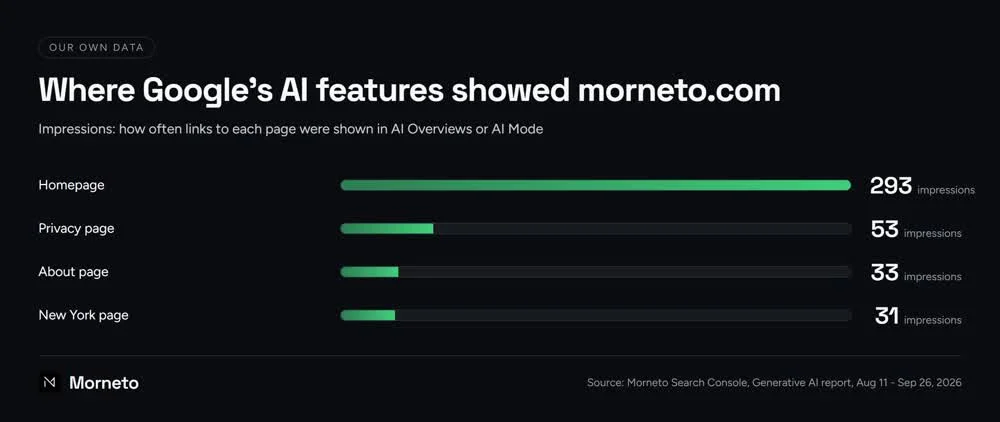
Three lessons came out of it. First, page rows don’t add up to the total: those four pages alone come to 410, above the 347 total. That fits the property-versus-page counting Google describes, so it isn’t an error.
Second, on our site the pages about the business led, not the guides. We can’t tell why our privacy page showed up at all, because the report has no query data. Our guess is searches about the business itself, but that’s a guess, not a finding.
Third, impressions aren’t traffic. An impression means a link to your site was shown, not that anyone clicked it.
On a small site, a handful of searches could swing a country’s numbers. We’d assume your own test searches can show up there too. So filter to the country you sell in before you read a trend.
Is a paid AI Overviews tracker worth it for a small business?
In our view, usually not at first. Start with the free report plus 10 to 20 dated manual checks. Pay for an AI Overviews tracker only when you run many locations, sell many products or report across several clients.
For the manual check, write down 10 to 20 questions a paying customer would type. Search each one on the same device and location. Log the date, whether an AI Overview appeared, whether you’re linked and who else is. Repeat monthly, try a few in AI Mode too, and compare the log with the report.
A tracker may show zero while Search Console counts link impressions. As we understand them, most mention trackers run a sample of prompts and check whether your brand is named in the answer text. That’s a different measurement, so in our view both numbers can be right.
We’d treat any visibility score as an estimate made from the outside. Check it against the report before you act on it.
Should you turn off Google’s AI features for your site?
For most small businesses, no. Opting out ends any chance to rank in AI Overviews or AI Mode. As we read it, the answer then simply gets built from other sites.
The switch is the Search generative AI control in Search Console. If you exclude your site, you get no traffic or impressions from AI Overviews, AI Mode or Discover’s generative AI features. Your content also stops being linked in them or used to ground their answers.
Google says the control isn’t a ranking or inclusion signal for the rest of Search. Opting out only removes you from those AI features. For a plumber, a dentist or a law office, giving that up is rarely a good deal, in our view. It can make more sense for a publisher whose product is the content itself.
If only one page or passage worries you, the site-wide switch is a blunt tool. The snippet controls covered earlier, such as data-nosnippet on a single passage, are narrower. Keep in mind they limit what Google shows in regular results too, not only in AI features.
What should you check this month?
Five checks cover most of what it takes to rank in AI Overviews, and none needs a paid tool. Do the first two before the rest, because nothing else counts until your pages qualify.
- Eligibility. Confirm your five most important pages are indexed, with no stray noindex or snippet limits.
- The control. Check that the Search generative AI control includes your site.
- The report. Filter the Generative AI report to your main country, note your top pages and don’t judge the dotted stretch yet.
- The answers. Run your 10 to 20 customer questions and log what you see, with the date.
- Your listings. Match your Business Profile hours, services and address to your website, and check Merchant Center if you sell products. For the profile itself, our Google Business Profile optimization guide for New York businesses covers the details.
If you’d rather hand this off, our AI SEO and GEO work covers it. It runs inside the SEO plan from $799 per month, month to month, with no AI surcharge. Google says indexing and serving aren’t guaranteed. So judge any provider, us included, on the checks they run and the dated numbers they report.
Common questions about ranking in AI Overviews
Is AI Mode the same as AI Overviews?
Not quite. Both are generative AI features in Google Search. Google says they may use different models, so their links can differ. In the regular Performance report, an AI Mode follow-up counts as a new query. The Generative AI report counts both features together.
Can you pay to appear in AI Overviews?
Not for a citation. Nothing in Google’s documented conditions for a supporting link involves payment. Search ads are sold separately, through Google Ads. Plan and measure them on their own terms, not as a way to earn a cited link.
Does the Search Console AI report show clicks or queries?
No. Only impressions are reported, by page, country, date and device. For clicks and queries, use the regular Performance report. Google counts AI Overviews and AI Mode there under the Web search type. Google says it may add more metrics later.
How long before a page shows up in AI Overviews?
We haven’t seen a timeline from Google. A page first has to be crawled, indexed and eligible for a snippet, and Google says indexing isn’t guaranteed. Snippet-control changes apply only after a recrawl. In our view, judge progress over months, not days. Keep a dated log of each change so you can match it to the report.
Does my Google Business Profile affect AI answers?
It can. Google says Business Profile data can help local businesses show up in AI responses. It also lists keeping that data current as a best practice. For most owners, that means updating hours and services whenever they change. It also means keeping the business name the same as on your website, with nothing added.