Short answer: Google can show your search ads above and below AI Overviews and, for English searches in 12 countries including the US, currently inside them as text or Shopping ads. You can’t target, opt out of or separately report that slot, so your main lever is how broadly you match. Google still describes ads in AI Mode as a test.
Last updated September 29, 2026. Ad rules below come from Google Ads Help and Google's own announcements, checked that day. Features Google calls tests are marked as tests.
This guide looks at ads in AI Overviews as a local business owner on a fixed budget sees them. It covers where the ads appear, what makes a campaign eligible and what you can’t change. Then it turns to what to check in your own account.
Google’s rules below come from its own help pages and announcements, checked in September 2026. Where a point is our judgment, we say so.
What are ads in AI Overviews, and how is an ad different from a citation?
They are ads from your existing campaigns, placed by Google around or inside the AI-written summary on some results pages. Nothing we found in Google’s ad documentation offers a paid spot in the summary’s own text. Google sets out both positions on its Google Ads help page for AI Overview placements, our main source here.
- Around the overview. Existing text, Shopping, local and app ads from Search, Shopping, Performance Max and App campaigns are eligible to show above or below it. That applies in every market where AI Overviews run, which Google puts at more than 200.
- Inside the overview. Currently, only text and Shopping ads from existing Search, Shopping and Performance Max campaigns qualify. The inside slot is available in English, on mobile and desktop, in 12 countries including the US. Google lists local and app ads only for the positions around it.
For the inside slot, Google weighs both the search and what the overview says. Ads that win the auction and fit both are automatically eligible there, with no extra setup.
This part is live, not a test. Google put these ads on mobile in the US in October 2024, labeled Sponsored. It added desktop in the US on May 21, 2025. Since then, it has taken English-language ads in AI Overviews to more countries.
Getting named as a source in the answer is organic work, which our AI SEO page on earning citations covers. This post stays on the paid side.
Which campaigns can show ads in AI Overviews, and do you need AI Max?
Existing Search, Shopping and Performance Max campaigns can all qualify, with no opt-in step. You don’t strictly need AI Max or broad match, because text ads from existing Search campaigns are eligible. Still, Google says matching ads to these searches takes AI-powered targeting: broad match or a keywordless option.
The reason is the searches themselves. Google says AI Overviews trigger on complex, answer-seeking queries that advertisers are less likely to target as keywords. The keywordless routes it lists are AI Max for Search, Performance Max, Shopping campaigns and Dynamic Search Ads.
In practice, that sorts small accounts into two groups. This is our reading, not Google’s wording:
- Tight accounts. Exact and phrase match keywords, no AI Max, no Performance Max. They are eligible on paper, but they seldom match the long questions where overviews appear.
- Broad accounts. Broad match keywords, AI Max for Search campaigns, Performance Max or Shopping. They can reach much further into conversational searches, and their spend spreads wider too.
Performance Max is its own way in, since it has no keyword list to limit it. Before you lean on it, read our plain-English guide to Performance Max on where else it spends.
How to check where your account stands
- Match types. In each campaign, note the match type of every keyword that spent money last month. If several people have edited the account over the years, look for broad keywords nobody remembers adding.
- AI Max status. Open the campaign settings and see whether AI Max is on. Check every campaign rather than assume, especially if you didn’t build the account yourself.
- Keywordless campaigns. List every Performance Max, Shopping and Dynamic Search Ads campaign. Each one is a route into these searches, whatever your keywords say.
- Search terms. Read the longest queries in the search terms report. Full questions there suggest your ads already reach the kind of search Google says triggers an overview.
Which businesses and searches won’t get ads inside AI Overviews?
Google currently shows no ads inside the overview for sensitive verticals, naming adult, alcohol, gambling, finance, healthcare and politics. Its list names broad categories rather than trades, so map it to your own business:
- Dental and medical practices. Healthcare is on the list and likely covers dental and medical practices. So check how your own category is treated before counting on the inside slot.
- Finance-related businesses. Finance is named outright. If you work close to lending, investing or financial advice, treat the inside slot as closed until Google says otherwise.
- Law firms, plumbers and contractors. Google’s list doesn’t name legal or home services. It isn’t exhaustive, so don’t assume you’re in or out.
Beyond the vertical list, ads can trigger on only a subset of AI Overview searches. Google’s conditions include detected commercial intent and a quality ad that fits the query. So, in our view, a search about why a radiator knocks may never carry an ad. One asking who repairs radiators in Queens sits much closer to a purchase.
The inside slot is English-only for now, which matters in New York for campaigns in Spanish or Chinese. Google describes ads above and below as eligible in every market where AI Overviews run. So, by our reading, a campaign in another language isn’t shut out of the page.
Is paid search still new to you? Our guide to what Google Ads costs a small business covers the basics that come first.
How are ads in AI Mode different, and can a local business use them yet?
Ads inside and around AI Overviews are live, while Google still describes its AI Mode formats as tests. So, in our view, a local service business should watch them, not budget for them.
The ad plans for Google AI Mode have moved in steps, and every step so far is a test:
- May 2025. Google started testing AI Mode ads, in English in the US. It said relevant ads may appear below AI Mode responses and integrated into them. Google also said advertisers already on Performance Max, Shopping or broad-match Search, including AI Max for Search, would be eligible.
- December 2025. Google still described the AI Mode ads as a test in the US.
- February 2026. Google said it was testing a format that shows retailers selling the products AI Mode recommends, marked as sponsored. That announcement didn’t mention local service businesses.
- May 20, 2026. At Google Marketing Live, Google said it is testing two Gemini-built formats, Conversational Discovery ads and Highlighted Answers. In Highlighted Answers, ads that are highly relevant and high quality are eligible to appear inside AI Mode’s recommendation lists. Google gave no country, language or device details.
Google’s page on the new AI Mode ad formats says they are powered by AI Max and Performance Max. It also says they are still being tested and gives no launch date or country list.
Our take for a plumber, a dentist or a law firm is simple. An account already on broad match may be eligible for the AI Mode test without opting in. Still, none of this is a general launch for local services. So don’t switch on broad automation today just to be ready for formats that may never fit your trade.
Bing is a separate story. For the Microsoft side, including Copilot, our comparison of Microsoft Advertising and Google Ads picks up where this one stops.
Can you opt out, and which settings keep a small budget from leaking?
No. Google says advertisers can’t opt out of AI Overview placements and can’t target them directly. The levers you do have are indirect: how you match, where you show, what you exclude and where clicks land.
On a small account, we’d suggest this order:
- Deliberate match types. Broad match is one of the routes Google names into these searches. Choose where you want that reach keyword by keyword, not by default.
- AI Max as a decision. Run it only on a campaign whose conversions you trust. By our reading, switching it off closes one route into these searches. It is not an opt-out, though, because plain Search ads stay eligible. Log the date so you can compare before and after.
- Negative keywords for non-buying questions. In our view, many of the long questions overviews answer are research, not buying. Read your search terms weekly and exclude the ones no buyer would type.
- Location settings. Wider matching is no reason for wider geography. Target your service area, then check the locations report monthly for clicks from places you don’t serve. For Google Ads aimed at Manhattan, that usually means several tight zones rather than one wide circle.
- Landing pages built for questions. A long question that lands on a page made for a two-word keyword can waste the click. Answer the question first, then show why you’re the one to call. If your pages need that rework, our website design and build service can take it on.
On a fixed budget, broad reach is a trade. In our judgment, you pay for more searches, and a smaller share of them is likely to come from buyers. Before you widen anything, our breakdown of a small-business Google Ads budget in New York helps you size the budget.
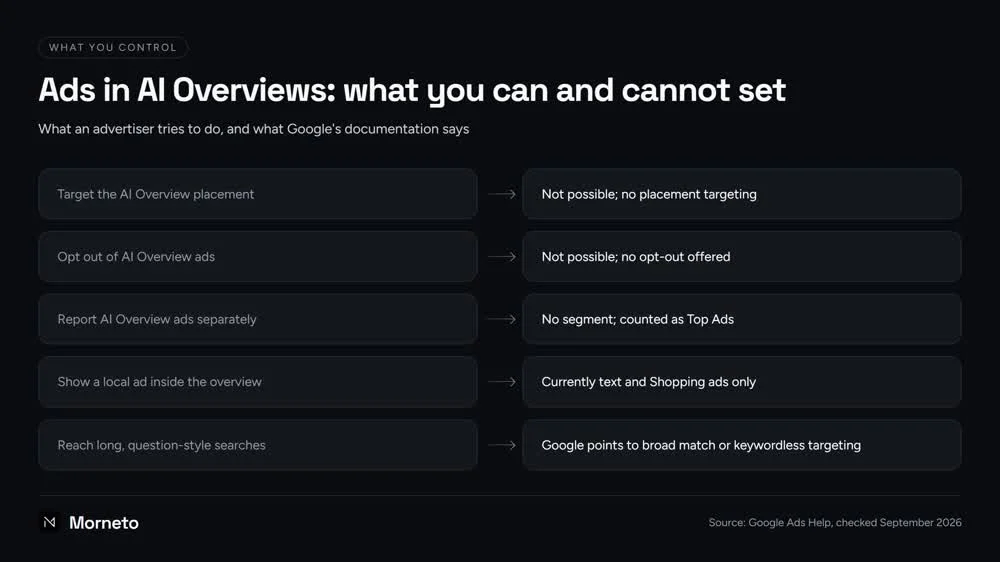
Side by side, the controls are lopsided: you can’t target the AI Overview slot or opt out of it. Nor can you report on it separately, since Google counts these ads as Top Ads, with no segment. Local ads aren’t currently eligible inside it; only text and Shopping ads are. What decides your reach is how widely you match, and for that Google points to broad match or keywordless targeting.
How do you measure these ads when Google reports nothing separately?
You can’t isolate them, so you measure around them. Google Ads counts ads in AI Overviews as Top Ads, so reports can’t tell them apart from other top-of-page ads. Google says it is still deciding what reporting will look like.
Here are proxies you can use instead, starting from the search terms report:
- Query shape. Filter your search terms for ones that contain who, what, how, why or can, or read like a full sentence. Track that group’s clicks, cost and conversions monthly in a spreadsheet.
- Match source. Note which keyword, match type or campaign brought each long query in. If most come through broad keywords or a campaign with AI Max on, that setting likely buys your long-question traffic.
- Top-of-page shifts. Because these ads count as Top Ads, a rise in top-of-page impressions on long queries is a hint. It is not proof, so never move budget on it alone.
- Calls and forms. Clicks don’t settle whether this traffic pays; tracked inquiries do. If calls aren’t counted yet, our page on Google Ads clicks that never become calls covers the tracking side.
We found no Google source describing any reporting for the AI Mode tests. Search Console won’t fill the gap either. On our own site, morneto.com, its Generative AI features report showed 347 impressions from August 11 to September 26, 2026. It shows impressions only, by page, country, device and day, with no queries and nothing about ads.
Should a small business let its ads into AI Overviews or hold back?
In our view, most small accounts shouldn’t chase the placement, and they shouldn’t fear it either. Let it come with wider matching only when your tracking, budget and landing pages can carry that reach.
AI Overviews ads are no reason to rebuild an account. Instead, four checks decide how far to open it up:
- Hold back in a named sensitive vertical. If you’re in healthcare or finance, wider matching currently can’t win you the inside slot anyway. Judge broad match on its own cost per inquiry, not on AI Overview hopes.
- Hold back without conversion tracking. Wider matching without counted calls and forms is guessing with money. Fix tracking first, then revisit.
- Hold back if the budget already runs out. If your campaigns hit their daily budget before evening, wider matching would likely spread the same money across weaker searches.
- Test when the basics hold. With tracking, a page per service and budget room, try broad match or AI Max in one campaign. Keep the negatives and location checks running. Before you start, write down the cost per inquiry you’d accept and the date you’ll review it.
We have found no Google figure for what these placements cost per click or how often people click them. Nor have we found one for the share of AI answers that carry ads. Anyone quoting a precise number should be able to name the source.
If you’d like a second pair of eyes, ask for an account review through our Google Ads management service page. We check AI Max status, match types, locations, negatives, landing pages and call tracking. Ongoing management costs $497 a month for accounts spending up to $5,000 a month, plus 12% of spend above that. The ad account stays in your name.
Common questions about ads in AI Overviews
Can I opt out of showing my ads in AI Overviews?
No. Google says advertisers can’t opt out of AI Overview placements, and they can’t target them directly either. What you can control is indirect: how broadly your campaigns match, plus negative keywords, location settings and the pages your clicks land on.
Do I need AI Max to show ads in AI Overviews?
Not strictly. Existing Search, Shopping and Performance Max campaigns can be eligible with no extra setup. Google says reaching these complex, answer-seeking searches takes AI-powered targeting. That means broad match, or a keywordless option such as AI Max for Search or Performance Max.
Can I see AI Overview ad results separately?
No. Google Ads reports these ads as Top Ads with no separate segment, and Google says it is still deciding what reporting will look like. Until then, group long, question-style search terms yourself and judge them on calls and form fills.
Do these ads cost more per click?
We can’t tell you, because we have found no Google figure for their cost per click or click rate. They still have to win the auction. You can’t isolate them, so judge the wider matching that reaches them by cost per inquiry in your own account.
Can paying for Google Ads get my business named inside the AI answer?
Not through anything we found in Google’s ad documentation. Paying can make your ad eligible above, below or, in some cases, inside the overview, and Google launched the inside ads with a Sponsored label. Being named as a source in the answer text itself is organic work.