
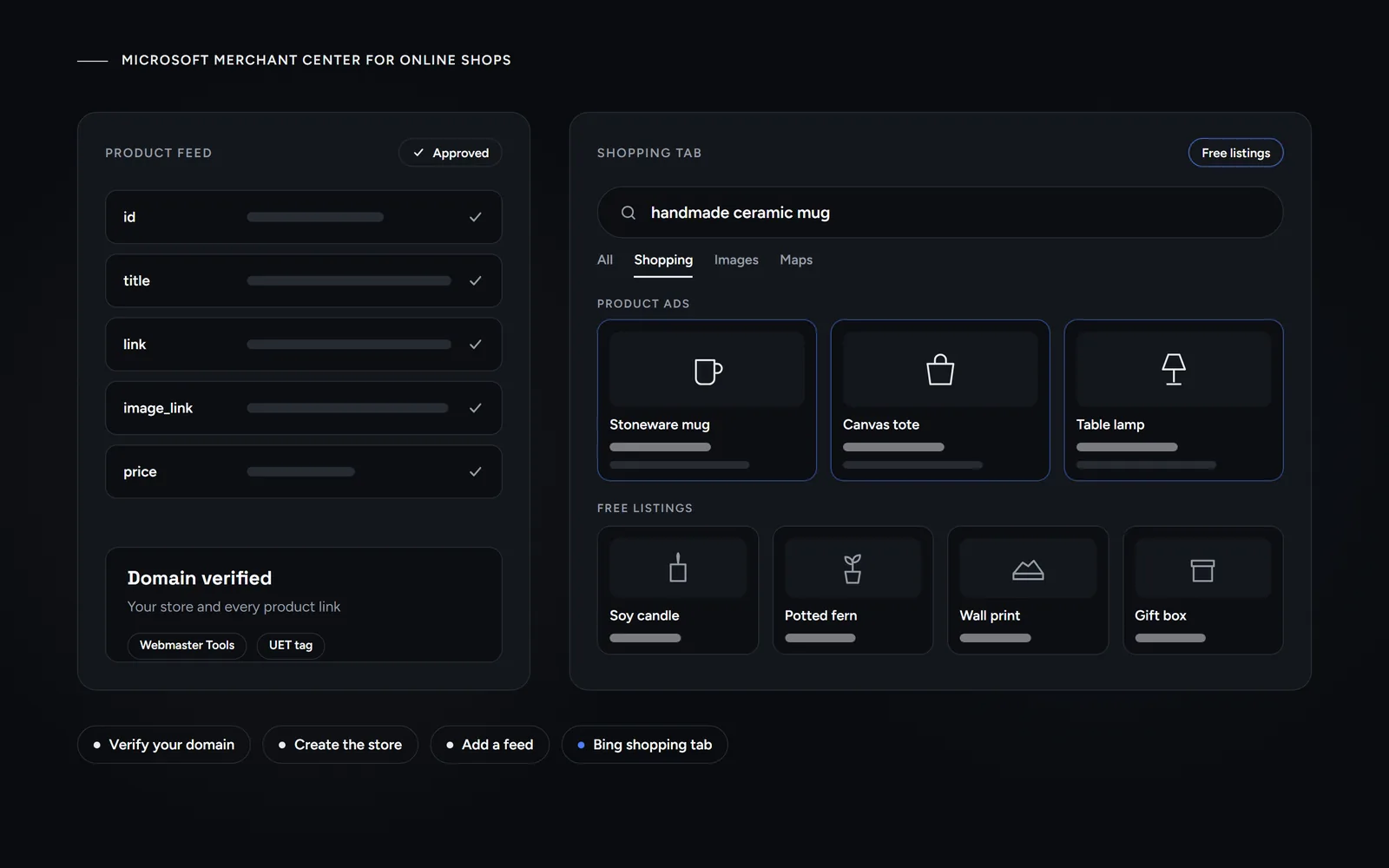
Short answer: Microsoft Merchant Center is Microsoft’s tool for sending your product catalog to Bing. Once Microsoft verifies your domain and approves your store and feed, your products can show for free in the Bing shopping tab. You can also pay for Product ads through Shopping or Performance Max campaigns, and you can import your Google feed.
Morneto is a web design, SEO and Google Ads studio in New York. We wrote this guide for owners of WooCommerce and Shopify stores in the five boroughs who already sell on Google and wonder whether Bing is worth one more feed. Every Microsoft rule below comes from Microsoft Advertising Help. Last checked: October 31, 2026.
What is Microsoft Merchant Center, and what does it do?
Microsoft describes it as the place where you create a catalog feed, with images and other details about your products, so those products can display on the Microsoft Advertising Network. According to Microsoft’s market availability page, that network includes search results on Bing, AOL, Yahoo, DuckDuckGo, Ecosia and search partners.
In practice, one catalog does two jobs:
- Free listings. Approved products can appear in the unpaid section of the Bing shopping tab, which Microsoft calls Product listings.
- Product ads. These paid ads show your product image, price and store name. They pull their inventory from the feed you submit, and you run them through a Shopping campaign or Performance Max.
However, clicks from the unpaid section are free, whereas Product ads run on a bid and a budget.
How is it different from Google Merchant Center?
Both tools follow the same idea, and Microsoft even accepts Google feed files, although it ignores some attributes. Still, the details differ, as this table shows.
| Microsoft | ||
|---|---|---|
| Free listings | The unpaid section of the Bing shopping tab. | Search, the Shopping tab, Images, Lens, YouTube, Maps and Gemini, according to Google. |
| Switched on | Automatically, once you have approved offers. | In most cases on by default, says Google. |
| Site verification | Bing Webmaster Tools or a UET tag. | Your e-commerce platform, email, an HTML tag or file, Tag Manager or Analytics. |
| Paid campaigns | Standard Shopping, or Performance Max with a store. | Shopping, or Performance Max with a Merchant Center feed. |
Can your products show on Bing Shopping for free?
Yes. Microsoft’s help page on free Product listings says your products can show in the Bing shopping tab for free, and clicks from its unpaid section cost nothing. The United States is on Microsoft’s list for this feature, which covers 26 markets in all, including Canada and the United Kingdom.
There is no separate sign-up, either. If your store has approved offers, Microsoft opts you in automatically, and a toggle on the Product listings page lets you opt out. Still, a few rules apply:
- Direct product links. The link attribute must point straight to the product’s own page on your site.
- No campaign templates. You may add UTM tags to that link, but campaign tracking templates won’t work, since free listings have no campaign. Microsoft also ignores ads_redirect here.
- No product-level opt-out. To keep one item out of free listings, remove it from the feed and upload the updated file again.
Impressions and clicks for free listings then appear on the Product performance tab in Merchant Center.
How do you set up a Microsoft Merchant Center store?
The steps follow a fixed order, and the first one happens outside Merchant Center:
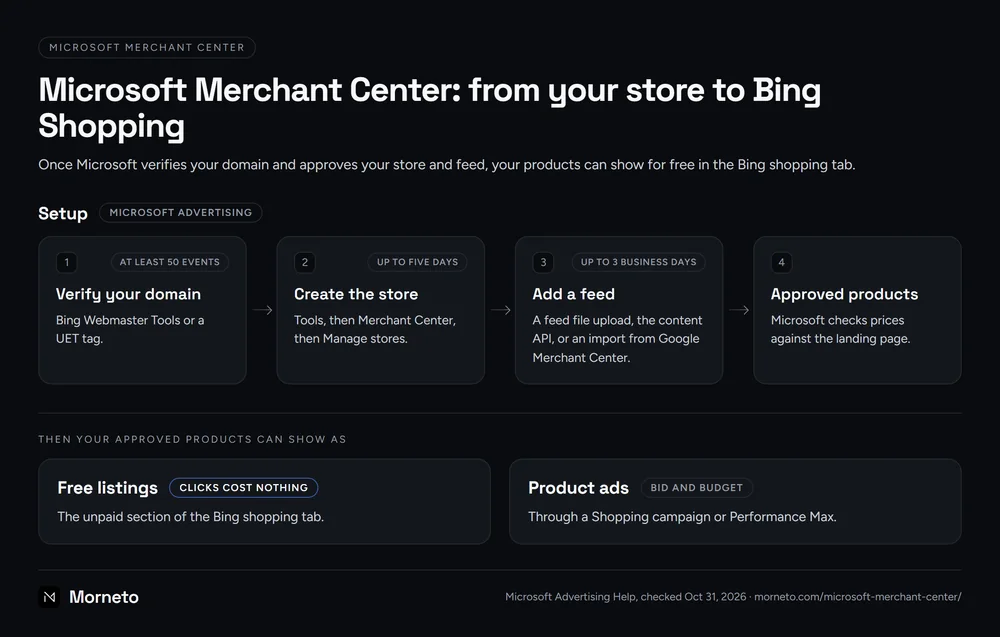
- Verify your domain. Use Bing Webmaster Tools, with an XML file, an HTML meta tag or a CNAME record. Alternatively, use a Universal Event Tracking (UET) tag that is already on your site. A UET tag must register at least 50 events first, and then the domain can take another 48 hours to appear.
- Pick the right URL. Microsoft recommends your site’s top-level address, starting with http:// or https://, with no IP address or port. Every product link must then sit under it or a subdomain.
- Create the store. In Microsoft Advertising, go to Tools, then Merchant Center, then Manage stores, and select Create store. Your store name appears in your Product ads, so get it right.
- Wait for review. Microsoft auto-approves a store, auto-rejects it or queues it for manual review. That review can take up to five days, and Microsoft emails you the decision.
- Add a feed. Once your store is approved, you can create your feed.
Two limits are worth knowing before you start. First, Microsoft does not allow two active stores for the same domain. Second, you can’t sell the same products through more than one store.
Why would Microsoft reject a store?
Microsoft lists its potential store rejection reasons plainly:
- An unverified domain. You tried to claim a domain you haven’t verified.
- Missing market presence. Your business lacks a presence in the markets where Microsoft supports Product ads.
- No real privacy policy. Your site needs a genuine one.
- An unencrypted checkout. Checkout without SSL fails, so check that your certificates are valid.
- A duplicate store. Another store already uses the domain, or your account already has one.
If you think Microsoft got it wrong, you can request a review from the Merchant Center summary page. You get only one per store, though, so fix everything first.
What does a Microsoft Merchant Center feed need?
Microsoft’s product attributes page lists the required fields. For a US shop, these matter most:
- id. A unique ID for each item, up to 50 characters, and unique across all your feeds.
- title. Up to 150 characters, with key details first, and no promotional text or all caps.
- description. Up to 10,000 characters, with no HTML. It must match the description on the product page.
- link. The product’s own page, with no redirects, on the same domain as your store.
- image_link. One image in bmp, gif, exif, jpg, png or tiff format. For most categories, Microsoft recommends at least 220 by 220 pixels, without watermarks or text.
- price. A fixed price that matches your product page. For the United States, leave tax out.
Brand, GTIN and MPN are also required when the manufacturer assigns them. By contrast, the shipping field is mandatory only for Austria and Germany. New or edited items stay pending until review, which can take up to 3 business days.
Microsoft checks prices against the landing page, and it recommends structured data markup to keep that page current. It also needs crawl access, so your robots.txt must let its crawler in. For that reason, feed quality starts with the build, as our guide to what a New York ecommerce site needs explains.
WooCommerce or Shopify: how do products get in?
That depends on your platform. Microsoft’s help center lists dedicated apps for Shopify, BigCommerce and PrestaShop:
- Shopify. The Microsoft Channel app connects your catalog to a Merchant Center store, and the United States is among its markets. After a review of 3 to 5 business days, synced products become eligible as free listings. The app also adds a UET tag to every page, which helps with conversion tracking.
- WooCommerce. Microsoft’s list has no WooCommerce app. So a WooCommerce shop sends its products another way: a feed file upload, the content API, or an import from Google Merchant Center.
Can you import your Google Merchant Center feed?
Yes, and for most shops it is the fastest route. Microsoft’s Google Import tool copies your product offers across, either manually or on a schedule, so you don’t maintain two feeds. However, it only takes part of your catalog:
- Online offers only. Products available only in-store are skipped.
- Shopping destinations only. Offers with any other destination are skipped, too.
- Supported markets. The United States is supported, in both English and Spanish.
- Matching domains. Your store domain in Google must match your Microsoft store’s domain. Otherwise, the import fails with a store domain mismatch.
Also, Microsoft ignores some Google attributes, such as tax and shipping outside Germany. Finally, if you change your Google password, the import stops with an authorization error until you sign in again.
Why does Microsoft disapprove products?
Several common rejections come from a gap between the feed and the live site. These are the errors we would check first, all from Microsoft’s troubleshooting page:
- Editorial guidelines. The offer breaks an advertising policy.
- Redirecting product URLs. The link sends shoppers to a different domain instead of the product page.
- Links outside your store. A product URL is not a sub-path of your store’s domain.
- Price or availability mismatch. The feed says one thing, while the markup on the product page says another.
- Blocked images. Your robots.txt stops adixbot, Microsoft’s crawler, from downloading images.
Once you fix an offer, upload the feed again, since Microsoft rechecks offers on every upload. If you believe Microsoft rejected an offer by mistake, you can appeal. Reviews usually take 1 to 3 business days, and each offer gets one appeal. Microsoft also warns that incorrect appeal requests may lead to a temporary account suspension, so appeal only when you’re sure.
Shopping campaigns or Performance Max: which paid route?
Both campaign types draw on the same store, but they give you very different levels of control:
- Standard Shopping. You choose Sell products as the goal, then sort items into product groups. Bid strategies include cost per sale, enhanced CPC, maximize clicks and target ROAS.
- Performance Max. You add assets such as text and images, and Microsoft’s AI decides where to show them across the whole network. To show Product ads, you select a Merchant Center store when you create the campaign.
- Priority. When both carry the same products, Performance Max automatically gets the highest priority. Your Shopping campaigns then step in once its budget runs out.
- Speed. According to Microsoft, a Performance Max campaign with Product ads should get its first impression within three days.
One setting is permanent in both types: you can’t change the linked store once you save the campaign. Also, if you skip the store in Performance Max, you need a new campaign to advertise products later.
In our view, a small shop should start with Standard Shopping, because product groups show you what sells. Then add Performance Max once conversion tracking proves itself. We explain that order in how Performance Max works on Google, and the logic carries over. Likewise, the setup steps in our guide to Bing Ads in New York apply here: install the UET tag before you spend, since Google’s tag does not report to Microsoft.
Is Microsoft Merchant Center worth it for a small New York shop?
Often, yes, because the free part costs only setup time. Here is how we would decide for a WooCommerce or Shopify store in New York:
- Start with the free listings. If your products already pass Google’s checks, import them and let them run in the Bing shopping tab, where clicks cost nothing.
- Check the shop, not just the feed. An SSL checkout, a real privacy policy and product pages that match the feed decide approval. So fix those first.
- Measure before you pay. Track clicks and sales from free listings for a month or two. If Bing shoppers buy, a paid test makes sense.
- Keep the paid test small. Microsoft reaches fewer searchers than Google, so we suggest ten to twenty percent of your Google budget as a test. Our comparison of Microsoft Advertising and Google Ads explains that trade-off.
As a Google Ads agency in New York, we run Search, Performance Max and remarketing campaigns, with conversion tracking set up before any bidding. Management costs $497 a month for accounts spending up to $5,000, plus 12 percent of spend above that, as listed on our published pricing page. Your ad budget goes directly to Google, and the plan runs month to month with 30 days notice. When a client also runs Microsoft Advertising, we agree how that account is handled in the written scope. If you already run ads, ask for a free audit of your existing ad account, and we reply within one working day.
What did the search data show on Oct 31, 2026?
Before writing, we pulled US keyword data from DataWise SEO on October 31, 2026. Volumes are average monthly searches in the US, and KD is the DataWise keyword difficulty score. A dash means the data showed no figure.
| Search | Monthly US searches | KD | Cost per click |
|---|---|---|---|
| microsoft advertising | 14,800 | – | – |
| bing ads | 9,900 | 27 | – |
| bing shopping | 590 | 25 | $35.54 |
| microsoft merchant center | 320 | 16 | – |
Two things stand out to us:
- Few shop owners look for the tool. Only 320 searches a month name it, against 14,800 for Microsoft Advertising, which is mostly a navigational search. So, in our reading, many shops never hear about the free listings.
- That click price is not your price. The $35.54 is the estimated cost per click on the search term bing shopping. In our reading, it reflects firms selling feed tools to merchants, so it says nothing about what your Product ads will cost.
Common questions about Microsoft Merchant Center
Is Microsoft Merchant Center free?
Clicks from the free Product listings in the Bing shopping tab cost nothing. You pay only when you run Product ads through a Shopping or Performance Max campaign, which work with a bid and a budget.
How long does approval take?
A store review can take up to five days, and Microsoft emails you the decision. After that, new or changed products can stay under review for up to 3 business days.
Can I use my Google Shopping feed on Bing?
Yes. The Google Import tool copies online offers with a Shopping destination into Microsoft Merchant Center, by hand or on a schedule. The store domains in both tools must match.
Do I need Bing Webmaster Tools?
Not necessarily. You can verify your domain through Bing Webmaster Tools or through a UET tag already on your site. A UET tag needs at least 50 events before the domain shows up.
Why are my products not showing on Bing Shopping?
First, check that your store shows Approved, that the free listings toggle is on and that the feed is enabled for publishing. Then confirm that you have approved products on the Product issues tab.