
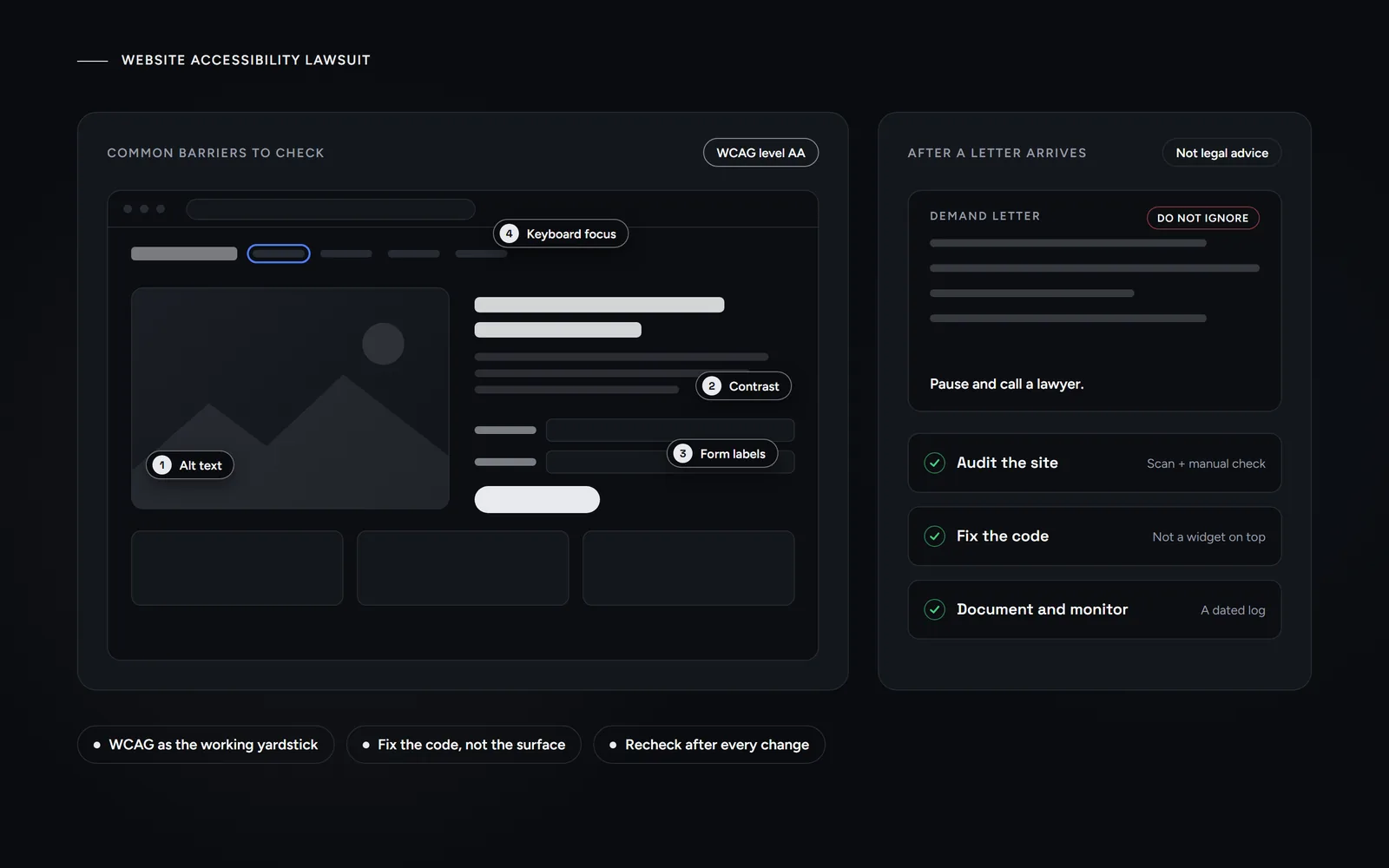
Short answer: a website accessibility lawsuit claims your site blocks people with disabilities, usually under Title III of the ADA. New York sees more of these cases than any other state, according to UsableNet. The most common barriers are fixable code issues, such as missing alt text, low contrast and unlabeled forms. Fix the code, document it and talk to a lawyer.
If you run a restaurant, shop, clinic or contracting business in New York, you may have heard about a website accessibility lawsuit from another owner. Or you may be holding a letter right now. Morneto is a web design, SEO and Google Ads studio in New York, and this guide sorts the data from the noise. We read the main trackers on Oct 31, 2026, and we quote each one by name. We also set one rule for ourselves: this post names no plaintiffs and no law firms. Everything below is general information, not legal advice. For your own case, talk to a lawyer licensed in New York.
Why is New York the top state for a website accessibility lawsuit?
According to UsableNet’s 2025 year-end report, 5,114 digital accessibility lawsuits were filed in 2025. Of those, 3,195 went to federal courts and 1,919 to state courts in New York and California. The report says New York leads the nation across both federal and state courts. Its 2026 midyear report goes further. It projects more than 6,000 filings in 2026, with New York still first and Illinois now second.
A second tracker counts differently. Seyfarth Shaw, a law firm that follows ADA Title III cases, counts only one kind of website accessibility lawsuit: website cases in federal court. According to its March 2026 post, plaintiffs filed 3,117 of them in 2025, a 27% increase from 2024. New York federal courts were the busiest, with 1,021 cases, while Florida followed with 961. Seyfarth also notes that New York federal judges have become more demanding about what a plaintiff must allege to have standing. As a result, many plaintiffs now file in New York and New Jersey state courts instead. So, in our reading, a federal count alone understates the New York picture.
| Tracker | What it counts | Headline figure | New York |
|---|---|---|---|
| UsableNet, 2025 year-end report | Websites, apps and video, in federal courts plus New York and California state courts | 5,114 lawsuits in 2025 | Leads in federal and state courts |
| Seyfarth Shaw, ADA Title III blog | Website cases in federal court only | 3,117 lawsuits in 2025 | 1,021 federal cases, the most of any state |
| UsableNet, 2026 midyear report | A projection for the full year | More than 6,000 in 2026 | Still first, with Illinois second |
The totals differ because the methods differ, not because one tracker is wrong. So read every single number as a partial view, and check what it counts before you repeat it.
Which businesses do these New York cases reach?
Two reasons stand out in the reports. First, UsableNet says a company can face a case in New York without being based there. According to the report, courts accept cases against businesses whose websites New York residents can use, even without a physical presence in the state. Second, the state courts add a large stream of cases on top of the federal ones.
Small businesses are not off the hook either. UsableNet reports that companies with less than $25 million in annual revenue accounted for 64% of cases in 2025. By industry, eCommerce made up 70% and food service 21%. That puts many New York shops and restaurants right inside the group that a website accessibility lawsuit tends to reach.
What do plaintiffs point at on a small-business website?
According to Seyfarth, a website accessibility lawsuit alleges that a person with a disability could not use a site. Often the site was not built to work with assistive technology, such as a screen reader. The usual yardstick is the Web Content Accessibility Guidelines (WCAG) from the W3C, the web standards body. The current version is WCAG 2.2, and most audits test against level AA. In practice, the same issues show up again and again. In WebAIM’s February 2026 scan of the top 1,000,000 home pages, 95.9% had detected WCAG 2 failures. These were the most common:
- Low contrast text (83.9% of home pages). Think light gray text on a light background.
- Missing alt text (53.1%). Images, logos and buttons have no text alternative, so a screen reader has nothing useful to say.
- Missing form labels (51%). A booking or contact form has fields that a screen reader cannot name.
- Empty links (46.3%) and empty buttons (30.6%). Icons without text, such as a cart icon, leave the visitor guessing.
- Missing document language (13.5%). The page never says it is in English, so a screen reader may pick the wrong voice.
WebAIM’s scan cannot see everything, though. For example, ada.gov lists mouse-only navigation as a barrier, because people who cannot use a mouse need to reach every link and button with a keyboard. Restaurants have one more classic weak spot. A scanned PDF menu is just a picture to a screen reader, and it is one more reason why a menu belongs on a web page instead of a PDF.
What matters most is the task, not the whole site. ada.gov’s own example is an event registration form that a visitor cannot complete. Therefore, start your checks where money or bookings change hands.
What does the ADA actually say about websites?
Title III of the Americans with Disabilities Act (ADA) covers businesses that are open to the public. ada.gov lists retail stores, hospitals and medical offices, and food and drink establishments among them. Since 1996, the Department of Justice (DOJ) has taken the position that the ADA applies to web content. Its guidance on web accessibility and the ADA, dated March 18, 2022, is the clearest plain-language source.
Here is the part that surprises most owners. The DOJ does not have a regulation setting out detailed technical standards for business websites. Instead, businesses have flexibility in how they make their sites accessible. Still, they must make sure that the goods and services they offer online are accessible. The guidance points to WCAG and the federal Section 508 Standards as helpful technical guides. The page also says its guidance has no legally binding effect. That is one more reason to get legal advice on a real website accessibility lawsuit.
What about the new federal rule you may have read about? In April 2024, the DOJ published a rule that requires WCAG 2.1 level AA. However, it covers state and local governments under Title II, not private businesses. On April 20, 2026, an interim final rule then moved its compliance dates. Governments serving 50,000 or more people now have until April 26, 2027, and smaller ones until April 26, 2028.
In short, a New York restaurant or clinic faces no new federal website rule in 2026. The old picture stands: a broad duty, no detailed federal standard for businesses, and WCAG as the working yardstick.
Can an accessibility overlay stop a website accessibility lawsuit?
An overlay is a script, often sold as a widget, that adds a toolbar to your site and promises automatic fixes. It is tempting, because it costs little and installs in minutes. However, the evidence points the other way. According to UsableNet, lawsuits against companies already using widgets ran between 95 and 155 a month in 2025. The same report says widgets typically do not fix the underlying code and may interfere with screen readers.
Regulators have stepped in too. On April 22, 2025, the Federal Trade Commission (FTC) approved a final order requiring accessiBe to pay $1 million. According to the FTC, the company claimed that its accessWidget plug-in could make any website compliant with WCAG. The order now bars accessiBe from claiming that its automated products can make any website WCAG-compliant, unless it has the evidence to support such claims.
ada.gov is more measured. It says automated checkers and overlays can be helpful tools, but owners need to use them carefully. It adds that a clean report does not necessarily mean everything is accessible. Put simply, an overlay alone is not a fix. A widget on top does not change the code underneath.
What should a small business check before launch?
Good news first: most issues behind a website accessibility lawsuit are cheap to prevent, and you can fix most of them after the fact. Use this list on a new build or on the site you have now. It follows the practices ada.gov lists, matched to the failures WebAIM finds most often:
- Alt text. Every meaningful image gets a short, descriptive text alternative, while purely decorative images get an empty one. It is also a step in our technical SEO checklist, since search engines read alt text as well.
- Contrast. Normal text needs a contrast ratio of at least 4.5:1 against its background under WCAG level AA. Also, never use color alone to mark a required field.
- Form labels and errors. Every field has a label that a screen reader can announce. When something goes wrong, the error says what happened and how to fix it.
- Keyboard access. Tab through the menu, the booking flow and the checkout. You should always see where you are, and nothing should trap you.
- Headings and language. Use real headings in a logical order, and set the page language in the code.
- Captions and zoom. Videos get accurate captions. Text should still work when a visitor zooms to 200%.
- A way to report problems. Add a short line with an email address where visitors can report a barrier. ada.gov lists this practice too.
How should you test the checklist?
Test it twice. First run a free automated checker, and then do a manual pass with a keyboard and a screen reader, such as the one built into your phone. ada.gov says that pairing a manual check with automated checkers gives a better sense of how accessible a site is. A one-time scan is not enough either, because sites change after every update.
On a new build, the cheapest moment is before launch, while the pages still sit on a staging link. That is how our web development agency in New York runs every project anyway: you review working pages on a staging link rather than static mockups. So you can tab through the real booking form before a single customer sees it.
What should you do after a website accessibility lawsuit or demand letter?
First, do not ignore it. A demand letter typically asks for money and for changes to the site, while a filed complaint comes with court deadlines. Either way, deadlines keep running, and the issues stay. Then take four steps:
- Pause and call a lawyer. Before you reply, pay or post anything about it. Choose a lawyer who handles ADA Title III cases in New York.
- Audit the site. Pair an automated scan with a manual check. Keep every report with its date.
- Fix the code. Alt text, contrast, form labels and keyboard access come first. Start with the pages named in the letter, then booking and checkout.
- Document and monitor. Keep a dated log, then recheck after every change. A redesign or a new page can bring an old issue back.
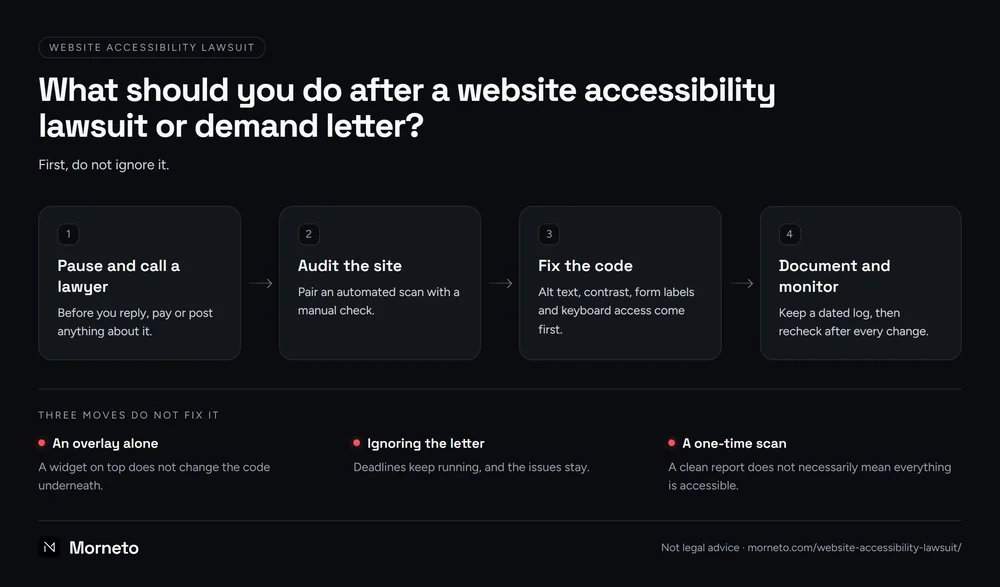
Notice what is missing from that list of website accessibility lawsuit steps. Three moves do not fix it: an overlay alone, ignoring the letter and a one-time scan. UsableNet found that 1,427 lawsuits in 2025 targeted companies that had already been sued, 45% of all federal filings. In other words, being sued once does not protect a business from the next claim.
Your lawyer decides the legal strategy. Meanwhile, your web team’s job is the evidence: an honest audit, real fixes and a record of both. Sites drift after updates, which is the same reason a monthly website maintenance plan exists in the first place. If you want a developer to make code changes like these, our published rate for work beyond a care plan is $150 an hour, quoted first when a job runs longer. Or, if you would rather start with a conversation, tell us what is not working on your website, and we reply within one working day.
Common questions about a website accessibility lawsuit
Can you get sued for not having an accessible website?
Yes. Businesses open to the public can face a website accessibility lawsuit under Title III of the ADA, and New York sees more of these cases than any other state, according to UsableNet. UsableNet adds that you do not need to be based in New York to face a case there.
Do small business websites need to be ADA compliant?
The DOJ says the ADA applies to the goods and services that businesses open to the public offer online. There is no detailed federal technical standard for private businesses, so WCAG level AA is the practical yardstick.
How can you tell if a website is accessible?
Run a free automated checker first. Then test by hand: tab through every page with a keyboard, try a screen reader and zoom to 200%. Automated tools catch only part of the issues, so a clean report alone proves little.
How much does it cost to make a website ADA compliant?
There is no fixed price, because it depends on how many templates, forms and issues a site has. A small site with a few templates is usually a far smaller job than a store with hundreds of products. Get a written quote after an audit, and be wary of any tool that promises full compliance for a flat fee.
Are there new ADA website requirements in 2026?
Not for private businesses. The DOJ rule from 2024 requires WCAG 2.1 level AA from state and local governments. In April 2026, its compliance dates moved to April 2027 and April 2028.