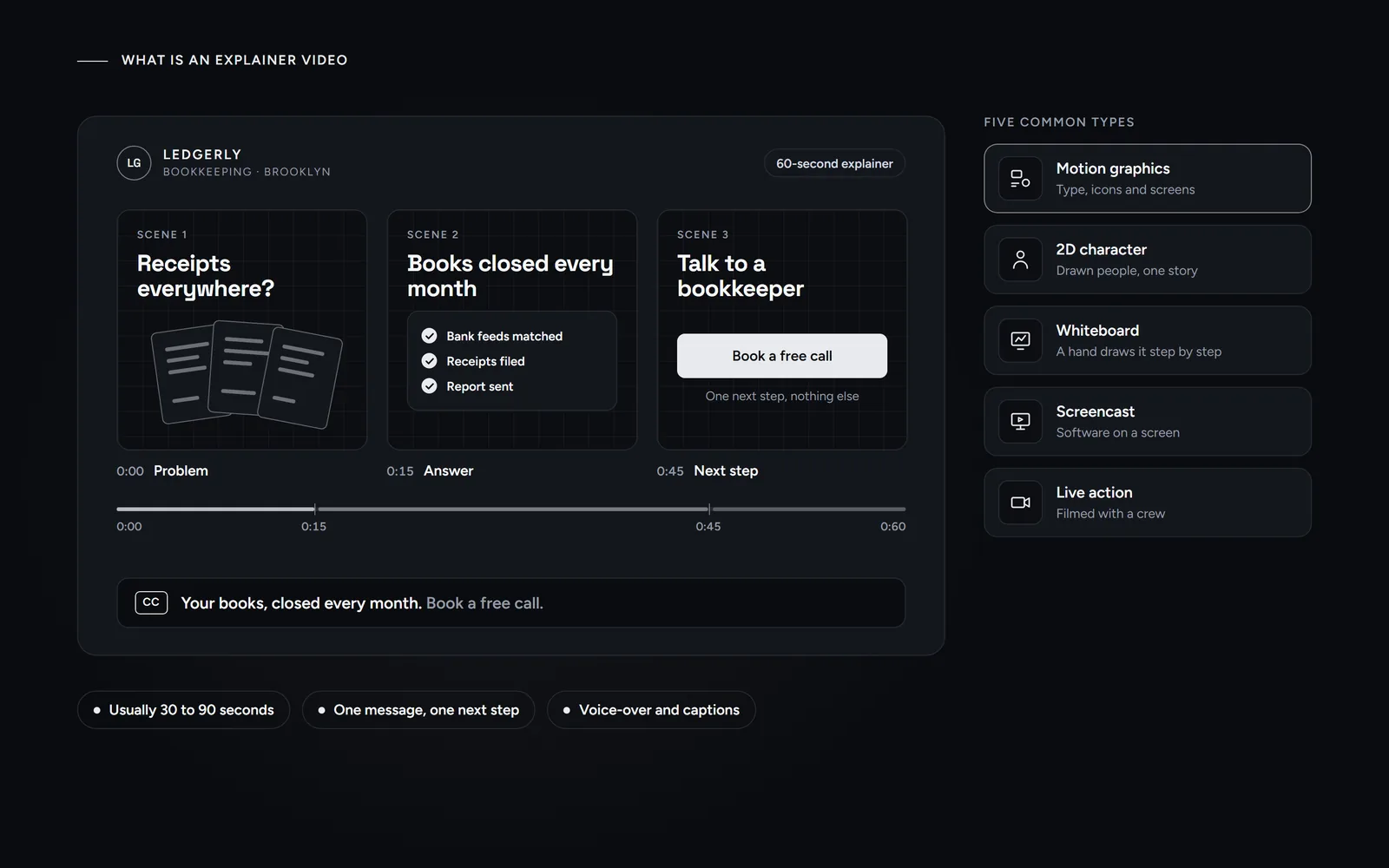
Short answer: an explainer video is a short video, usually 30 to 90 seconds long, that explains one product, service or idea and ends with one next step. Most explainer videos are animated, with motion graphics, illustration or whiteboard drawing and a voice-over, so nothing has to be filmed. Businesses use them on websites, in ads and in sales emails.
If a 60-second animation ever showed you how an app works before you signed up, you have seen an explainer video. This guide covers what one is, the common types, the right length and how a studio makes one in your own brand style. We make these videos ourselves and run four on our own website, so the examples come from real projects.
What is an explainer video?
An explainer video answers the question a customer has before they buy: what is this, and why should I care? It does that in three moves. First, it names a problem the viewer recognizes. Then it shows the answer, usually your product or service. Finally, it asks for one next step, such as booking a call.
A few traits set an explainer video apart from other business videos:
- It is short. Most run 30 to 90 seconds.
- It has one message. One video covers one problem and one answer.
- It is scripted. Every word is written and approved before any animation starts.
- It is usually animated. A voice-over tells the story while graphics show it.
- It should have captions. According to the W3C’s guidance on captions, they are a text version of the speech and other sounds, so the video also works on mute.
What are the different types of explainer videos?
Five types cover almost every explainer video you will see. They differ in how they look, what they cost and what they suit:
| Type | What you see | Best for |
|---|---|---|
| Motion graphics | Animated type, shapes, icons and screens | Services, software, pricing and processes |
| 2D character animation | Drawn people acting out a short story | Consumer products where emotion matters |
| Whiteboard | A hand drawing the story step by step | Training and complex ideas |
| Screencast | A recording of software on a screen | Showing how an app or tool works |
| Live action | Real people, filmed by a crew | Teams, places and physical products |
Explainer videos also differ from two close cousins. A promo video sells a mood or an offer, often in 15 to 30 seconds, without showing how anything works. A product demo walks through features one by one, usually for people who already plan to buy. An explainer sits in between, since it explains just enough to earn the next step.
Morneto makes motion graphics only, with no filming. For a small business, that style is usually the easiest to match to an existing brand, because it builds on the colors, type and screens you already have.
How long should an explainer video be?
For a first explainer, 60 seconds is a sensible limit. That is long enough for one problem, one answer and one next step. Our own videos run from 39 to 81 seconds: a 39-second showreel, a 49-second service video, a 51-second explainer and an 81-second company story.
Where the video will play matters, too. Google Business Profile, for example, accepts videos of up to 30 seconds, according to Google’s Business Profile photo and video guidelines. So if you want the video on your profile as well, plan a 30-second cutdown from the start.
Length also changes the price. Our guide on what an explainer video costs shows how studios price every extra 30 seconds.
How is an animated explainer video made?
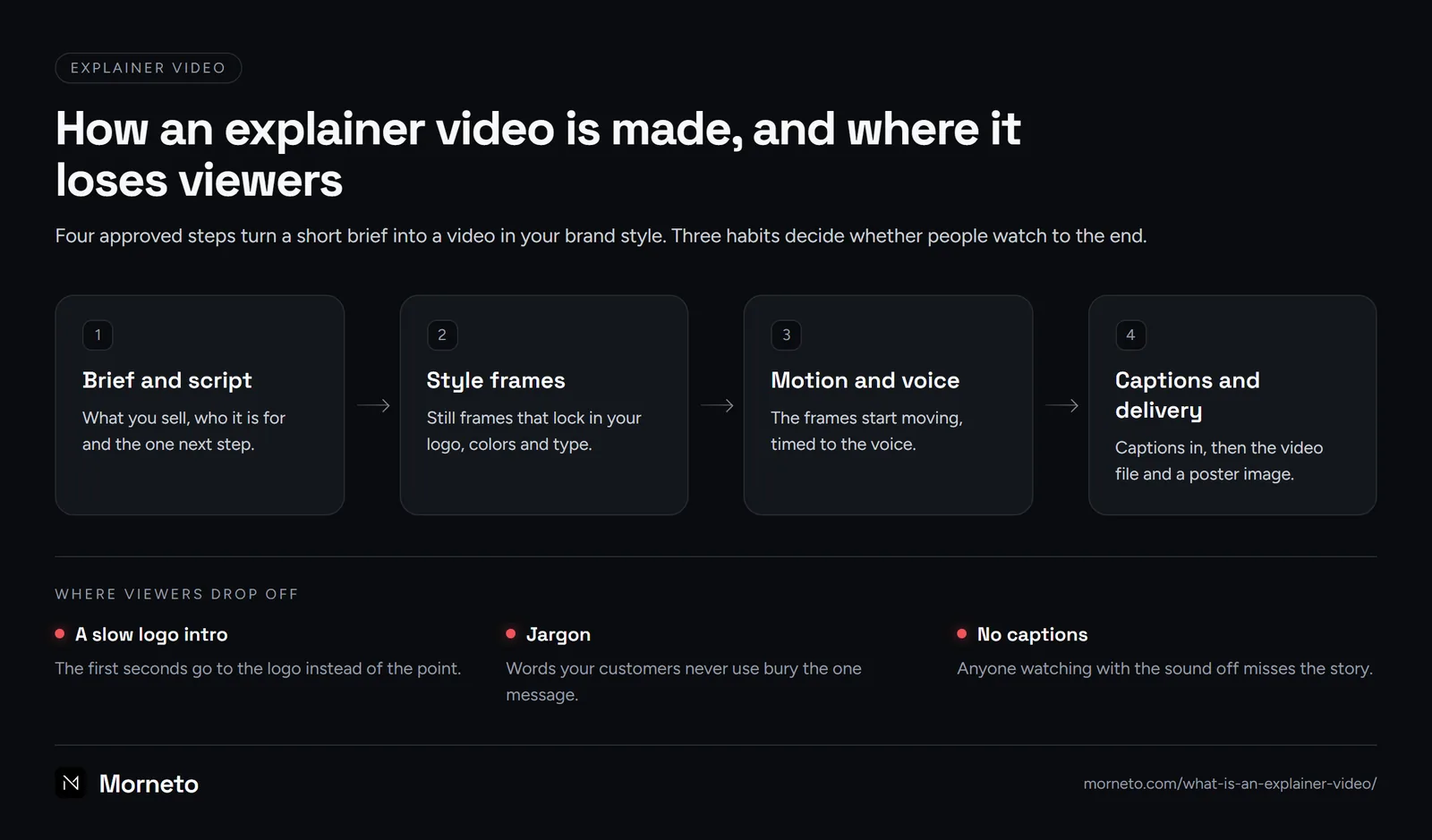
A typical process has four steps, with an approval after each one:
- Brief and script. A short note on what you sell, who the video is for and the one next step, then the voice-over text, approved before any design starts.
- Style frames. A few still frames in your colors and type, approved before animation starts. Some studios show a storyboard at this point instead.
- Motion and voice. The frames start moving, timed to the recorded voice-over.
- Captions and delivery. Captions go in, and you receive the final video file. At Morneto, captions are always burned in, and a poster image comes with the file.
For example, our 51-second explainer shows how an app project starts and how it is priced, in the same colors and type as our website.
That is also how our animated explainer video production in New York works. The approvals keep surprises out of the final video, because you sign off on the words and the look before anything moves.
How do you make it match your brand?
An explainer video should look like the rest of your business. That comes from the style frames, which lock in your logo, colors, type and the look of your screens and icons before any animation starts.
So if your brand is still unclear, fix that first. A logo and a few rules for type and color make every frame easier to design. Our branding agency in New York can do both, and our guide to the seven types of logos helps you choose a mark.
Three habits also keep a video clear and on brand. First, open with the point, since a slow logo intro gives viewers a reason to scroll on. Next, use your customers’ words instead of jargon. Finally, set the captions in your brand type, so the video still reads with the sound off.
Where should you use one?
An explainer video works best where people decide whether to contact you:
- Your homepage or a service page, near the top, with a poster image.
- Ads and social posts, usually as a shorter cutdown.
- Sales emails and proposals, as a link to the page that hosts the video.
- Your Google Business Profile, as a version of 30 seconds or less.
On your website, two details help. Google’s video best practices ask for a valid thumbnail at a stable URL and a standard HTML element, such as video. In addition, a video that loads only on play keeps the page fast, as our guide on how to make your website faster explains.
Ready to plan one? Send us a few lines on what you sell and who the video is for, and we will reply with a written scope and a fixed price.
Common questions
What is the purpose of an explainer video?
To answer one question before a customer contacts you or buys: what is this, and why does it matter to me? A good one ends with one clear next step, such as booking a call.
What is the difference between an explainer video and an animated video?
Animated video is the technique: moving drawings, shapes or type instead of filmed footage. An explainer video is the purpose, which is explaining one thing. Most explainer videos are animated, but not every animated video explains something.
Can AI create an explainer video?
AI tools can draft a script, generate a voice and fill templates. Still, someone has to choose the one message, match your brand and check every claim. AI-generated packages we read started at about $500.
How much does an explainer video cost?
Prices published on October 4, 2026 ran from about $500 for AI packages to $3,500 to $7,500 at mid-market studios, for 60 seconds. At Morneto, videos of up to 60 seconds start from $250.
Do I need a script before I contact a studio?
No. A few lines on what you sell, who the video is for and what viewers should do next are enough. The studio writes the script from that, and you approve it before design starts.