Short answer: Ask every customer right after the job, using the review link or QR code Google provides under Read reviews, then Get more reviews. Reply to every review and keep asking every month. Never offer anything in return, never ask only the customers you think are happy, and never pressure anyone on site.
Last updated September 29, 2026. Review rules below come from Google's own policy and help pages, checked that day.
If you want to get more Google reviews, start with your own asking habit rather than your customers. The goal is a system that asks everyone consistently, at a good moment, in a way Google allows. This guide covers the owner’s side of that system. That means the link, the timing, the wording, the staff rules, the replies, and what gets a profile restricted.
Why should a small business get more Google reviews?
Because Google says the number of reviews you have feeds prominence. Google adds that more reviews and positive ratings can help your local ranking. Put simply, prominence is your standing in Google’s eyes. A steady review routine can add to it.
At the same time, Google says you cannot pay for or request a better local ranking. So reviews have to be earned, one customer at a time. They also show next to your Business Profile in Maps and Search, where potential customers see them before calling. Where word of mouth is strong, as it is for home-service businesses on Staten Island, reviews are how a neighbor’s recommendation checks out.
Reviews are not the whole story, though. Our breakdown of how the New York map pack chooses its three businesses shows where reviews fit.
How do you get your Google review link or QR code?
Open your Business Profile, choose Read reviews, then Get more reviews. From there you can copy the link or save the QR code as an image. Google officially lets businesses share either one to ask for reviews, as its help page on getting customer reviews explains.
Google says review QR codes can currently be generated only in a computer browser. Make the code once, save the image and reuse it. Also, only people signed into a Google Account can leave a review. So test the link from a signed-in phone and a signed-out one to see exactly what a customer sees.
Then put the Google review link wherever the moment of asking already happens:
- Texts and email. Google names email, WhatsApp and Facebook as ways to send a request. Sending the same link in a plain text message after the job is a practical option too.
- Invoices, receipts and counters. Add the link to your invoice template, or print the QR code on receipts and a small counter card.
To get more Google reviews from the customers you already have, keep the path to the review box short. Don’t send a Maps search link instead of the review link; it leaves customers hunting for the review button. While the profile is open, check that your hours, services and photos match what customers actually get. For the other settings, our Google Business Profile optimization guide for New York businesses walks through each one. When you have a finished job or new service to show, a short post on the profile can point people to it.
When and how should you ask customers for a Google review?
Ask when the customer can see the result, and ask every customer, not a hand-picked few. Keep the request short, include the direct link, and never tell people what to write.
The hard part of how to ask customers for Google reviews is asking every time, not finding the words. So tie the request to an event in your workflow. A job marked complete or an invoice paid should trigger it, rather than your read of the customer’s mood. That way everyone gets the same request, and nobody on staff decides who deserves one.
The right moment depends on the trade:
- Contractors and home services. Ask at the handover, during the final walkthrough, and text the link that evening. Reviews are one piece, and our contractor SEO guide for New York covers the rest.
- Restaurants and shops. Checkout is the moment: a QR code on the receipt or a table card, then let people leave. Standing over someone until they post starts to look like the on-premises pressure Google rules out. For Greenwich Village restaurants and shops, recent reviews, photos and current hours are the deciding signals.
- Appointment businesses. Salons, clinics and dental offices can send one email the same day. Keep it generic and leave the treatment out, because the request itself shouldn’t reveal anything private.
A request that works by text or email can be this short. “Hi Dana, thanks for having us fix your kitchen faucet today. If you have a minute, we’d value an honest Google review of your experience: [link].” It names the job, asks for honesty, and puts the review one tap away.
Just as important is what the message leaves out:
- No star rating. Skip lines like “a 5-star review would mean a lot,” because that asks for a sentiment, not a review.
- No conditional opener. Phrases like “if you loved your visit” quietly limit the ask to happy customers.
- No suggested wording. Don’t propose keywords, services, neighborhoods or staff names. Google doesn’t let businesses dictate review content, and staff may not ask for reviews that name them.
Finally, make it easy: one message, one link, nothing to decode. If a customer says they don’t know how, send our plain-language walkthrough of leaving a Google review. It covers posting without a Gmail address too. One polite reminder a few days later is reasonable; after that, let it go.
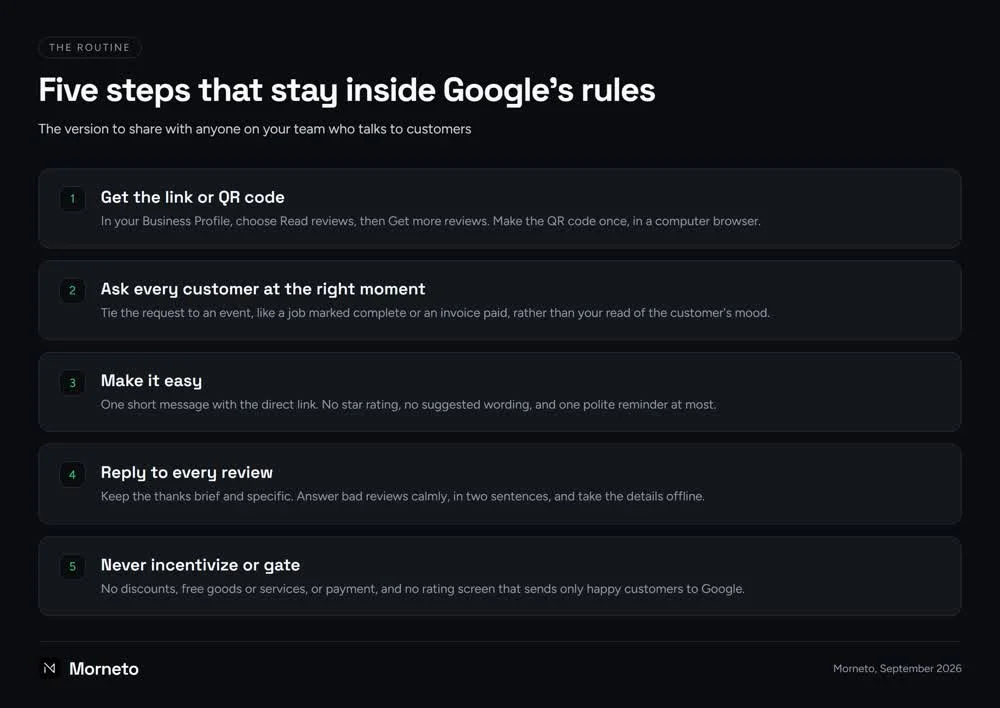
Put together, the routine has five steps, and every one stays inside Google’s rules. Get the link or QR code, ask every customer at the right moment, and make it easy. Then reply to every review, and never incentivize or gate. The chart below is the version to share with anyone on your team who talks to customers.
What is review gating, and what else does Google prohibit?
Review gating means asking only the customers you expect to be happy, or steering unhappy ones away from Google. Google bans it as rating manipulation, and the same policy prohibits incentives, on-premises pressure, conflict-of-interest reviews and staff quotas.
In plain language, here is what Google’s prohibited and restricted content policy rules out:
- No gating. Discouraging negative reviews or asking only happy customers both fall under this ban. Watch for rating screens that send high scores to Google and low scores to a private form.
- No incentives of any kind. Discounts, free goods or services, and payment are all out. That applies to posting a review, changing one or removing a negative one. Google’s Business Profile help calls review incentives fake engagement that is strictly prohibited.
- No pressure on the premises. Asking in person is not the problem. What Google rules out is requiring a review, or pressuring customers to write one, while they are on site.
- No staff quotas. A monthly review target per employee is exactly the kind of quota the policy forbids.
- No conflict-of-interest reviews. Google says these may include current or former employment, a contractual or consulting relationship, industry competitors or family relationships. So keep your team, your vendors and your relatives out of it.
- No fake or paid reviews. Paid reviews, directly or in kind, count as fake engagement. So does content posted from multiple accounts by one person, or at one person’s request.
For your own team, put these rules in writing and share them with everyone who meets customers. Every customer gets the same request, and nobody asks for a review that names them. Nobody is measured on review counts, and nobody on the team reviews the business.
How does Google enforce these rules?
For fake engagement violations, Google can block new reviews for a set period and unpublish existing reviews. It can also show a public warning that fake reviews were removed. Google says it emails owners first, and they can appeal. The public warning is the part we’d worry about most, because future customers can see it.
Google describes a separate measure too. An April 16, 2026 Google post said it pauses new reviews when a profile gets a spike in spam reviews. In that case, it also shows a notification banner. The same post said Google blocked or removed over 292 million policy-violating reviews in 2025.
Where does the FTC rule fit in?
The FTC’s Consumer Reviews and Testimonials Rule took effect on October 21, 2024. It bans fake reviews, including AI-generated ones, and incentives conditioned on a particular sentiment. It also bans suppressing reviews through groundless legal threats, intimidation or false public accusations. The FTC can seek civil penalties against knowing violators.
On incentives and gating, Google’s policy goes further than the FTC rule. The FTC rule doesn’t ban incentives without a sentiment requirement, but Google bans all review incentives. On gating, the FTC says its rule has no specific ban, though the practice could violate the FTC Act.
So build your routine on Google’s rules, and keep the FTC’s bans on fake reviews and review suppression in mind. Check anything unusual with your own counsel.
Should you reply to every Google review, even the negative ones?
Yes. Google frames replying as a way to show customers you value them and to help you stand out. Still, it doesn’t call replies a ranking factor. Treat every reply as customer service that happens in public.
A few mechanics shape how to respond to Google reviews. Only verified businesses can reply. Google checks each reply before it posts, usually within 10 minutes but sometimes up to 30 days. Replies show under your business name, and the reviewer is notified and can still change their review.
For good reviews, keep the thanks brief and specific, and sign with a first name. Also, don’t paste one line under every review or stuff service names into replies; it reads like an ad.
For bad reviews, answer calmly, in two sentences, and take the details offline. For example: “Thanks for taking the time to write this, and I’m sorry to read it. Please call or email me directly so I can look into it.” No argument, no account details and no blame in public.
Fixing the problem privately is worth doing. The FTC’s guidance says its rule doesn’t prohibit contacting customers who posted negative reviews to resolve their issues. However, never make a refund or discount conditional on changing the review, because Google treats that as an incentive.
If privacy rules cover your work, keep replies general. Mentioning a treatment, an appointment or a visit can reveal that the reviewer is a patient or client. For one regulated field, our search marketing guide for dental offices shows how that works. Before your team uses any reply template, have your compliance advisor or counsel check it.
Last, report only reviews that break the policy, such as spam or a competitor’s review, not ones you disagree with. Google says it doesn’t get involved in conflicts between businesses and customers. Evaluations typically take several days, status shows in the Reviews Management Tool, and there is a one-time appeal.
How do you know whether your review count is keeping up?
Google doesn’t name a review count that wins, so the useful comparison is with the businesses your customers actually see. Our guide to Google Maps SEO across the five boroughs covers how to size up that competition.
Meanwhile, track three numbers of your own each month: requests sent, reviews received and replies posted. If requests are steady and reviews aren’t arriving, look at timing and friction first. If requests have quietly stopped, restart them.
If you’re wondering how to get more Google reviews fast, here is our honest answer. The quick methods are mostly the prohibited ones listed above. A steady monthly flow from real customers is slower, but there is nothing in it you’d ever need to undo.
Can review software or an agency help you get more Google reviews legitimately?
It can, as long as it automates the same neutral request to every customer. It can’t if it scores customers first and sends only the happy ones to Google. That is the gating Google’s policy prohibits.
Software can handle the boring part: the request after every job, one reminder and a log of who was asked. Before you pay for any tool, check these points in the demo:
- Same message for everyone. Every customer should get the same request and link, with no rating screen in front of it.
- Editable wording. You should be able to remove star-rating language and any line that tells customers what to write.
- No contests or rewards. Drawings, points and discounts tied to reviews are incentives, whatever the vendor calls them.
- No posting on your behalf. A service that writes or posts reviews from its own accounts is selling fake engagement.
Any agency you hire should run the same routine in the open, not a secret one. Be wary of anyone promising a review count or a ranking. Nobody controls what customers write, and Google says a better local ranking can’t be paid for or requested.
The review work in our local search plan for New York businesses follows that routine. Requests go out on a schedule, every review gets a reply, and the words are always the customer’s own. Our Business Profile was verified on September 16, 2026. The rules in this guide apply to it exactly as they apply to yours.
In our view, owners who get more Google reviews over a year have no trick; they never stop asking. If you’d rather hand the routine off, our SEO and marketing plan starts at $799 per month. It runs month to month with 30 days notice.
Common questions about getting more Google reviews
Can I offer a discount for a Google review?
No. Google’s policy treats any incentive for a review as a violation, including discounts, free goods or services and payment. The FTC rule is narrower and targets incentives tied to a particular sentiment, but your profile answers to Google’s broader ban.
Can I ask customers to mention a specific service?
We’d advise against it. Google doesn’t let businesses dictate review content, and it rules out staff asking for reviews that name them. Ask for an honest review of their experience, and let each customer decide what to write.
Can employees review the business?
They shouldn’t. Google prohibits conflict-of-interest content, which it says may include current or former employment, contractual relationships, competitors and family. If staff want to help, they can hand customers the QR code card instead of writing reviews themselves.
Can I create the Google review QR code on my phone?
Not at the moment. Google says review QR codes can currently be generated only in a computer browser. Make the code once on a laptop or desktop, save the image, and reuse it on receipts, counter cards and thank-you emails.
Can I ask for reviews in person?
Yes. Google’s policy targets requiring or pressuring customers to review while they are on the premises, not asking them. Mention it at checkout, hand over a card with the QR code, and let the customer decide later, on their own phone and time.