Short answer: website redesign SEO is the work of protecting the Google traffic you already have while the site changes around it. Record what ranks and keep URLs where you can. Give every moved page a 301 redirect to its closest new page, and let pages you drop return 404 or 410. Then submit the new sitemap and watch Search Console. Google says temporary ranking fluctuation during a move is normal.
Last updated September 14, 2026. Every rule quoted here comes from Google’s own documentation.
A redesign can put traffic that a working website has already earned at risk. When page addresses change, rankings may fluctuate while Google recrawls and reindexes the site. That risk is real, but it is not mysterious. Google says careful planning can minimize problems. This guide walks through that planning in the order you will meet it. Still deciding whether to redesign at all? Start with whether you need a new website or better SEO, because a rebuild is not always the right fix.
Does changing your website affect SEO?
It can, but a redesign is not one change. It is a bundle of changes, and each one carries a different level of risk. New colors and fonts on the same URLs, with the same words, sit at the low-risk end. Moving a page that brings in calls every week sits at the other end. These are the changes that decide what happens to your traffic:
- A new domain. Every address changes at once, so Google has to move all of your signals to the new one.
- New page addresses. A moved page whose old URL shows an error instead of redirecting loses the visitors and links that pointed to it.
- Removed or merged content. A page cannot keep ranking for a question once the answer is gone.
- New titles, headings and menus. Rewriting them changes the words and links Google reads on every page.
- A new platform. Switching content management systems can change URLs, templates and settings together.
Google’s guide to site moves with URL changes recommends changing only one thing at a time. Its example is a new domain, a new content management system and a new layout. Google advises doing them one after another, not all together.
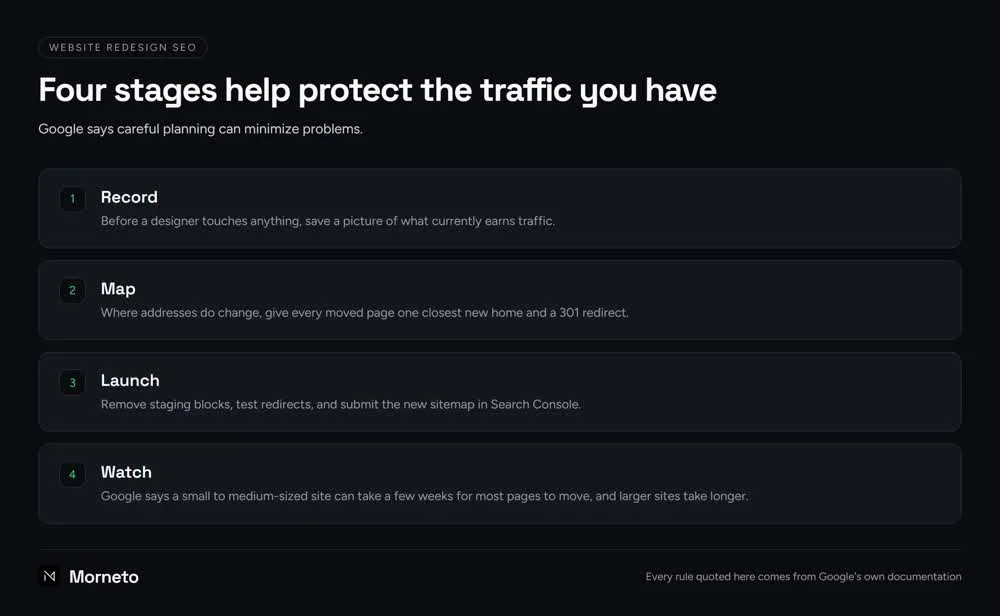
Four stages help protect the traffic you have: record, map, launch and watch. Good website redesign SEO simply runs them in that order, and so does the rest of this guide.
Website redesign SEO, step 1: what should you record before anything changes?
Before a designer touches anything, save a picture of what currently earns traffic. You cannot protect pages you never listed, and after launch the old titles, headings and URL list are much harder to rebuild.
- Your top pages. In the Search Console Performance report, export pages and queries for the last twelve months. These are the URLs that must survive.
- Every URL on the site. Pull the list from your sitemap and your content management system. Include images and PDF files that people download.
- Your most-linked pages. The Links report in Search Console shows which pages other sites point to, and those links are worth keeping.
- Titles, descriptions and headings. Copy them for each page that brings in traffic, so the new versions can keep the wording that already ranks.
Our free SEO audit is one way to get a second look at your site before a redesign, and you keep it either way.
Website redesign SEO, step 2: how do you map old URLs to new ones?
The simplest URL change is no change. When a page keeps its address, there is nothing to redirect and nothing for Google to move, even if the design around it is completely new. So keep existing URLs wherever the new structure allows.
Where addresses do change, give every moved page one closest new home and a 301 redirect. A spreadsheet with two columns, old URL and new URL, does the job. Then apply three rules:
- One old page, one closest match. Each moved URL points to the new page that answers the same question, not to whichever page happens to exist.
- Merged pages go to the merged page. When three thin pages become one strong page, all three can redirect to it, and Google explicitly allows that.
- Gone means gone. A page you drop on purpose, with no replacement, should return a 404 or 410 error instead of a redirect.
The shortcut to avoid is sending every old URL to the homepage. Google warns that redirecting many old URLs to one irrelevant page, such as the home page, can confuse users and might be treated as a soft 404 error.
Finally, update the links inside your own site so they point straight at the new URLs. Google notes that redirects are slow for users, so your menus and in-text links should not depend on them. Our guide to how internal links tell Google which pages matter explains the role those links play.
Should you use a 301 or a 302 redirect?
Use a 301 for anything permanent, and the URL changes in a redesign are meant to be permanent. Visitors generally cannot tell the two apart, but Google Search treats them differently.
- 301 or 308: permanent. Googlebot follows the redirect, and Google uses it as a signal that the new URL should be the one shown in search results.
- 302, 303 or 307: temporary. Googlebot still follows it, but Google does not use it as that signal, so the old URL can stay in search results.
So is a 302 bad for SEO? Not in itself. According to Google’s documentation on redirects, a temporary redirect fits cases such as a service that is briefly unavailable. That way the original URL can keep its place in search results. It is simply the wrong tool for a page that has moved for good.
Three more points from Google keep redirects clean:
- Redirect straight to the final page. Googlebot can follow up to 10 hops in a chain, but Google advises redirecting to the final page directly. If that is not possible, it suggests ideally no more than 3 hops.
- Keep redirects as long as possible. Google says generally at least a year. That gives it time to transfer signals, including links on other sites that still point to the old addresses.
- Link credit carries over. Google states that 301 and other permanent redirects do not cause a loss in PageRank.
On a standard WordPress site, you can set redirects with a redirect plugin or with rules on the server, such as an .htaccess file on Apache. Whichever route you pick, test a handful by hand before launch.
Website redesign SEO, step 3: what should you check on launch day?
Launch-day oversights matter because they can affect every page at once. Remove staging blocks, test redirects, and submit the new sitemap in Search Console. For a small or medium site, Google recommends moving all URLs at the same time rather than in sections. It also suggests launching during a quieter period if your traffic has one.
- Staging blocks removed. If the site was hidden during development with a noindex rule or a robots.txt block, remove both the moment it goes live.
- Redirects tested. Check the top pages from step 1 one by one. The URL Inspection tool in Search Console handles single URLs, and a crawler handles the full list.
- Canonical tags updated. Each new page should carry a canonical tag that points to itself, not to its old address.
- New sitemap submitted. Submitting it in Search Console helps Google learn the new addresses. On WordPress, a sitemap is likely available already.
- Search Console still verified. If you verified with an HTML file or a meta tag, make sure the new site still includes it.
Unless your domain or subdomain changes, you do not need the Change of Address tool. Google says it is for moves from one domain or subdomain to another, not for HTTPS switches, www changes or pages moving within the same domain. For the checks that come after the redirects, such as indexing and speed, our technical SEO checklist in dependency order covers the rest.
How long does it take Google to catch up after a redesign?
Google says a small to medium-sized site can take a few weeks for most pages to move, and larger sites take longer. The pace depends mainly on how many URLs you have and how fast your server responds.
Google’s documentation calls temporary ranking fluctuation during a move normal and says rankings settle down over time. A move is not complete until Googlebot has visited every old and new URL at least once.
Requesting indexing for the same URL again and again will not speed things up. Google notes that crawling can take anywhere from a few days to a few weeks, and that repeat requests do not get a URL crawled any faster. Watch these three reports in Search Console instead:
- Sitemaps. If you submit both sitemaps, the new one starts with zero indexed pages and climbs as the old one drops toward zero. Warnings that the old URLs redirect are normal.
- Page indexing. An unusually high number of Not found errors can point to redirects aimed at pages that do not exist.
- Performance. Compare clicks per page for the weeks before and after launch. As more new URLs get indexed and start ranking, Google says they should start getting impressions and clicks.
When a page that brought in steady clicks is still missing after several weeks, check its redirect first. If the redirects are fine and traffic still slides, the cause may lie elsewhere. Google’s guide to debugging traffic drops also covers algorithm updates, security or spam issues, site-wide technical issues and seasonal shifts in interest. For ongoing help with search, our SEO and marketing support in New York starts at $799 per month and runs month to month. Once the new site is stable the job becomes upkeep rather than a project, which is what a monthly website maintenance plan is for.
What should you ask before the redesign starts?
Put website redesign SEO in the brief before design begins, not after launch. A designer who knows which URLs, titles and pages must survive can design around them, while adding that knowledge afterward can mean rework. Three questions are worth settling in writing:
- Who builds and tests the redirect map? It belongs in the written scope, with one named person responsible for it.
- Who keeps Search Console verified? Google advises making sure verification still works after the move, so decide who checks it on launch day.
- Who watches the reports after launch? The move can take weeks, so agree who checks Sitemaps, Page indexing and Performance in that time.
If you are still choosing who builds the new site, put those three questions to every option. Our web development service in New York builds on standard WordPress and hands the site over editable, so you make changes visually. The site, code, design files, domain and hosting are yours once the final invoice is settled.
As for budget, a website build with us starts at $997 one-time, and what a small-business redesign realistically costs comes down to scope. Hosting, domain registration, paid stock photography and premium plugin licenses are not included in any price. The full breakdown of web design cost in New York lives on our pricing page, which keeps this guide focused on your rankings.
Common questions about website redesign SEO
Can you redesign a website without losing SEO?
Google says careful planning can minimize problems, and that temporary ranking fluctuation during a move is normal. Keep URLs where you can, give moved pages a 301 redirect to their closest match, let dropped pages return 404 or 410, and submit the new sitemap.
Is a 302 redirect bad for SEO?
Not in itself, but it is the wrong choice for a permanent change. Google does not use a 302 as a signal to show the new URL in search results, so use a 301 or 308 instead.
How long does it take for SEO changes to update?
For a small to medium-sized site, Google says most pages can take a few weeks to move to their new URLs, and larger sites take longer. Asking Google to recrawl the same URL repeatedly does not make it faster.
Do you need the Change of Address tool after a redesign?
Only if the domain or subdomain changes, such as example.com to example.net. Google says you do not need it for HTTP to HTTPS moves, switching between www and non-www, or moving pages within the same domain.
How long should you keep 301 redirects after a redesign?
Google recommends keeping them as long as possible, generally at least a year. That gives Google time to transfer signals, including links from other sites, to the new URLs.
How can you tell if SEO is working after a website redesign?
Compare the Search Console Performance report for the weeks before and after launch, page by page. As more new URLs get indexed and start ranking, Google says they should start getting impressions and clicks.