
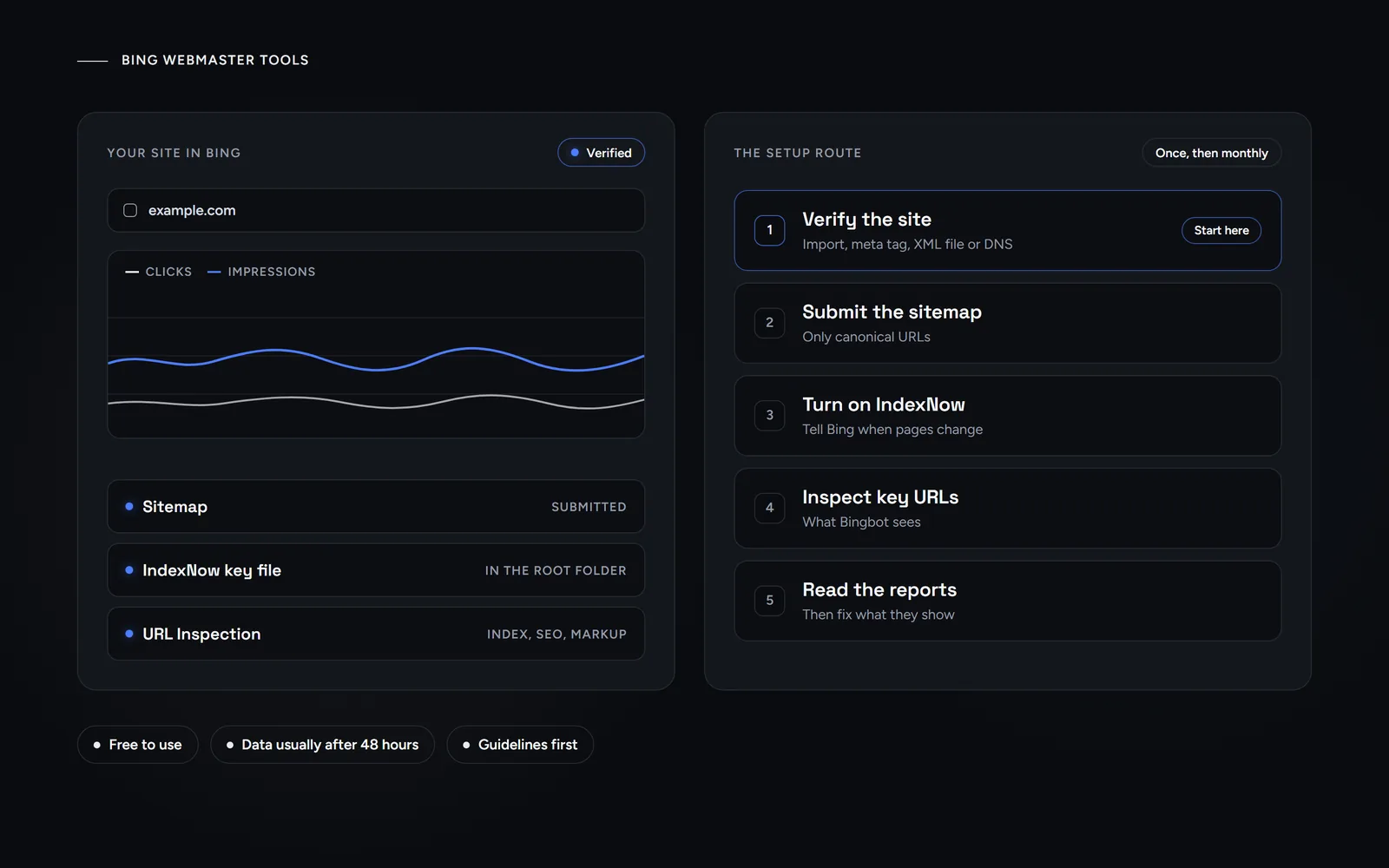
Short answer: Bing Webmaster Tools is Microsoft’s free dashboard for seeing how Bing crawls, indexes and shows your site. To set it up, add your site and verify it with a Google Search Console import, a meta tag, an XML file or DNS. Then submit your XML sitemap, turn on IndexNow and check the reports once a month.
Many small businesses set up Google Search Console and stop there. However, that leaves a second search index unwatched. Morneto is a web design, SEO and Google Ads studio in New York, and we run this setup on our own site too. So this guide follows Microsoft’s own help pages and adds what we saw on morneto.com in 2026. For the wider picture, our broader guide to getting found on Bing covers listings, content and ads. This one sticks to the tool itself.
What is Bing Webmaster Tools, and why does it matter in 2026?
Put simply, it is Bing’s version of Search Console. Microsoft offers it as a set of free SEO and GEO tools, together with your site’s performance data. In practice, it answers three questions: can Bing reach your pages, has it indexed them, and what do people search before they click?
Bing’s reach also goes beyond bing.com. Here is what the companies involved publish themselves:
- Bing and Copilot. Bing’s Webmaster Guidelines say they cover Bing search, Copilot and grounding API results.
- DuckDuckGo. Its help pages say it largely sources traditional links and images from Bing, next to its own crawler and other sources.
- ChatGPT search. OpenAI says ChatGPT search sometimes partners with other search providers, and its help page links Microsoft’s privacy statement among them.
None of that promises traffic. Still, a page that Bing never indexes misses every place that draws on Bing’s results. Our guide on what OpenAI says about ranking in ChatGPT explains the AI side in more detail.
How do you add and verify your site in Bing Webmaster Tools?
First, sign in and add your site. Bing lets you create a property for a whole domain or for one section, such as example.com/clothing/. Next, you prove that you own it. According to Microsoft’s help page on adding and verifying a site, you can start in two ways.
- Import from Google Search Console. Give Bing permission to read your Search Console account, then pick the sites to import. Bing says imported sites are verified automatically, and it imports their sitemaps too. You can import up to 100 sites at once.
- Add the site manually. Enter the URL, then choose one of the verification methods below.
| Method | What you do | Good fit when |
|---|---|---|
| DNS auto verification | Sign in to your DNS provider when prompted, and the record is added for you | Your DNS provider supports Domain Connect |
| XML file | Upload the file BingSiteAuth.xml to the root folder of your site | You can upload files to your server |
| Meta tag | Paste the tag at the end of the head section of your home page | You use a CMS or an SEO plugin |
| CNAME record | Add the code Bing gives you as a CNAME record at your domain host | You manage DNS but not the site files |
We verified morneto.com on Aug 14, 2026 with the meta tag. Our site runs on WordPress, so we pasted the code into the Yoast SEO plugin instead of editing a theme file. The tag is still on our home page today. That matters, because the tool itself notes that you should not remove the meta tag if you want to stay verified.
After that, be patient. Bing says it usually takes 48 hours to generate analytics and data for a newly added site. It also can’t show data from before the day you added it.
How do you submit a sitemap to Bing?
A sitemap tells Bing which URLs exist, including ones its crawler might miss. Bing accepts four formats: an XML sitemap, RSS 2.0, Atom 0.3 and 1.0, or a plain text file with one URL per line. To submit one, first open the Sitemaps tool and then select the Submit sitemaps button. You can also add a Sitemap line to your robots.txt file, which other search engines read too.
If you imported from Search Console, Bing may already list your sitemap. Even so, check the processing status and the number of URLs it found. After that, keep the file clean. Bing’s guidelines ask that a sitemap:
- Lists only canonical URLs. So leave out duplicates, filter pages or old versions.
- Reflects your current structure. Also remove deleted or redirected URLs promptly.
- Carries freshness signals. For example, an accurate lastmod date helps Bing spot real changes.
Bing is also clear that sitemaps do not guarantee visibility. In other words, a sitemap is a map, not a ticket into the index.
What is IndexNow, and how is it different from URL submission?
IndexNow is an open protocol for telling search engines that a URL was added, updated or deleted. For example, Bing names Bing, Seznam.cz and Naver. According to indexnow.org, participating engines share the URLs they receive with every other participating engine. So one notification can reach several of them.
Setup is simple, and many platforms build it in. The IndexNow report in Bing Webmaster Tools lists sources such as a WordPress plugin, Cloudflare and Shopify. For a manual setup, these are the rules from indexnow.org:
- Create a key. It must have 8 to 128 characters, using letters, numbers and dashes.
- Host the key file. Put a text file named after the key in the root folder of your site, with the key inside. Indexnow.org strongly recommends the root.
- Send the URLs. One request can carry up to 10,000 URLs, so most small sites need just one.
- Read the response. HTTP 200 only means the search engine received the URL. A 403 points to a key problem, while a 429 means too many requests.
Our own site uses IndexNow with a key file in the site root. On Oct 6, 2026, we submitted all 164 URLs from our sitemaps, and the request returned HTTP 200. Then, on Oct 31, 2026, we submitted 16 new and updated URLs. Both api.indexnow.org and bing.com answered with HTTP 200. Again, that confirms receipt, not indexing.
Manual URL submission still exists inside Bing Webmaster Tools. Bing’s help page lists up to 10,000 URLs per domain per day for it. However, Bing now recommends IndexNow and says the older submission methods may be deprecated in the future. It also says repeated manual submissions do not accelerate indexing.
Which Bing Webmaster Tools reports should a small business check?
In practice, you don’t need every tool in the menu. For a small site, these six cover most of what matters:
- Search Performance. Clicks, impressions, average click-through rate and average position, for up to the past six months. Since March 2023 it also includes sources such as Chat, News and Images.
- URL Inspection. When you enter one URL, you get an index card, an SEO card and a markup card. The Live URL tab shows what Bingbot sees, and you can request indexing from there.
- Site Explorer. Browse your site folder by folder, with counts for indexed, error, warning and excluded URLs. Its filter for URLs with guideline issues is especially worth a look.
- Recommendations. Bing groups issues it found on your indexed pages by severity: High, Moderate or Low. Each issue shows up to 50 affected pages, and you can download the full list.
- Site Scan. An on-demand audit that crawls your site and sorts issues into errors, warnings and notices. However, you can store only up to five scans.
- AI Performance. It shows how often Copilot, AI summaries in Bing and select partners cite your pages. Bing notes that it does not measure rankings or importance.
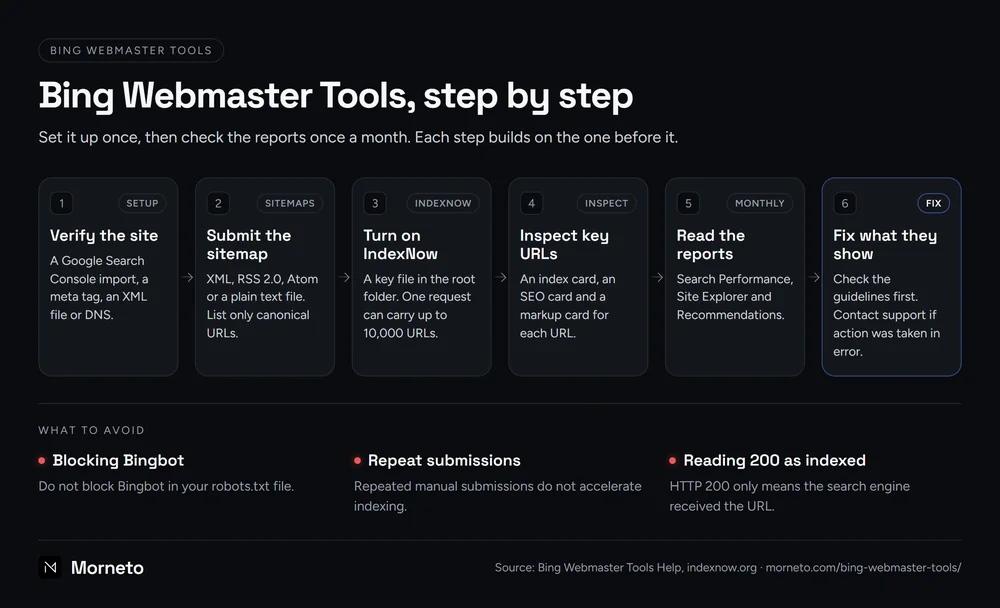
In our view, once a month is enough for most small businesses. Start with Search Performance, then open URL Inspection for any page that matters but is missing. The diagram below shows the whole routine.
What do Bing’s Webmaster Guidelines ask for?
The guidelines are the rulebook behind every report. Bing says that failing to follow them can mean reduced visibility, less eligibility for what Bing calls grounding experiences, or delisting from the index. Still, most of it is plain technical hygiene:
- Let Bingbot in. Do not block Bingbot in your robots.txt file, and avoid hiding key content behind client-side rendering.
- Help Bing find URLs. Use IndexNow, XML sitemaps and crawlable internal links.
- Redirect properly. Use a 301 for a permanent move, and a 302 only for changes shorter than 2 days.
- Write for people. Above all, content should fully satisfy what the searcher wants and be original.
Bing also lists tactics to avoid. For example, they include cloaking, link schemes, keyword stuffing, automatically generated content at scale, misleading structured data and prompt injection aimed at AI systems. If you want to check the technical side yourself, our technical SEO checklist for small business sites goes through crawling, sitemaps and structure. And if you have heard that a special file helps with AI answers, read what the llms.txt file can and cannot do first.
What should you do when your pages drop out of Bing’s results?
First, stay calm and work through it in order. Each step rules something out before you ask Bing for help.
- Inspect the URL. URL Inspection shows whether Bing indexed the page and why it may not appear.
- Check Site Explorer. Next, look for URLs with guideline issues, errors or exclusions.
- Compare with the guidelines. Then fix anything that breaks them, on the page or across the site.
- Ask support. Bing says site owners can contact support through Bing Webmaster Tools if action was taken in error. Open a ticket from inside your account, and describe what you checked.
We went through this ourselves. In late August 2026, our pages stopped appearing in Bing’s results, even though Bing Webmaster Tools still listed them as indexed. So we opened a ticket with Bing Webmaster support. On Oct 6, 2026, Bing replied that the issue was resolved. It also said that it could take a few weeks before pages were served again. On Oct 31, 2026, a Bing search for our brand showed our homepage and our New York page again.
Our takeaway is about patience rather than tricks. On the day of the reply, we sent our sitemap URLs through IndexNow, as described above, and then waited. Your local listing is a separate system, and our guide to adding and verifying a Bing Places for Business listing covers it.
If you would rather hand this over, our work as an SEO agency for New York small businesses starts with an audit, and the monthly plan is $799, month to month with 30 days notice. Or, if you only want a second opinion, send us your URL for a free search visibility audit. We reply within one working day.
Common questions about Bing Webmaster Tools
Is Bing Webmaster Tools the same as a Bing search console?
Yes. People often call it the Bing search console, because it does a similar job to Google Search Console. Microsoft’s official name is Bing Webmaster Tools.
Is Bing Webmaster Tools free?
Yes. Microsoft offers the tools for free. You only need an account and a site you can verify.
How long until data shows up?
Bing says it usually takes 48 hours to generate data for a newly added site. Search Performance can take a few days, and it starts on the day you add the site.
Does verification mean my pages will be indexed?
No. Verification only proves that you own the site. Bing says it may choose not to index URLs that don’t meet its selection criteria.
How can I tell if a visit is really from Bingbot?
Use the Verify Bingbot tool. Enter the IP address from your server logs, and it tells you whether that address belongs to Bing.