Short answer: for an owner who will not maintain the site, WordPress vs Webflow comes down to two things. Who can change the site later, and what the platform bills you every month. Webflow charges a subscription per site that includes hosting. WordPress charges nothing for the software, so you buy hosting separately. We build in WordPress, and our builds start from $997 one-time.
Last updated September 20, 2026. We state our bias up front rather than burying it: we build in WordPress. We read the Webflow prices below from Webflow’s own pricing page on that date.
A studio that sells one of the two platforms writes almost every WordPress vs Webflow comparison. This one is no exception. So instead of neutrality, here are specifics: what each platform asks of an owner who will never touch the code.
WordPress vs Webflow: which should a small business pick?
Neither half of WordPress vs Webflow is better in the abstract. Design quality barely enters into it, because both can produce a site that looks current. For a small business, five practical questions decide it.
- Who edits the site later. Whether somebody in your office can change a price without booking a developer.
- What the platform bills you. A subscription per site, or no license fee at all plus a host you pick yourself.
- What you can take with you. What comes out of the platform the day you leave, and in what shape.
- Whether you sell online. Ecommerce pulls the answer somewhere else entirely.
- Who carries updates. Somebody has to apply them. The only question is whether that is the platform, somebody you pay to look after it, or nobody.
Is a site builder like Squarespace or Wix still in the running? Our rundown of the website builders worth a small business owner’s time covers that wider field first.
Who can edit the site after launch?
This decides more projects than anything else on the list. Most people ask about it last.
On WordPress, text, images, prices and blog posts live in one editor. Anyone comfortable with a word processor can pick it up quickly. Webflow splits the same work across two surfaces. A visual Designer holds the layout, and a content editing view handles everyday copy. On both platforms, real layout changes go back to somebody who builds for a living. The difference is who that somebody can be.
- Hiring the next person. WordPress builders are everywhere, at every price. Webflow’s pool is smaller, which matters most when you want somebody local or need help this week.
- The handover itself. A login, a walkthrough and a written note of what sits where make the difference. Without them you get a site you are afraid to touch.
We hand over every site editable, with the code and the design files in your name. That is the part of our web design and build work people notice six months later. For a gallery or studio in SoHo or Chelsea, that means swapping a show or a lookbook without a developer.
WordPress vs Webflow: what does it cost over three years?
The build is a separate bill, so compare the platform on its own first. Webflow charges a site plan. Webflow’s published pricing page, read on September 20, 2026, lists two of them. Basic is $15 per month billed yearly, for simple sites that do not need a CMS. Premium is $25 per month billed yearly, for content-rich sites with the CMS. The same page carries a line worth reading twice. It says: “All prices in USD, per site, plus applicable taxes added at checkout.” Per site is the part owners miss, because a second site is a second subscription.
WordPress has no license fee, because the software is free and open source. In exchange you buy hosting, register a domain, and renew any premium plugin licenses. That is more invoices and more choice at once: you can change hosts without rebuilding anything. Hosting is the whole variable on that side. Our comparison of hosting options for a small business site is where to put a real number against it.
Our own fees sit on top of either platform. A build of 5 to 15 pages starts from $997 one-time against a written scope. We name hosting, domain registration, paid stock photography and premium plugin licenses separately. The rest is on our published price list, alongside the typical New York ranges.
Strip it back to what the platform alone bills you over three years, before anybody builds anything. Webflow Basic comes to $540 and Premium to $900, against no license fee at all for WordPress.
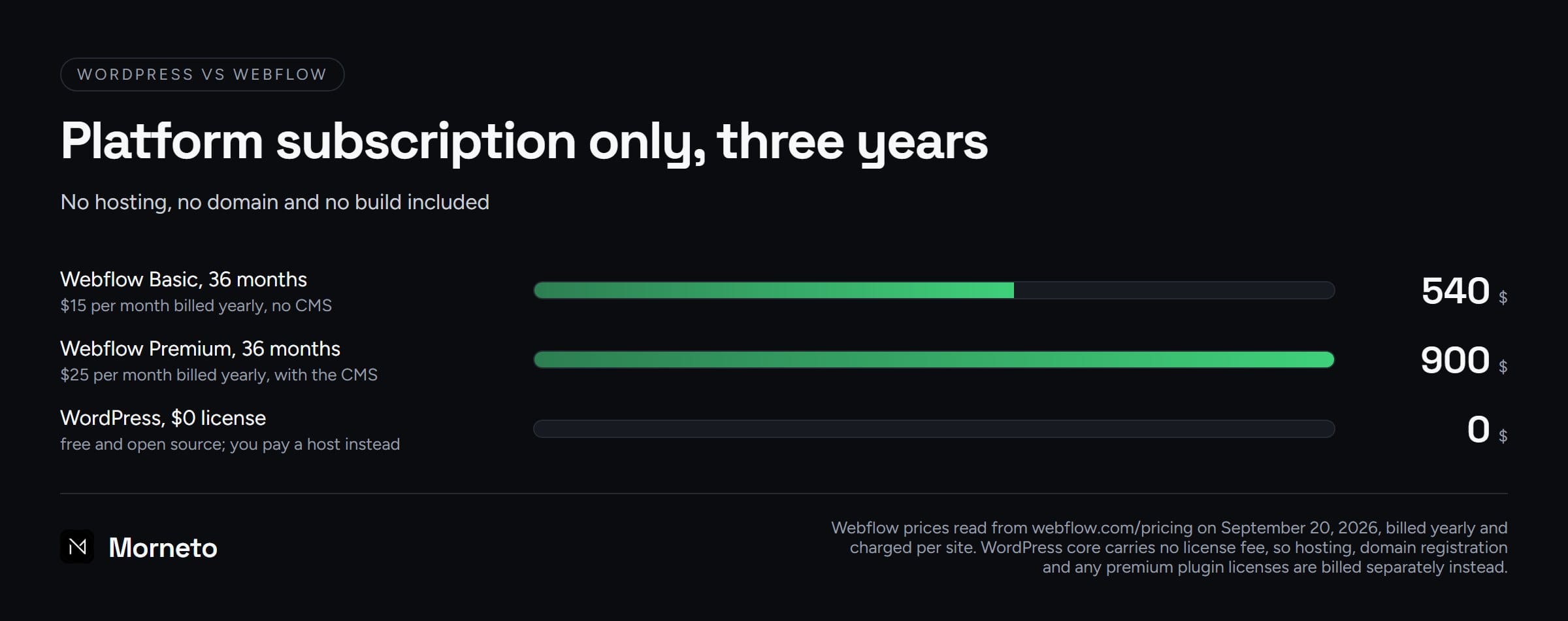
That is not total cost of ownership. It is the part of WordPress vs Webflow that is fixed on the day you choose.
How do the content and SEO controls differ?
Both platforms cover the basics: title tags, meta descriptions, canonical tags, redirects and an XML sitemap. Both also let you control what gets indexed. Anyone telling you that one platform ranks and the other does not is selling something.
- WordPress puts most of it in plugins. Tools like Yoast or Rank Math add depth. They also add something to keep updated and something to misconfigure.
- Webflow builds the controls in. Fewer moving parts, and fewer escape hatches when you need something the platform did not anticipate.
- Content structure is the real split. WordPress lets you invent post types to match how your business works. Webflow’s collections are cleaner and more bounded.
Write down the three things you most want to change about your pages in search. Then ask each builder to demonstrate them live. In WordPress vs Webflow, platform choice sets the ceiling. The ongoing work is a separate job, and our SEO and marketing service covers it month to month from $799.
What happens when you want to leave the platform?
A WordPress site is files plus a database, and both are yours. You can export posts, pages and media, move hosts, and hand the site to another studio.
Webflow does support a code export. It sits on a paid Workspace plan rather than on the site plan that hosts you. So the $15 and $25 above do not include it. What you get is the static side: clean HTML and CSS. The same pricing page adds that dynamic CMS items and pages cannot be exported that way. So a WordPress vs Webflow move is a rebuild rather than a file copy. Budget for that now. Our breakdown of what a website redesign costs maps onto it closely, because a platform move is a redesign.
Which one handles an online store better?
Beyond a handful of products, this is where WordPress vs Webflow genuinely separates.
- WordPress with WooCommerce. Open source, deep control over checkout, URLs and product data, and the same site holds your blog. You carry the updates and the work of keeping it quick as the catalog grows.
- Webflow ecommerce. Suited to small, design-led catalogs where the look matters more than the operations. Complicated tax, shipping or fulfillment rules sit outside that.
Our guide to ecommerce web design in New York covers what a store needs from the build. Most of it applies whichever platform you land on.
Shopify vs WordPress: which suits a small shop?
Shopify vs WordPress is the neighboring question, and the answer turns on what the site is really for.
- Selling is the point of the site. Shopify. It is hosted, and inventory, shipping and tax come built in. The trade is living inside its rules for URLs, checkout and data.
- Content is the point and the shop is part of it. WooCommerce on WordPress keeps one domain, one blog and one set of URLs. Your search presence then sits in one system rather than two.
- You sell three things. Consider not building a store at all. A clear page, a payment link and an email reply carry a small catalog a long way.
We do not resell Shopify, so read that as advice rather than a quote.
WordPress vs Webflow: which one is actually faster?
Speed is a property of the build far more than of the platform. Webflow ships on its own hosting and CDN. A default Webflow site tends to be fast, because there is less to go wrong. Meanwhile, a default WordPress site can be slow, and often is. A heavy theme, a page builder and a long list of plugins will flatten any platform. Built lean, cached and served from a CDN, WordPress is quick. Staying quick is a habit rather than a setting.
So the better question is who builds the site, and what they leave out. We hold builds to a performance budget from the first layout onward. That is what performance-first web design in New York means in practice.
For the mechanics, our guide on how to make a website load faster lists what moves the number. The piece on what a slow site costs you in lost customers translates it into inquiries.
When would we tell you to choose Webflow?
We build in WordPress for the reasons above. The editor is familiar, the hosting is yours, and the export is complete. You can take the whole site to another studio without negotiating for it. We do not sell a maintenance plan. So weigh what maintenance costs after launch against your own time before picking WordPress. These are the cases where we would tell you to pick Webflow instead.
- Nobody will own maintenance. If no one will apply updates, a managed platform removes a real risk rather than a theoretical one.
- The site is a design piece with little content. A brand site that changes twice a year needs less of what WordPress is good at.
- Your team already knows Webflow. An in-house marketer who can build pages today beats our preference for a platform.
And a case for neither. If selling online is the business rather than a feature of it, look at Shopify first. For a second opinion, send us your current site and your goal, and we will name the platform. When that is not the one we build in, we will say so.
Common questions about WordPress vs Webflow
Is Webflow better than WordPress?
Webflow is often safer for a design-led site that rarely changes and has nobody on maintenance. For a business that publishes regularly or may change studios one day, WordPress fits better.
Is Webflow cheaper than WordPress?
Webflow is one predictable subscription per site that includes hosting. WordPress has no license fee, so the recurring cost is hosting, a domain and any premium plugin licenses. Which is cheaper depends on what you pay a host, and on how many sites you keep.
Can you move a Webflow site to WordPress?
Yes, and it is a project rather than a download. The code export sits on a paid Webflow Workspace plan rather than the site plan that hosts you. It covers the static HTML and CSS. Webflow states that dynamic CMS items and pages cannot be exported that way. Somebody then rebuilds the templates, brings the content back in, and redirects the old URLs.
Is WordPress better than Webflow for SEO?
Neither platform ranks you. Both handle title tags, meta descriptions, canonicals, redirects and sitemaps. WordPress goes deeper through plugins and custom content types. That is an advantage if someone uses it, and a maintenance job if nobody does.
Do I need a developer to update a WordPress site?
Not for everyday changes. Text, images, prices and blog posts are editable by anyone in your office after a walkthrough. Layout changes, new templates and plugin updates go back to whoever maintains the site.