
Short answer: Bing Places for Business is Microsoft’s free tool for managing how your business shows up in Bing search results and on Bing Maps. Since October 2025 it lives at bing.com/forbusiness. If your Google Business Profile is already verified, you can import it, and Bing verifies the import automatically. Publishing then typically takes 7-12 days.
Most New York owners set up Google first and never look at Microsoft. That is understandable, because Google is where most owners start. Yet Bing has its own map, its own local results and its own listing tool. Morneto is a web design, SEO and Google Ads studio in New York, and our own Bing listing runs on a sync with our Google profile. So this guide follows Microsoft’s help pages step by step and adds what we saw on our own listing.
What is Bing Places for Business in 2026?
In Microsoft’s words, Bing Places for Business is a free online platform where businesses create and manage listings to appear in Bing search results and Bing Maps. On October 3, 2025, the Bing blog announced a rebuilt version. Three changes matter for owners:
- A new address. The tool moved from bingplaces.com to bing.com/forbusiness. Microsoft said existing users and their listings would move over automatically, and today the old address redirects to the new one.
- Better Google imports. Microsoft says the new import flow is faster, more reliable and better at keeping the business name, hours and contact details.
- A Recommendation Tool. It suggests photos and missing details, such as a website link, opening hours and social media links.
The same post names deeper integrations with Bing Maps and Copilot as a next step. The post says nothing more specific about Copilot, so we read it as a direction, not a feature you can count on today. Still, in our view a correct listing is the sensible base for anything Microsoft builds on its local data later.
Do you need a Bing business listing if you already have a Google profile?
In our view, yes, because the setup is short and the listing is free. Also, Bing does not wait for you. Its help pages say Bing fills local listings from many internal and external sources, with Bing Places as one of the primary ones. As a result, a listing about your business may already exist, built from data you never checked.
Bing’s help also explains how it ranks local results: by relevance, distance and popularity. Popularity comes from web signals, such as reviews and ratings on sites like Yelp and TripAdvisor. Website SEO plays a role too. That is why we treat the listing as one part of the wider work in our guide on how to get found on Bing beyond the map.
Each platform has its own listing tool, and each one covers a different app:
- Google Business Profile. It covers Google Search and Maps, and it is the profile Bing can import from. Our field-by-field guide to a Google profile for New York businesses covers every field.
- Apple Business Connect. It covers Apple Maps on the iPhone. For that one, see our walkthrough on claiming an Apple Maps business listing.
- Bing Places for Business. It covers Bing search results and Bing Maps, and it can sync from Google.
How do you add your business to Bing Places?
First, search for your business on Bing, because a listing may already exist. After that, follow Microsoft’s steps:
- Sign in. You can use a Microsoft account, a work account, Google or Facebook. Every listing you claim stays tied to that login, so pick an account the business controls.
- Search first. Select the country, then enter your business name and location.
- Claim or create. If the listing exists and nobody has claimed it, claim it. If no listing exists, select Create a new business.
- Report duplicates. Pick the listing that matches your address, and report any duplicate listings for your business.
- Verify. Updates only go live once the listing is verified.
If someone else already claimed the listing, Bing’s help points you to its Request Access section. Did you move recently? In that case, don’t edit the old listing. Instead, Bing asks you to create a new listing with the new address and mark the old one as closed. Otherwise the old address can keep feeding conflicting data.
How does the Google Business Profile sync work?
If you already have a Google profile, Google sync is the quick route. It imports your listings into Bing Places and can keep them up to date. Bing’s help page on syncing a Google Business Profile with Bing Places lists four steps:
- Start the import. In your account, select Import from your Google Business Profile.
- Pick a schedule. Choose a weekly, biweekly or monthly sync.
- Connect Google. Sign in to your Google Business Profile.
- Import. Bring in the detected listings.
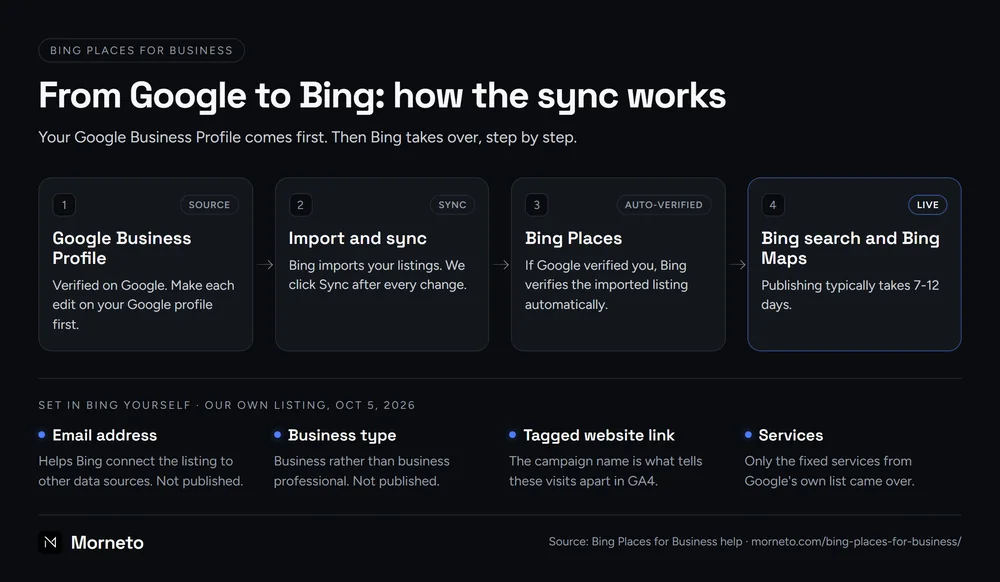
A verified Google profile matters here. If your business is already verified on Google, Bing automatically verifies the imported listing. Publishing then typically takes 7-12 days, and the dashboard may show Pending Publish in the meantime. If Google has not verified you yet, finish that first; our guide on how Google verification works for New York businesses explains the options.
Before you click Import, note the limits Bing lists:
- Edits go through Google. Direct editing isn’t currently available for listings linked to a Google profile. You update the listing on Google, then sync.
- No picking. You can’t choose specific listings, because the system detects eligible ones in your Google account.
- Possible duplicates. Syncing may create duplicates, especially when a listing already exists on Bing.
- Fields that drift. Some fields may not sync exactly, including categories and Google UTM tags.
What did Bing take from our own Google profile?
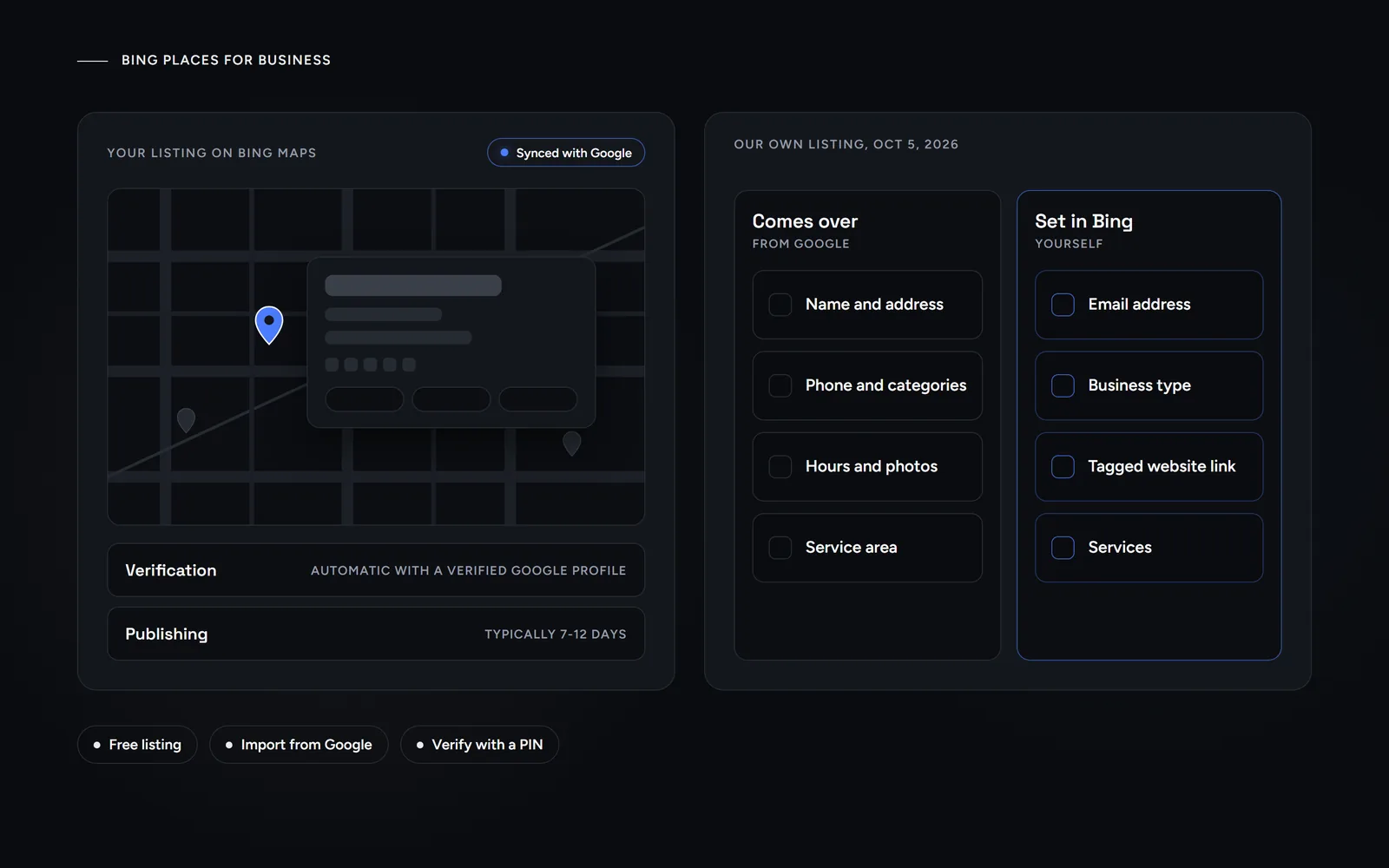
Here is our own listing as a real example of what comes over from Google and what you set in Bing yourself. On October 5, 2026, the Morneto listing on Bing Places was live and marked Synced with Google. These fields came over from Google:
- Identity. The name, address, phone number, categories and description.
- Hours and media. The opening hours, our photos and our Instagram link.
- Service area. The five boroughs of New York City.
We couldn’t edit the name and address in Bing, since they follow Google. That matches Bing’s rule that linked listings change on Google first. Even so, some details did not come over in full, so we set them in Bing ourselves:
- Email address. Bing’s help says contact details like email help it connect a listing to other data sources. It also says it doesn’t publish them.
- Business type. We picked Business rather than business professional. Bing doesn’t publish this field either.
- A Bing-specific website link. Our link carries utm_source=bing, utm_medium=organic and utm_campaign=bing_places_listing. The source and medium match normal Bing search, so the campaign name is what tells these visits apart in GA4.
- Services. Only the fixed services from Google’s own list came over, so any other services have to be added in Bing itself.
Bing’s help says synced services import automatically. In our case that held only for Google’s fixed services, so check this field after every import.
How do you verify a Bing Places for Business listing?
Without a verified Google import, you verify with a PIN. According to Bing’s help, the PIN can arrive by phone, mail, email or text, although some options won’t be available to every business:
- Phone. This option only appears when the existing listing already holds the business phone number, unedited.
- Postcard. In the United States, postcards typically take 5-6 business days. Bing suggests you wait at least 12 days before you contact support.
- Email. Use an email address on the account that you can actually open.
Then enter the six-digit PIN with the same account that started the request. A PIN that an agency or a colleague requested from another account won’t work in yours. Once verified, the listing enters a publish cycle, which Bing says typically takes 7-12 days in North America.
What should a complete Bing listing include?
The required fields are the name, address, phone number, website, hours, category and status. These basic details go through automated validation. In other words, Bing only applies a change when it matches trusted external data, so consistency across the web matters. Beyond the basics, Bing’s guidelines add:
- Up to 10 categories. You get one primary category plus up to 9 secondary ones. The primary one should match your core business.
- A clean name. Leave out descriptors like best or cheap unless they are legally part of the name. Microsoft also says it doesn’t accept keyword insertion in a business name.
- The full address. Include the suite number and the building. In New York, a floor or suite is easy to drop, so make it read the same everywhere.
- Service areas. If you travel to customers, you can hide the address and add up to 20 service areas, such as boroughs or ZIP codes.
- Photos. Add up to 100 photos of at least 480×360 pixels, tagged as interior, exterior or logo.
Some setups don’t qualify at all. If your business has a mailing address but doesn’t operate from it, Bing says you can’t use it, and a P.O. box isn’t allowed either. Moreover, Microsoft warns that breaking these guidelines could lead to suspension.
How do you keep a Bing Places for Business listing current?
Maintenance is light, but it needs a routine. According to Bing’s help, other sources can take priority when Bing Places data hasn’t been updated for more than 6 months. Here is the routine we suggest. We do the first step on our own listing. Steps 2 and 3 follow Bing’s help, and the last two are our own advice:
- Change Google first. Make each edit on your Google profile, then click Sync in Bing Places. We do this after every change instead of waiting for the scheduled sync.
- Wait for the cycle. Every edit resets the publishing ETA, so don’t stack changes while a listing is still processing.
- Check both views. Look at the dashboard and at the live listing on Bing, because the live listing can update before the status does.
- Recheck the Bing-only fields. After a sync, confirm the email, the business type, the tagged website link and the services.
- Read the numbers. In GA4, filter on the bing_places_listing campaign to see whether the listing sends visits.
We also suggest a short check every quarter, comparing the listing with your website and your other listings. After all, Bing checks your details against other sources anyway. If you want an outside view of the whole picture, read what a good SEO audit should tell you before you hire anyone.
For ongoing help, we offer Google Business Profile work in our SEO plan from $799 a month, which also matches your other listings to the profile’s name and address. Or, if you only want a second opinion, send us your business name for a free search visibility audit. We reply within one working day.
Common questions about Bing Places for Business
Is Bing Places for Business free?
Yes. Microsoft calls it a free platform where businesses create and manage listings for Bing search results and Bing Maps. You don’t need to buy ads to have a listing.
Is bingplaces.com still the address?
No. With the October 2025 relaunch, Microsoft moved the tool to bing.com/forbusiness. When we checked on October 31, 2026, bingplaces.com redirected there.
How long before my listing shows on Bing?
After verification, Bing says publishing usually takes 7-12 calendar days. Updates such as photos or hours can take extra time to appear after that.
Can I edit a listing that syncs from Google?
Bing says direct editing isn’t currently available for listings linked to a Google Business Profile, so you update Google and then sync. On our own listing, the name and address were locked, but we could still set the email, business type and website link.
Will a Bing listing get my business into Copilot?
Microsoft has not said that. Its October 2025 post only names deeper integrations with Bing Maps and Copilot as a next step. A correct listing is a sound base either way.