Short answer: website maintenance cost is a few fixed bills plus time. The bills include hosting, domain renewal, any premium plugin licenses and paid backup storage if you use it, each charged by its own provider. The time goes to updates, backups, checks and search upkeep in Google and Bing. On a standard WordPress site, an owner can handle much of that time themselves.
Last updated September 14, 2026. We checked every provider price on the provider’s own page that day. Each one links to its source, so you can check it again. Prices change, so treat them as examples, not quotes. Morneto publishes care plans of its own: Website Care at $97 per month and Website Care Plus at $197 per month, with work beyond the plan at $150 per hour, listed on our pricing page. This guide explains what upkeep consists of, whoever does it.
Website maintenance charges can bundle three things into one monthly number. There are bills you would pay anyway, work you could do yourself, and work that genuinely needs a professional. Pull those three apart and the real website maintenance cost becomes easy to see. This guide does exactly that. It also covers the recurring tasks that help Bing and AI answers pick up your changes.
What does website maintenance cost cover?
Two kinds of spending hide under one label. The first is pass-through bills, such as hosting, the domain, premium plugin licenses and paid backup storage. A provider sets those prices, whoever ends up paying them. The second is labor: someone’s time spent updating, backing up, checking and fixing. Only the second part is really a service.
That split is also why website maintenance cost and build cost are separate questions. A build is a one-time project with a scope. If that is the number you need, what a small business website should cost in New York covers it. Upkeep, by contrast, keeps that project working, current and findable every month after launch. When a site outgrows upkeep, it needs a full redesign budget rather than a bigger maintenance fee.
For transparency, here is how our own pricing handles the split. A Morneto website build starts from $997 one-time. No Morneto price includes hosting, domain registration, premium plugin licenses, paid stock photography or ad budget. Those stay separate. Once the business settles the final invoice, it owns the site, code, design files, domain and hosting.
Which upkeep bills are real line items?
The table covers four recurring bills on a small business WordPress site. It shows what each one pays for, plus one real published price as a reference point. Your own site may carry others. The providers are examples, not recommendations.
| Line item | What it pays for | Example price, checked September 14, 2026 |
|---|---|---|
| Hosting | The server your site runs on | Billed by the host; compared in our hosting guide |
| Domain | Your address, renewed every year | Porkbun lists a .com at $11.08 and says the price you see is the price you pay, year after year |
| Premium plugin license | Updates and support for a paid plugin | Yoast lists SEO Premium at $118.80 a year, excluding VAT, for one site |
| Backups | Copies of the site kept off the server | Jetpack lists VaultPress Backup at $4.95 a month for the first year, billed yearly, with renewals at the full $9.95 a month |
Hosting gets its own treatment in our 2026 web hosting comparison, platform by platform. Backups may not need a paid line at all. Most website hosts provide backup software, WordPress.org notes, so check what your plan already includes. Either way, you need both the database and the files to restore a typical WordPress site. Add up your recurring bills once a year and you have the fixed part of your website maintenance cost. Anything else in a quote should be either labor or a subscription the quote names.
What does website maintenance include?
Strip out the bills and five recurring tasks remain. The first two draw on WordPress.org’s documentation.
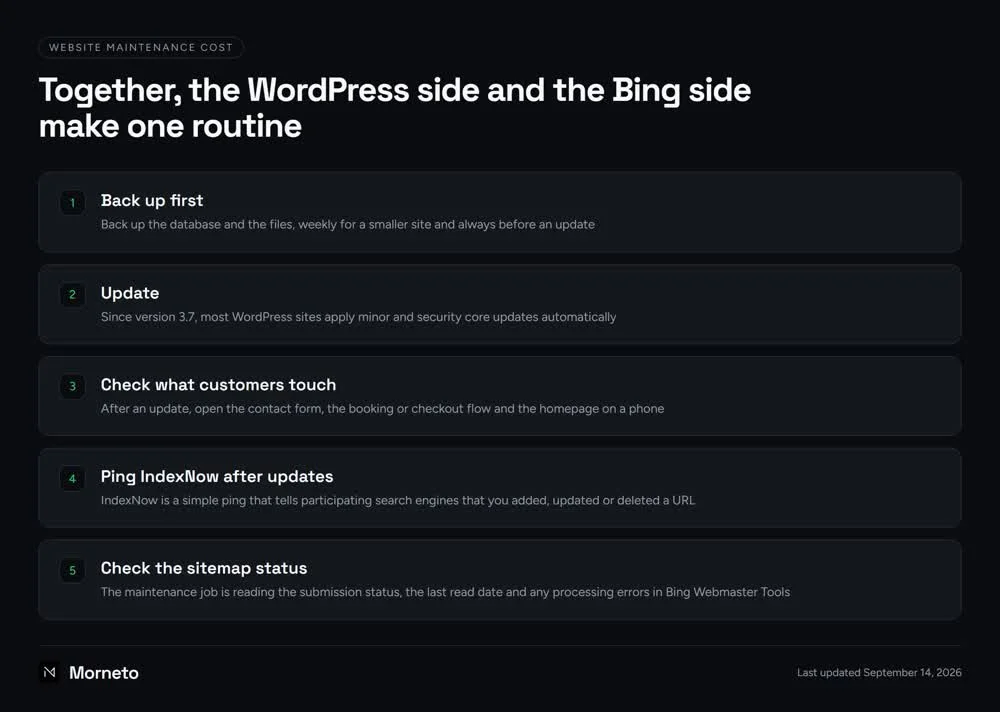
- Back up first. Back up the database and the files, weekly for a smaller site and always before an update. WordPress.org’s backup guide also suggests keeping at least 3 to 5 recent backups in different locations. Once in a while, add a manual backup to confirm the automated ones work.
- Update. Since version 3.7, most WordPress sites apply minor and security core updates automatically. Major feature releases install on their own only if the site’s auto-update setting allows it. Otherwise they need a click on Update Now, as WordPress.org’s guide to updating explains. Run plugin and theme updates in the same routine, right after the backup.
- Check what customers touch. After an update, open the contact form, the booking or checkout flow and the homepage on a phone. A quick test is the cheapest check there is.
- Keep the facts current. Prices, hours and services on the site should match what you offer today. An old price on a page is still the price people read.
- Tell search engines what changed. Keep the sitemap readable, and send an IndexNow ping whenever you add, update or delete a page. That is the Bing side of upkeep, and it comes next.
Before any of this, check who holds the logins. Hosting, domain, WordPress admin and Bing Webmaster Tools should all sit in accounts the business controls. After all, a backup you cannot reach is not much of a backup.
How do Bing and AI answers pick up your changes?
Keep Google Search Console in the routine, and put Bing Webmaster Tools right next to it. Bing’s getting-started guide for Bing Webmaster Tools says the tool is free and lists IndexNow submission among its features. Meanwhile, AI Performance in Bing Webmaster Tools, launched as a public preview in February 2026, adds another reason. It shows how often Microsoft Copilot and AI-generated summaries in Bing cite your pages. The one-time setup lives in our guide to getting found on Bing.
- Check the sitemap status. According to Bing’s own guidance on sitemaps, Bing tries to fetch a sitemap as soon as you submit it. After that, it typically revisits the sitemap at least once per day. The maintenance job is reading the submission status, the last read date and any processing errors in Bing Webmaster Tools.
- Keep lastmod honest. Bing uses the lastmod date to prioritize recrawling. So that date should reflect the last real change to the page content, not the sitemap file itself. Bing ignores changefreq and priority.
- Ping IndexNow after updates. IndexNow is a simple ping that tells participating search engines that you added, updated or deleted a URL. Without it, IndexNow.org notes, discovering a change can take days to weeks. On WordPress, the IndexNow plugin from the Bing Webmaster team detects those changes and submits the URLs in the background.
- Read the results. Once a month, look at IndexNow insights and AI Performance in Bing Webmaster Tools. That way you notice when submissions stop or AI answers stop citing a key page.
Since Bing Webmaster Tools is free, this part of your website maintenance cost is mainly your time, not a subscription. In return, Bing says IndexNow helps AI systems reference the most current version of a page.
Together, the WordPress side and the Bing side make one routine.
Should you maintain the site yourself or pay for a plan?
On a standard WordPress site, an owner with a little time each month can run the routine above. The editing is visual, the updates are buttons, and Bing Webmaster Tools is free. What decides the route is usually time, plus a clear line for when to stop and call someone.
- Do it yourself if the site has a handful of pages, changes rarely, and you back up before every update. Beyond the bills, your website maintenance cost is then mostly your own time.
- Pay for help as needed if you keep the routine but want to hand off what goes wrong. Think of a failed update, a restore, or a hosting or DNS change. For a site that is down right now, what to do when a website breaks outright is the faster read.
- Pay for a monthly plan if nobody on your team will run the routine reliably. The same goes for a site that takes bookings or payments every day. In that case, the plan’s written task list is what you are buying.
The sites we deliver are set up for that first route. The WordPress websites we build for New York businesses run on standard WordPress. We hand them over editable, and the business edits them visually. For an emergency, email support@morneto.com or use the contact form. Existing clients who mark the email Urgent get a reply within 4 hours as a target. Our office hours are 09:00 to 18:00, seven days a week.
How much should website maintenance cost for a small business?
There is no honest single number for the cost of website maintenance, because the labor part depends on scope. What you can do is make every quote comparable. First, add up the pass-through bills from the table. Then hold the rest of the website maintenance cost against a written list. The same list works for website maintenance plans and packages alike.
- Pass-through bills at cost. Hosting, domain and licenses listed separately, at the provider’s price, in accounts in your name.
- Backups in writing. How often they run, where they live, how many copies they keep, and whether the price includes a restore.
- Updates with a check. Who runs them, and who tests the forms and checkout afterward.
- Bing and Google both. Whether Bing Webmaster Tools, the sitemap and IndexNow are part of the routine, or only Google.
- Response time and hours. A written target and working hours, not a vague promise of fast support.
- A way out. The notice period, and what you keep when you leave.
Two quotes with the same monthly total can buy very different things, and the list shows which is which. Sometimes the goal behind a maintenance request is really growth in search. That is search work rather than upkeep, and our published prices for website builds and monthly SEO work spell it out. Unsure where your site stands today? You can request our free SEO audit, and the business keeps it either way.
Common questions about website maintenance cost
Is website maintenance necessary?
For any live WordPress site, yes. On most sites, WordPress applies minor and security core updates on its own. However, backups, plugin updates, renewals and search tools still need a person. The routine is small; it just has to happen.
How much does it cost to have someone manage my website?
It depends on the scope, so compare quotes on the same written list rather than on the monthly total. First, ask for hosting, domain and licenses at the provider’s price. Then ask for the tasks, how often they run and the response time, all in writing.
Should hosting be part of a website maintenance fee?
Hosting is a bill from the host, not a maintenance task. Ideally you pay the host directly from an account in your name. If a maintenance fee includes resold hosting, ask what the host itself charges and what the difference pays for.
Which Bing checks belong in a monthly maintenance routine?
Read the sitemap status and any processing errors, then look at IndexNow insights and AI Performance. All three live in Bing Webmaster Tools. AI Performance shows how often Microsoft Copilot and AI-generated summaries in Bing cite your pages.
How often should you back up a small business website?
WordPress.org suggests weekly for smaller sites, daily for sites with a lot of activity, and always before an update. Keep at least 3 to 5 recent backups in different locations, and include both the database and the files.